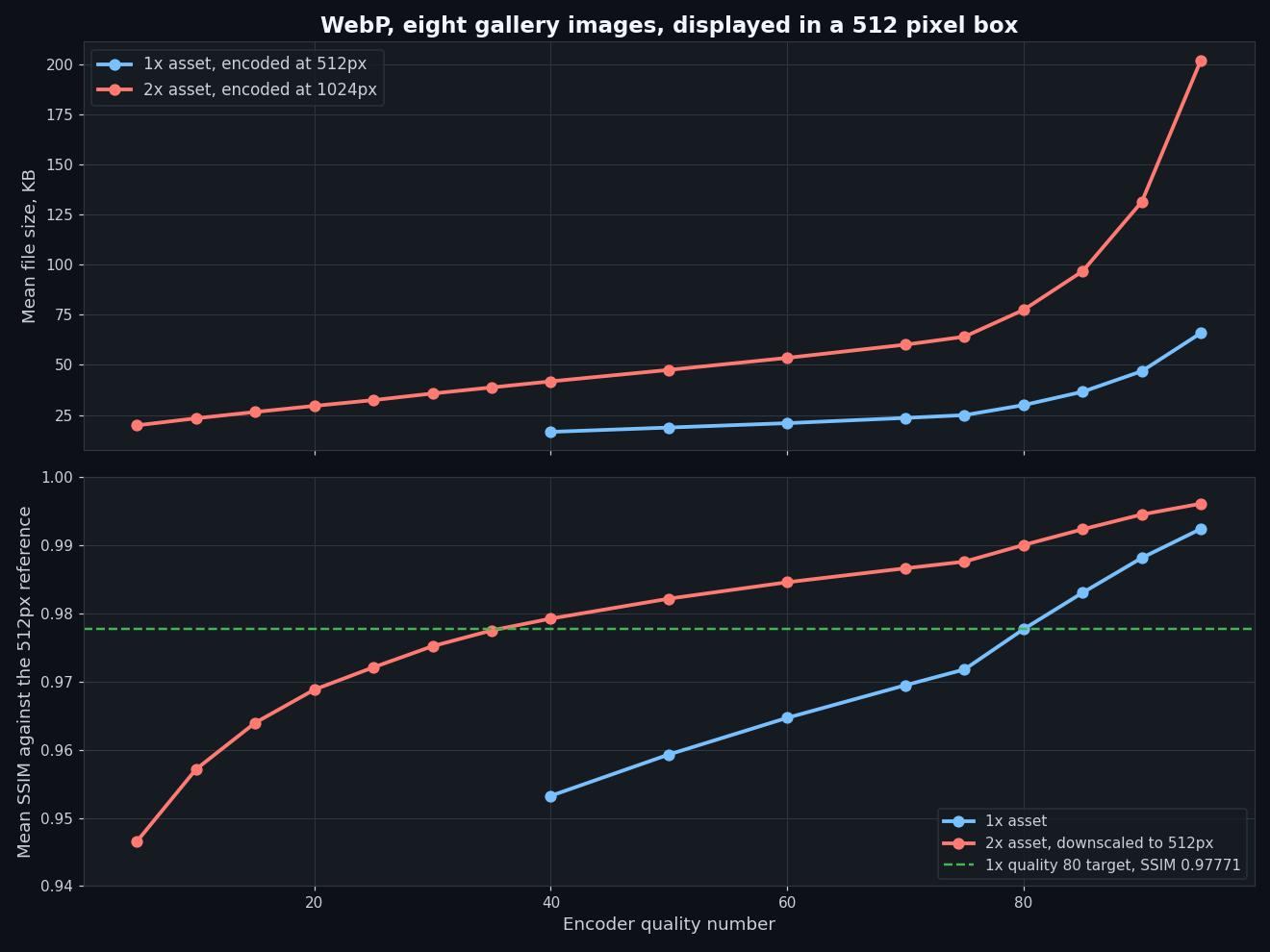
A 2x Image Costs 35 Percent More Bytes Than A 1x Image For The Same Picture In A 1x Box
The trick you hear is to serve a 2x image at a low quality number and let the browser shrink it, because downscaling hides the artifacts. It does hide them, and the file is still bigger. Matched on what the viewer actually sees, the 2x path costs a third more bytes and never once came out ahead.
Published September 10, 2026 · RealAIGirls · About an 8 minute read
The advice turns up in every performance thread. Serve a 2x image, set the quality number low, and let the browser downscale it. The downscale averages away the compression artifacts, so you get a sharp picture from a cheap file.
Half of that is true. The downscale really does hide the artifacts. So I measured whether the file is actually cheaper, and on eight gallery images it never was.
The Measurement
The display box is 512 pixels wide. That is the fixed thing. Everything below is a question about what to put in it.
Path A, the 1x asset: resize the source to 512 pixels with Lanczos, encode at quality q, decode, score.
Path B, the 2x asset: resize the source to 1024 pixels with Lanczos, encode at quality q, decode, then resize the decoded image down to 512 with Lanczos, which is what a browser does when it drops a 2x asset into a 1x box, and score that.
Both paths are scored against the same 512 pixel Lanczos reference with SSIM over 11x11 Gaussian windows, sigma 1.5, the standard Wang et al. formulation, on the luma channel. Eight source images, JPEG and WebP, sixteen quality settings from 5 to 95.
512 encodes. No cherry picking, no per image tuning.
At The Same Quality Number It Is Not Close
The 2x column is roughly two and a half to three times the bytes at every setting, and it scores higher everywhere. Neither of those is surprising and neither of them answers anything, because the two columns are not two ways of doing the same job. They are two different pictures.
Any comparison that holds the quality number fixed across two different source resolutions is comparing quality targets, not encoding strategies. The number 80 does not mean the same thing when there are four times as many pixels underneath it.
Match The Picture Instead Of The Number
Here is the honest version. Take the SSIM that the 1x asset achieves at quality 80, which is the setting most galleries actually ship. Then walk the 2x ladder down until you find the cheapest file that still reaches that score after the browser shrinks it.
Eight images out of eight, the 2x file is bigger. The best case is 22.23 percent more bytes and the worst is 50.49. In JPEG the same exercise lands at 31.51 percent more, with the matched settings clustering at quality 30 and 35.
This is why the ladder had to be extended below 40. Every image cleared the target at 2x quality 40 on the first pass, which means 40 was not the matched point, it was just the floor of the run. Reporting the number from that first pass would have said 39.53 percent for WebP instead of 35.32. Both are bigger than 1x, and only one of them is the measurement.
Why The Downscale Trick Feels Like It Works
Because it does work, in the sense people mean it. Look at the 2x SSIM column again: at quality 40 the downscaled 2x asset scores 0.97925, which is already better than a 1x file at quality 80. At quality 5, where a 512 pixel image would be unusable, the downscaled 2x asset still scores 0.94657 in WebP.
That is the artifact hiding, and it is real. Averaging four pixels into one removes most of the ringing and blocking that made the low quality setting look bad in the first place. You genuinely can crush a 2x asset far harder than a 1x one and get away with it.
What does not follow is that you end up with a smaller file. The 2x encode starts with four times the pixel data, and crushing it down to par costs more bytes than encoding the smaller picture properly in the first place.
The Case Where 2x Still Wins
All of the above assumes a 1x display. On a device with a 2x pixel ratio, which is every phone sold this decade and most laptops, the 1x asset is being stretched rather than shrunk, and no quality setting recovers detail that was never encoded.
So the finding is narrower than it sounds. It is not that 2x assets are wasteful. It is that serving one 2x asset to everybody, on the theory that it is cheap because it downscales well, costs about a third more than it needs to for every 1x viewer.
The answer is the boring one that has been in the HTML spec for a decade. Ship both, let srcset pick, and set each one's quality on its own merits rather than assuming the big file is doing the small file a favour.
What I Actually Do With This
Two files, not one. A 512 at quality 80 and a 1024 at quality 80, wired through srcset with a sizes attribute that tells the browser the box is 512.
Do not lower the quality on the 2x file to compensate. The people receiving it have the screen to see it. Compensating turns a sharp asset into a soft one for the only audience that can tell.
Never quote a 2x saving measured at a fixed quality number. It is the same mistake as comparing two codecs on a shared slider, and it goes the same way: the number moves, the picture moves with it, and the comparison measures neither.
The Limits Of This Run
Eight images from one gallery, all AI generated art with a similar palette, one display size, one downscaling filter. Lanczos in Pillow is not identical to what a browser does, and browsers do not agree with each other, so the 2x scores here are a good approximation rather than a promise.
SSIM on luma also flatters downscaling slightly, because averaging pixels raises structural agreement in flat regions faster than it damages edges. If anything that makes the 2x path look better than it is, and it still lost eight times out of eight.
Everything above is one measurement run on one set of files, reported exactly as it came out, including the first pass that got the number wrong.