AVIF Cost 35 Percent Fewer Bytes Than WebP At The Same Score, And Encoded Faster Doing It
Posted: September 4, 2026 - 12:00 PM ET
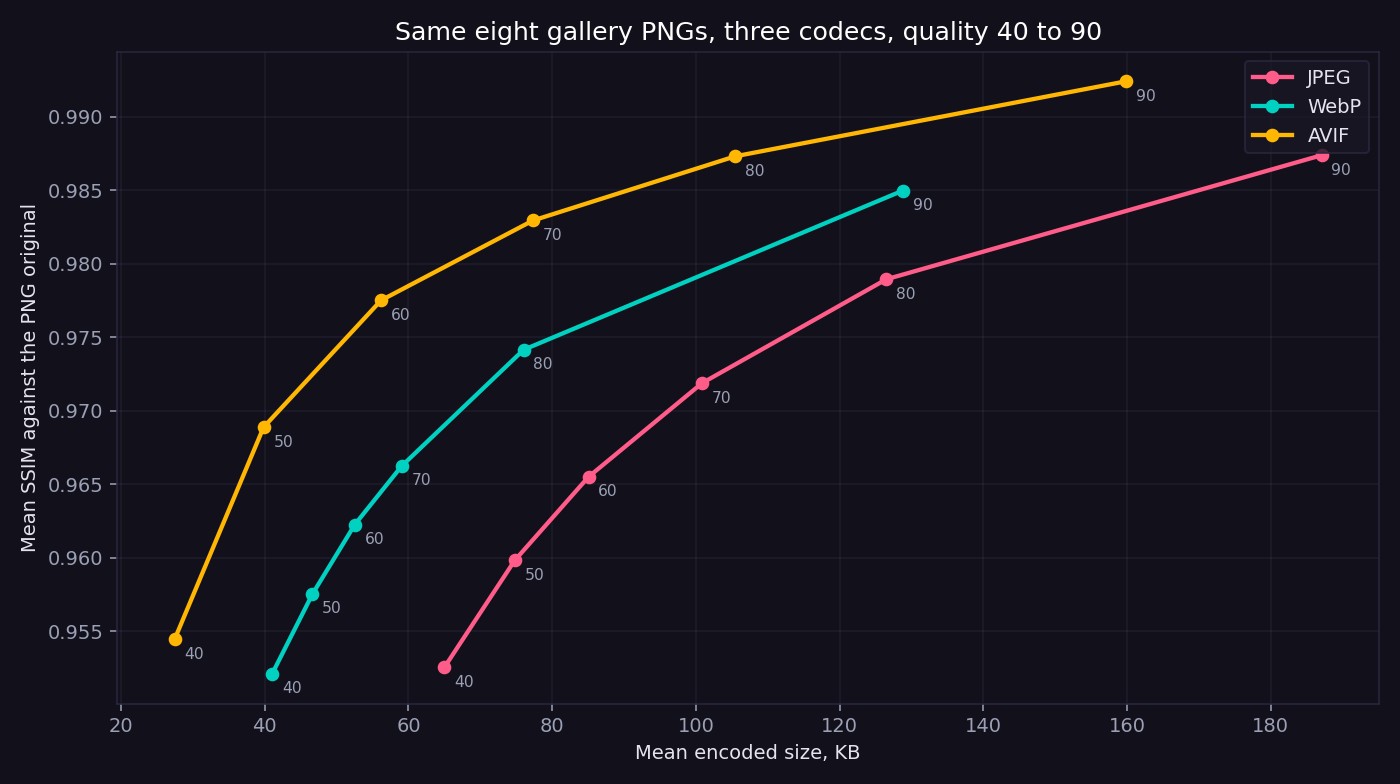
Eight 1024 pixel PNGs from this gallery, encoded 144 ways across JPEG, WebP and AVIF at quality 40 through 90 and scored with SSIM. AVIF matches WebP quality 80 at 49.8 KB against 76.0, a 34.5 percent saving, and it did it in 0.41 seconds a file against WebP method 6 at 0.65.
Downscaling Is The Wrong Knob. Quality 60 At Full Size Beats Quality 80 At 768.
Posted: September 2, 2026 - 12:00 PM ET
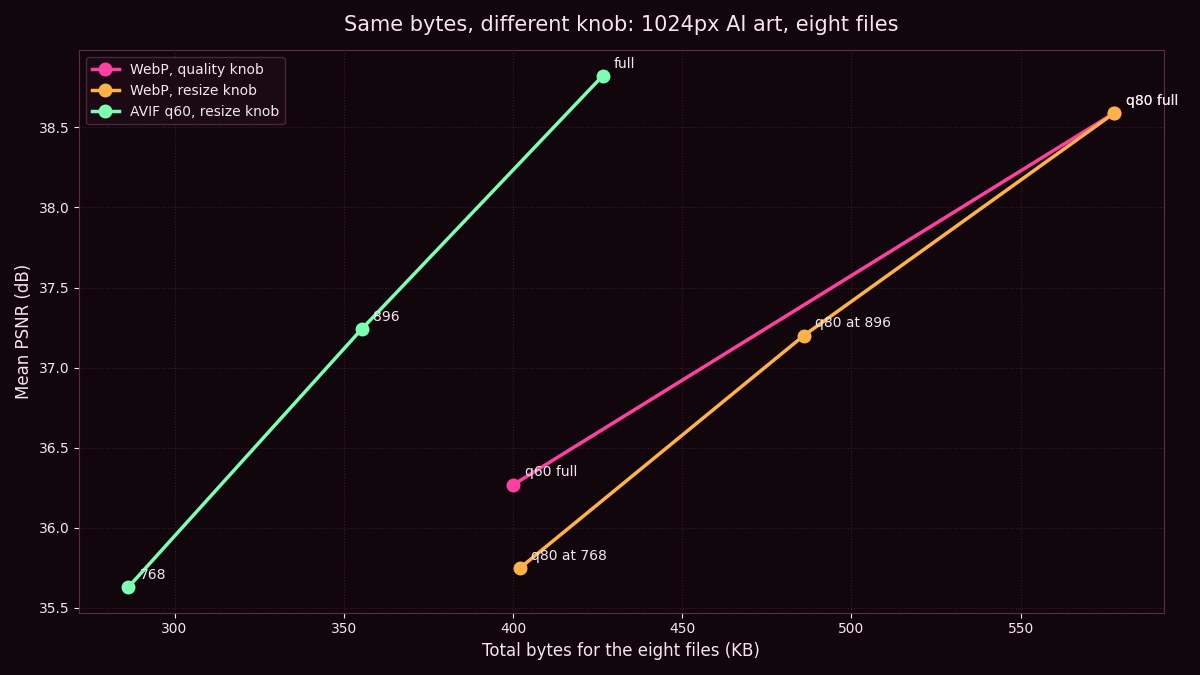
Eight gallery files, two knobs, one chart. Shrinking a 1024 image to 768 pixels at WebP 80 costs the same bytes as keeping every pixel at WebP 60 and scores 0.52 dB worse. AVIF 60 at 896 pixels beats both at 355 KB.
AVIF At 60 Beats WebP At 80 By 26 Percent Of The Bytes
Posted: August 31, 2026 - 12:00 PM ET
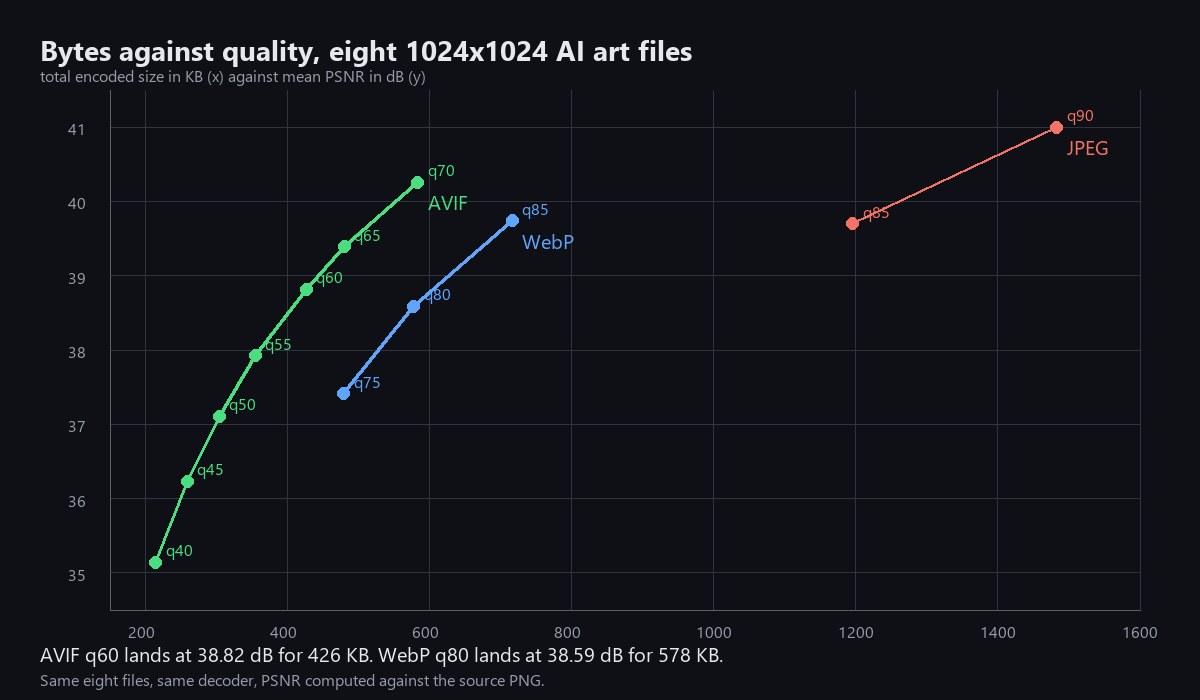
Eight real AI art files from this gallery across twelve encoder settings in three formats, with total bytes and mean PSNR for every one. AVIF at 60 lands at 38.82 dB for 426 KB, WebP at 80 lands at 38.59 dB for 578 KB.
Chroma Subsampling Is Worth 18 Percent. WebP Is Worth 59.
Posted: August 30, 2026 - 12:00 PM ET
Eight real AI art files from this gallery across the chroma subsampling ladder with byte counts and pixel error at every step. 4:2:0 saves 18.62 percent, full chroma at quality 85 lands in the same place, and WebP 80 is 59 percent below both.
WebP At Quality 80 Beats JPEG At 85 By Thirty Eight Percent Of The Bytes
Posted: August 29, 2026 - 12:00 PM ET
Five real photographic images across the full JPEG and WebP ladder with byte counts and pixel error at every step. WebP 80 lands 38 percent smaller than JPEG 85 at an error difference of 0.14.
PNG Level 9 Costs Six Times The Time For Three Percent Of The Bytes
Posted: August 27, 2026 - 12:00 PM ET
Four real 1024 by 1536 gallery PNGs re-encoded at every zlib level with a timer running. Level 3 does 99 percent of the work in 349 milliseconds. Level 9 takes 2,299 and buys 3.5 percent.
Your Parameters Block Costs 740 Bytes. On Every Single Image.
Posted: August 26, 2026 - 12:00 PM ET
Six real files, measured. An A1111 style parameters block adds exactly 740 bytes to a PNG whether the image is a 336 pixel thumbnail or a megabyte portrait, and switching the chunk to zTXt drops that to 499.
Eighteen real files off this server, measured. The gallery JPEGs run 193 KB per megapixel against 63 for the WebP files beside them, and at matched PSNR the same fourteen pictures cost 983 KB as WebP against 1,812 KB as JPEG.
Two character LoRAs in one repository are both exactly 109.06 MB. An SDXL LCM LoRA is 375.61 MB and the SD 1.5 version of the same method is 128.39 MB. Real sizes off the Hugging Face API, plus what rank, alpha and the target module list actually control.
The prompt reader is bigger than the painter. T5 XXL at f16 is 9.53 GB against 6.81 GB for a Q4_K_S diffusion model, and quantizing the encoder to Q4_K_S frees 6.79 GB, more than the entire quantized model occupies. This guide has the real published sizes for every rung from F16 down to Q2_K, why a K quant is free next to a legacy quant of the same width, what the complete four file stack weighs at three configurations, an fp8 comparison run honestly against a full Q8 stack rather than against the transformer alone, and why the encoder should be offloaded to system RAM before you drop the model another rung.
Latent diffusion never denoises a pixel. The model works inside a compressed grid and the VAE decodes it back, which makes the decoder the only piece of the pipeline that ever produces an image. This guide covers what the channel count actually buys you, from kl-f8 at 4 channels and 48x compression through SD3 and FLUX.1 at 16 channels and 12x to the FLUX.2 autoencoder at 32 channels and 6x. It also explains the SDXL fp16 overflow that returns solid black images and the 83.7 million parameter finetune that fixes it, why vae-ft-mse-840000 improved faces on SD1.5, when ft-EMA beats ft-MSE, and the four checks worth running before you blame your checkpoint for grey colours.
Denoising strength is not a blend slider and it is not an opacity control. The method underneath img2img, published in 2021 as SDEdit, adds noise to your input and then denoises it back, so the number decides how far up the noise schedule you start and therefore how much of your picture survives. It also does a second job nobody mentions: in the default AUTOMATIC1111 setup the executed step count is your step count times your denoising strength, rounded down, so 20 steps at denoise 0.2 runs four steps and looks exactly as undercooked as that sounds. This guide covers the mechanism, the step-count arithmetic, the option that flips it, the 0.999 clamp that stops you ever reaching 1.0, and how to pick a value by asking what you are willing to lose.
Your Negative Prompt Does Nothing On Flux, And That Is Not A Bug
Posted: August 17, 2026 - 12:00 PM ET
A negative prompt does not filter or ban anything. Classifier-free guidance runs the model twice at every denoising step, once on the positive prompt and once on the negative, and the sampler pushes the positive prediction away from the negative one by the amount set in CFG. That is why an empty negative still works, why CFG 1 makes negatives stop mattering, and why generation is roughly twice as slow above CFG 1. Guidance distillation bakes that behavior into a single pass, which is why Flux has a guidance number instead of a CFG number and why the negative box does nothing on a stock Flux workflow. One fixed-seed test with the word "red" tells you which one you are on.
Clip Skip 2 Helped Anime Renders. It's Hurting SDXL Now
Posted: August 16, 2026 - 12:00 PM ET
Clip skip decides how many of the CLIP text encoder's final layers your prompt actually passes through before the image model sees it. The number 2, still recommended in tons of anime tutorials, traces back to the 2022 NovelAI SD 1.5 leak, which trained at clip skip 2, and every booru-style finetune descended from it inherited that assumption. SDXL and Illustrious were trained at clip skip 1, and Flux's CLIP-L encoder only contributes a pooled embedding, so the setting barely reaches it at all. This guide covers what the slider mechanically does, where 2 actually came from, why some UIs apply it to newer models and some don't, and what to check before you copy a setting from an old tutorial onto a checkpoint it was never written for.
Stable Diffusion 1.5 was trained on 512 pixel images and SDXL on 1024 pixel images across fifteen or more supported aspect ratios, all of which land near one megapixel: 1024x1024, 1216x832, 1536x640 and the rest of the published list. Push far past that and the model stops holding the frame together, which is where duplicated structures, merged limbs and tiling artifacts come from. This guide covers the native size of each model, the shapes SDXL actually knows, why bigger numbers make stranger pictures, and the two-pass hires fix route to a genuinely large image, including why 0.7 denoising strength is usually too much.
Your Best Render Already Wrote Down Its Own Recipe
Posted: August 13, 2026 - 12:00 PM ET
The settings you lost three weeks ago are probably still inside the image. The Automatic1111 wiki says the WebUI adds generation parameters to the PNG as a text chunk, readable with any software that can view PNG chunk info. ComfyUI goes further: its documentation says a built-in save node can store the entire workflow inside the output file, and dragging that file back onto the canvas rebuilds the whole node graph. This guide covers reading the recipe back out of your own renders, the everyday actions that silently shred it, including JPEG export, screenshots and re-encoding uploads, and the privacy flip side: every raw PNG you share is also sharing your full prompt.
Somebody Sends You A Seed. You Will Not Get Their Picture.
Posted: August 11, 2026 - 12:00 PM ET
ComfyUI describes the KSampler seed in one line: it is used to generate random noise, and the same seed generates identical images. True, with a silent condition attached. Go one layer down and PyTorch's own reproducibility notes open by saying that completely reproducible results are not guaranteed across PyTorch releases, individual commits, or different platforms. A seed is an index into a stream of pseudo-random numbers, and when the code or the hardware producing that stream changes, the same index points somewhere else. This guide covers what actually survives a seed share, why changing resolution destroys a seed entirely, and the three seed features worth your time: the variation seed and variation strength pair behind the Extra checkbox, seed resize for carrying a composition to a new resolution, and the control_after_generate dropdown with its Random, Inc, Dec and Keep options that decides whether you keep the render you liked.
The Negative Prompt Box Still Works on SDXL. On Flux It's Decoration.
Posted: August 10, 2026 - 12:00 PM ET
A negative prompt was never a content filter, it's the unconditioned half of classifier-free guidance, the reference point the positive prompt gets extrapolated away from every denoising step. That's why it works on SDXL and barely does anything on a stock Flux.1 dev workflow. Flux dev is guidance-distilled, trained to reproduce two-pass CFG in a single forward pass, which is why the standard workflow sets KSampler cfg to 1.0 and controls strength through a separate FluxGuidance node whose documented default is 3.5 instead. This guide breaks down the actual math behind negative prompting, why long negative prompts can backfire by dragging the unconditioned prediction somewhere strange, what "true CFG" community workflows do to bring negative prompting back on Flux at roughly double the compute, and what to type instead when the box you're used to isn't wired to anything.
There Are 369 Sampler And Scheduler Combinations. You Need Four.
Posted: August 9, 2026 - 12:00 PM ET
Two dropdowns, no tooltips, and a whole subculture of copied settings. The sampler list in ComfyUI's comfy/samplers.py holds 41 entries and the scheduler list holds nine, which is 369 pairings nobody has explained. This guide separates the two jobs: the scheduler decides where the denoising stops are placed, the sampler decides how you travel between them. It covers what the digits in dpmpp_2s, dpmpp_2m and dpmpp_3m_sde actually encode, why ancestral and SDE variants never converge and what that does to an XY grid, and what Diffusers documents about Karras sigmas clustering density in the middle of the sequence. It publishes the Align Your Steps SDXL schedule as an actual list of ten numbers you can paste, quotes the timestep spacing table for leading, linspace and trailing, gives ComfyUI's KSampler defaults of 20 steps and cfg 8.0 as a testing baseline, and closes with the four combinations the Diffusers maintainers recommend in writing.
Your Faces Are Melting Because They Only Got Sixty Pixels
Posted: August 7, 2026 - 12:00 PM ET
A face in a full body render breaks because it occupies almost none of the latent canvas, not because the prompt was weak. This guide covers the automated fix: a detection model finds the region, the pipeline crops it, re-renders it at a working resolution and blends it back. It walks through detector choice in ADetailer, face_yolov8n for normal shots and face_yolov8s when profiles get missed, plus a separate hand_yolov8n pass most people never enable. It covers the denoise ranges that decide everything, roughly 0.30 to 0.35 to keep a likeness, 0.35 to 0.45 for general repair and 0.4 to 0.5 for hands, and why 0.8 produces a technically perfect face that looks pasted on. On the ComfyUI side it explains what guide_size actually does at its default of 256, how bbox_threshold at 0.5 decides whether a face gets found at all, and why adding a SAM silhouette mask removes the rectangular seam a bounding box leaves behind. It closes with the three failure modes: detailing before upscaling instead of after, prompt bleed from the full scene prompt, and identity drift across a series.
A raw diffusion render skips the finishing pass every photograph and film frame you have ever admired went through, and it shows up as dull, gray-looking shadows and one flat contrast curve across the whole image. This guide covers the three-step fix: pulling the black and white points in to where the histogram's real data starts instead of leaving a diffusion model's compressed shadow range untouched, adding a small S-curve for the contrast a straight response is missing, and split toning the shadows and highlights in opposite directions so the color reads as a chosen story instead of an accident. It also covers the specific way AI renders break under a strong grade, banding in gradients too smooth to have real photon noise, fixed with a light grain layer, and the honest limit that no amount of grading fixes a bad hand or saves consistency across a series without a saved preset.
Every settings argument you have ever read was somebody describing a different checkpoint, a different prompt and a different seed, which is why none of them agree and none of them can. The fix is the oldest trick in image generation and the least used: lock the seed, lock the prompt, lock the resolution, and move exactly one thing across a row. This guide covers building your first grid on a workhorse prompt rather than an exotic one, the six axes worth sweeping and their useful ranges, why the prompt-fragment axis is the one people skip and the one that finds the tokens you have been typing for two years for no reason, when a second axis earns its multiplication cost, running grids at lower resolution because you are reading relative differences, and the three habits that stop a grid fooling you: look before you read the labels, confirm on a second seed, write the result down. Plus an honest account of where the method lies, including single-sample seeds, thumbnails that flatter contrast and hide hands, and the local answer problem.
Why Beautiful Lighting Does Nothing And Rembrandt Does
Posted: August 4, 2026 - 12:00 PM ET
A diffusion model has never encountered light. It has no renderer and no falloff curve, only a very large pile of images paired with text somebody wrote. That single fact explains why beautiful dramatic cinematic lighting produces a flat face while the word Rembrandt produces a shadow in the right place: lighting words work in proportion to how often a professional would have typed them under a photograph. This guide covers what Rembrandt lighting actually specifies, including the triangle under the eye that should be no wider than the eye above it and no longer than the nose, the key at 45 degrees slightly above eye level, and the 3:1 to 4:1 ratio that puts about two stops between the lit and shadow sides. Also here: the six named setups worth memorizing, why 3200K tungsten and 5600K daylight beat any warm or cool adjective, the difference between golden hour and the twenty to thirty minute blue hour, the inverse square law and why doubling the distance leaves a quarter of the light, and an honest account of where naming a setup stops working and structural control has to take over.
Inpainting: Fixing One Part Of An Image Without Losing The Rest
Posted: August 3, 2026 - 12:00 PM ET
Render 47 finally lands the pose, the light, and the wardrobe, and then the left hand has five and a half fingers. Rerolling the seed loses everything good along with the flaw. This guide covers the repair path: starting from the 512-inpainting-ema.safetensors checkpoint ComfyUI's own tutorial calls out as designed for controlling the generation area, painting the mask through the Copy(Clipspace) into Open in MaskEditor click path, and the fork that decides whether a repair blends or blows up. VAE Encode (for Inpainting) is meant to run at full denoise for true replacement, while Set Latent Noise Mask is the one that lets a lower denoise actually do something on a masked region. Also covered: grow_mask_by as the seam control that expands the mask outward for smoother transitions, and outpainting through Pad Image for outpainting with its left, top, right, bottom, and feathering parameters, which ComfyUI describes as the same inpaint workflow with the mask built a different way.
Training Your Own LoRA: What A Custom Character Model Actually Needs
Posted: August 1, 2026 - 12:00 PM ET
IPAdapter FaceID and a structured prompt sheet get a character close at render time, but neither one bakes the face permanently into the model. Training a LoRA does. This guide covers what that actually takes: a captioned reference photo dataset where coverage beats raw volume, the kohya-ss sd-scripts folder-naming trick where a folder named 3_subjectname sets the repeat count with no separate config field, and how network dim and alpha have to be picked together, not independently, since alpha well below dim quietly weakens the effective learning rate. Also covered: running Flux training locally through Ostris's ai-toolkit and its flux_train_ui.py browser interface (24GB VRAM minimum, and FLUX.1-schnell needs its own training adapter that FLUX.1-dev doesn't), plus the no-GPU option, Civitai's on-site trainer, which auto-selects a training engine based on the chosen base model and handles newer architectures through the same AI-Toolkit engine underneath.
Wildcards And Dynamic Prompts: One Template, Endless Renders
Posted: July 30, 2026 - 12:00 PM ET
Editing the same prompt by hand fourteen times an evening is the least creative part of the hobby, and it's the part a machine does better. This guide covers the sd-dynamic-prompts extension for AUTOMATIC1111: {a|b|c} variant groups that roll one option per render, the 2$$ counted form that blends two picks from a group, and __wildcard__ files, plain txt lists one option per line, that turn a prompt library into tens of thousands of possible prompts from a single template. Also covered: combinatorial mode that enumerates every combination instead of sampling, the Magic Prompt feature that runs prompts through Gustavosta's MagicPrompt model on flat-inspiration days, and the ComfyUI route via Impact Pack's ImpactWildcardProcessor, with its populate-versus-fixed modes and the ImpactWildcardEncode node that lets a wildcard line pull in its own matching LoRA.
Locking A Face Across Renders Needs A Photo, Not A Better Prompt
Posted: July 29, 2026 - 11:00 AM ET
A structured JSON character sheet gets a character close, then the eyebrow shape drifts on render three anyway, because a face is thousands of tiny relationships no written description fully captures. This guide covers the three tools that solve that gap by feeding the model an actual reference photo instead of more words: IPAdapter FaceID, the ComfyUI-native option that needs insightface installed and a FaceID model paired with its own matching LoRA; InstantID, which locks identity harder via a ControlNetModel plus IP-Adapter combo but requires manually downloading the antelopev2 face model because the default link is invalid; and PuLID, the NeurIPS 2024 method built specifically to protect background, lighting, and style from the identity-lock drift the other two can introduce. Also covered: exact weight guidance, which FaceID variant to pick for which job, and the honest case for skipping all three when a character only appears once.
Generate Small, Upscale Smart: The Hires Fix Trick For Sharp AI Art
Posted: July 25, 2026 - 12:00 PM ET
The thumbnail looks perfect and then the full-size file shows an earring smeared into a smudge and lashes fused into one dark wedge. That's not a bad seed, it's what happens when a diffusion model gets pushed to generate a big image in a single pass, well past the resolution it was actually trained around. This guide covers hires fix, the two-pass technique built into both AUTOMATIC1111 and ComfyUI: generate small at the model's native resolution, upscale, then run a second sampling pass at low denoise so the model paints in real detail instead of just stretching a soft image bigger. Covered in detail: why the second-pass denoising strength is the one setting that decides everything, why latent upscalers and pixel-space upscalers like ESRGAN want different denoise ranges, the exact node setup in ComfyUI versus the built-in checkbox in AUTOMATIC1111, and a troubleshooting table for when detail still isn't coming back or the face starts drifting after the upscale.
Copy A Pose From Any Photo With ControlNet OpenPose
Posted: July 24, 2026 - 2:00 PM ET
Pose is the one thing text prompts are genuinely bad at, because a sentence has no idea what a shoulder is doing at forty degrees. ControlNet OpenPose fixes it completely by letting you hand the model a photo of the pose you want instead of describing it. This guide walks the whole workflow: how ControlNet feeds diffusion an extra channel of instruction beyond the prompt, why a separate preprocessor has to turn your reference photo into a colored stick-figure skeleton first, and how that skeleton carries pure geometry with no face, clothing, or background attached, which is what lets you steal a pose from a stock photo and paint your own character into it. Also covered: the OpenPose variants for face and hands, why DWPose is often the cleaner detector now, matching the ControlNet model to your SD 1.5 or SDXL checkpoint, and the two dials, control weight and ending control step, that decide whether the pose comes out crisp or mannequin-stiff.
Generate the same character twice and check the fingernails, the earrings and the exact shade of the jacket. They will not match, and the comma-separated prompt is why. Newer models read structure, and most people's prompting never updated. This guide covers the techniques Max Woolf documented on Google's Nano Banana models: capitalised rules and MUST constraints that measurably tighten compliance, dashed lists instead of comma walls so the model stops guessing where one instruction ends, labelled sections for character, composition, lighting and restrictions, and the JSON character sheet with roughly 2,600 tokens of named attributes down to fingernail length. Consistency comes from specification, because anything you leave unnamed gets re-rolled every render. Also covered: why precise negative sentences beat word-salad, why a named publication context outperforms "masterpiece, 8k", and the two situations where all this overhead is genuinely the wrong tool.
Build A Prompt Library And Stop Rewriting The Same Prompt Forever
Posted: July 21, 2026 - 10:00 AM ET
Most people retype their prompts from scratch every session, and every good result they ever made quietly disappears into a folder they cannot reverse engineer. The fix is not a better model. It is a filing system. This guide breaks a prompt into seven interchangeable blocks (subject, wardrobe, setting, light, camera, medium, negatives), shows you what a reusable block actually looks like, and covers the column almost everyone forgets: the exact model, sampler, CFG, seed and LoRA weights that produced the image. Prompts are not portable across checkpoints, so a library without the model name slowly fills with entries that no longer work. Save on delight rather than on completion, keep the render log separate from the block palette, and within a month your setup time collapses and your work starts looking like it came from one person.
Z-Image Turbo: Big-League AI Art On The Budget GPU You Already Own
Posted: July 20, 2026 - 2:00 PM ET
The unspoken rule of local AI art has been that quality costs VRAM. Z-Image Turbo just broke it. Alibaba Tongyi Lab's 6 billion parameter open-source model, released under Apache 2.0, generates full-quality images in 8 sampling steps and runs comfortably on consumer cards in the 8 to 16GB range, RTX 3060 class and up. It is also weirdly good at rendering readable text in both English and Chinese, the thing diffusion models have famously botched forever. This field report covers what it is, the spec-sheet reality, who should make it their main model, and how heavyweight-setup owners can use it as a speed layer for composition roughs before an img2img polish.
Fabric And Clothing Texture In AI Art: Silk, Lace, Denim, And Satin That Read As Real Cloth
Posted: July 19, 2026 - 2:00 PM ET
The face is gorgeous, the lighting is perfect, and then your eye drops to the sweater and something dies: no stitches, no weave, no wrinkle where a body would make cloth wrinkle. Fabric is one of the quiet skill gaps in AI art, and it stays a gap because most prompts describe clothing by garment name and color and stop there. This guide breaks down how the big fabric families actually behave, satin's highlight bands, lace's pattern trap, denim's diagonal twill, the visible stitches that sell a knit, plus the weight-and-surface vocabulary that turns a painted-on shell into cloth, and the inpainting rescue for when the lace melts anyway.
Reflections In AI Art: Water, Glass, And Mirrors Without The Melt
Posted: July 18, 2026 - 2:00 PM ET
Put your subject in front of a mirror and watch the whole image quietly lose its mind. The reflection shows a different face, or a second head, or a smeared ghost that does not match the person standing in front of it. Do it near a lake and the mountains in the water bend in ways real water never bends. Reflections are one of the last honestly hard problems in AI art, and it pays to understand why before you try to fix it.
This guide covers reflective and transparent surfaces without the optics homework: why diffusion models mangle mirrors because they paint plausible pixels instead of tracing real light, the two physics ideas that make your prompts smarter, why still water is a clean mirror while rippled water hides every mistake, prompt language for glass and wet pavement and polished floors, and how to rescue a broken reflection with inpainting instead of throwing the whole image away.
Samplers, Steps, And CFG Scale: The Settings Panel Explained
Posted: July 17, 2026 - 2:00 PM ET
Someone spends forty minutes perfecting a prompt, rewrites it nine times, tunes the negatives, and still gets a muddy, oversaturated, slightly melted picture. Then they blame the prompt. It was CFG 18. It was always CFG 18. We have written a lot about what goes in the prompt box and almost nothing about the three dials sitting right underneath it, which decide whether that prompt ever had a chance.
This guide explains the settings panel without the math. Your image starts as pure static and the model chips noise away until a picture is left, so the sampler is the chipping method, steps is how many swings it gets, and CFG scale is how hard you shove it toward your words while it works. Covers why 50 steps is usually a waste, what burnt orange crunchy CFG damage looks like on sight, the ancestral versus converging sampler split, a CFG range table, and the big asterisk for distilled models like Flux and Turbo that want guidance around 1 to 3.5 and break every rule here.
Prompt Anatomy: Word Order, Weights, And Length In AI Art
Posted: July 12, 2026 - 2:00 PM ET
Two prompts with the exact same words can produce meaningfully different images depending on the order those words arrive in, whether any of them carry extra weight, and whether the whole thing fits inside the model's reading budget. Most of us write prompts like grocery lists and hope for the best, but under the hood the model is reading in a specific order, with a hard token budget, and with a volume knob on every single term.
This guide breaks down three levers most people never touch: word order that front-loads what you cannot lose, weighting syntax from Stable Diffusion's (word:1.4) to Midjourney's double colon, and the 77-token truth about prompt length, plus the big split where Flux and other natural-language models ignore weighting syntax entirely and want full sentences instead.
Perspective In AI Art: Vanishing Points, Camera Height, And Depth
Posted: July 12, 2026 - 11:00 AM ET
Composition decides where the shapes sit on a flat rectangle. Perspective decides whether there is a room behind that rectangle at all. It is the difference between a subject standing in front of a backdrop and a subject standing inside a world you feel you could walk into, and a diffusion model needs you to specify it on purpose.
This guide covers what vanishing points actually are, how one, two, and three-point perspective each change the feeling of a scene, how camera height from worm's-eye to eye level to bird's-eye rewrites the whole emotion of a shot, foreshortening that makes figures pop, the difference between linear and atmospheric depth, the perspective mistakes models make and how to catch them, and the exact prompt language that builds convincing three-dimensional space.
Img2Img Explained: Denoising Strength, Style Transfer, And Controlled Variations
Posted: July 11, 2026 - 11:00 AM ET
Text-to-image starts from pure noise and a prayer. Img2img starts from a picture you already have, and one slider decides whether the model gives it a gentle polish, repaints it in a new style, or tears it down to the foundation and builds something new on the same footprint.
This guide covers what img2img actually does under the hood, how denoising strength trades faithfulness for freedom with working sweet spots at 0.2, 0.5, and 0.7, style transfer that repaints a composition in a new medium, the sketch-to-render workflow that turns crude blobs into finished images, the variation loop that refines a near-miss instead of rerolling it, and when inpainting or a fresh prompt beats img2img entirely.
Mastering Lighting In AI Art Prompts: Control Mood And Realism
Posted: July 10, 2026 - 11:00 AM ET
You can get the face, the pose, and the color palette right and still end up with something that looks like a flat render, because the thing that makes an image feel real and gives it a mood is the light, and it is the part most of us describe with a single lazy word or forget entirely.
This guide covers the working lighting knowledge that changes an image: the five directions of light and what each one feels like, named portrait setups like Rembrandt, loop, butterfly, and split, rim light for separating a subject from the background, hard versus soft quality, golden hour and blue hour and color temperature, cinematic terms like chiaroscuro and volumetric light, and how to stack a full lighting recipe into a prompt the model will follow.
Color Theory And Palettes For AI Art: Mood And Composition
Posted: July 9, 2026 - 11:00 AM ET
You can nail the pose, the lighting, and the framing and still end up with an image that feels flat, because the piece carrying the emotion is the color, and it is the one part most of us hand entirely to the model. Color reaches the viewer before they have consciously read the scene.
This guide covers the working color theory that actually changes an image: a quick trip around the color wheel, how complementary, analogous, and triadic palettes each work and when to reach for them, the warm-versus-cool switch that flips a whole mood, how to prompt for a specific palette and its lighting, and the common color mistakes like muddy, oversaturated, or clashing results with the fixes that clean them up.
Posing And Body Language: Natural, Dynamic Poses In AI Art
Posted: July 8, 2026 - 11:00 AM ET
The face is flawless, the lighting is cinematic, the outfit is perfect, and the person still stands there like a mannequin propped against a wall. Pose is the quiet difference between a living human and a shop dummy, and it is the part most of us leave completely to chance.
This guide covers how to direct the body on purpose: prompting the action instead of the anatomy, using line of action and weight shift to create real movement, giving the hands and eyes a job, letting the camera angle amplify a pose, reaching for pose reference and ControlNet when you need exact control, and iterating a stiff result back to life.
AI Art Backgrounds: Building Believable Environments For Your Characters
Posted: July 7, 2026 - 11:00 AM ET
You spend an hour perfecting the character and three seconds on the world behind her, then wonder why the image still looks fake. The background is half the story, and it is the half most people leave to chance, which is exactly why so many AI images have a gorgeous subject floating in nonsense soup.
This guide covers how to design environments that feel like real places: scouting the location like a photographer, matching the background light to your subject so it stops looking pasted on, controlling clutter with depth of field, building foreground-to-distance depth in layers, and rebuilding a broken backdrop with inpainting and outpainting.
Two artists type nearly identical prompts, load the same model, and one gets a plastic passport photo while the other gets a film still. The difference is almost never the model. It is that one of them told the model where the light was coming from and the other left it to guess. Lighting is a vocabulary, and vocabulary is learnable in an afternoon.
Inside: why light words do so much work, the four classic studio patterns of butterfly, loop, Rembrandt and split lighting in plain language, adding a rim or backlight for real depth, outdoor and colored recipes from golden hour to neon, a quick mood-to-recipe reference table, and how your lighting choice changes the finishing pass.
The Supreme Court just declined to hear Thaler v. Perlmutter, closing the loop on four straight rulings that all say the same thing: a work with no human author behind it does not get a copyright, no matter how good it looks. That is not a doom headline for AI artists. It is the clearest answer yet to the question almost everyone making AI art eventually asks themselves.
Inside: what the Thaler case actually argued, why the ruling is narrower than the headlines suggest, what the Copyright Office's guidance says about prompts versus real creative contribution, the disclosure duty you take on if you ever register a piece, and the simple habits that turn your process into proof the work is yours.
Consistent Characters: The Same Face Across Every Image
Posted: July 5, 2026 - 11:00 AM ET
You finally generate a character you love, then try to make a second image of her and the model hands you a stranger. Same vibe, different person. The hardest jump in AI art is going from pretty images to a character, because a character only exists if she is recognizable from one image to the next.
Inside: why characters drift in the first place, writing a character bible instead of a description, anchoring your winning seed, letting a master portrait do the talking through image-to-image and face reference, building a character sheet turnaround, and when it is finally time to train a small character LoRA.
AI Art Finishing Workflow: From Raw Generation To Gallery-Ready
Posted: July 4, 2026 - 11:00 AM ET
Most people hit save the second the render looks good, and that is exactly why their work looks like a lucky roll instead of a finished piece. A great generation is the halfway point, not the finish line. The second half, the finishing pass, is the part almost nobody shows you.
Inside: the full end-to-end pipeline in order, why order of operations matters, repairing before you enlarge, upscaling that adds real detail with tools like Real-ESRGAN and Topaz Gigapixel, cleaning up after the upscale, subtle color grading and film emulation, restrained output sharpening, and clean export settings for print and web.
Inpainting: Fixing Hands, Faces And Small Mistakes Without Starting Over
Posted: July 3, 2026 - 11:00 AM ET
You finally got the pose, the light, and the mood exactly right, and one hand has six fingers. Your instinct is to hit generate again and pray, but that almost always trades one flaw for three new ones and throws away the shot you loved.
Inside: what inpainting really is, how to mask a problem area well, the denoise-strength dial that decides a gentle nudge versus a full redraw, prompting for just the mask, matching light and color at the seam, when to inpaint versus regenerate, and a repeatable repair workflow.
Strand By Strand: A Realistic Hair Guide For AI Art
Posted: July 2, 2026 - 11:00 AM ET
Skin, expression, wardrobe, and light all nailed, and the portrait still looks a touch off? Look at the top of the head. Default AI hair is a smooth, molded, suspiciously perfect shell, like a glossy wig pressed on from a mold, and that plastic helmet is one of the most common tells left.
Inside: how to ask for real strands and texture, giving hair a little movement, naming an actual style like a stylist, the backlight trick that turns flat hair into depth, and the negative prompts that kill the helmet look.
Now Do The Reflection: A Guide To Mirrors, Water And Glass In AI Art
Posted: July 1, 2026 - 11:00 AM ET
Find a mirror, a puddle, a wet street, or a pane of glass in almost any AI image and really look at what it reflects. Nine times out of ten it is nonsense: a different outfit, a face that does not match, a scene with no relationship to the room. That one lazy reflection quietly screams synthetic.
Inside: the rules a real reflection never breaks, how to prompt mirrors as a true copy, why water is the friendliest surface, how to make glass whisper instead of shout, and how to keep the bounce-back matched to your scene.
Eyes That Feel Something: Prompting Facial Expression And Emotion In AI Art
Posted: June 30, 2026 - 11:00 AM ET
Real skin, styled wardrobe, gorgeous light, and the face still feels like nobody is home? A blank, pretty stare is the next great AI tell, and it sneaks past you precisely because everything else looks so good. Expression is the part people forget to ask for.
Inside: the emotion words that actually land, why the eyes carry most of the feeling, how to direct the gaze on purpose, the micro-expressions and tiny asymmetries that humanize a face, and the negative prompts that kill a dead, vacant stare.
Real Skin, Not Plastic: A Photorealistic Skin Texture Guide For AI Art
Posted: June 29, 2026 - 11:00 AM ET
The single thing that gives away an AI portrait faster than mangled hands is the skin: poreless, evenly toned, and buffed to a soft plastic sheen. The good news is that waxy look is almost never the model failing you. It is the prompt forgetting to ask for texture.
Inside: the skin words that bring back pores and freckles, the negative prompts that kill the plastic look, lighting the face like a real camera would, and a finishing pass with a whisper of grain that seals the deal.
Wardrobe And Styling: Prompting Believable Outfits In AI Art
Posted: June 28, 2026 - 11:00 AM ET
Nailed the face, the pose feels alive, the light is gorgeous, and then your character is wearing a vague, shapeless dress that screams stock template? Wardrobe is the quiet half of a portrait, and a styled outfit can carry a whole story while a generic one flattens everything around it.
Inside: the fabric plus fit plus silhouette formula, how layering and a tight color palette turn a pile of clothes into one styled look, borrowing an era or genre on purpose, and how to lock an outfit so it stays consistent across a whole series.
Posing And Body Language: Prompting Natural, Dynamic Figures In AI Art
Posted: June 27, 2026 - 11:00 AM ET
Face is gorgeous, lighting is perfect, and the person still stands there stiff as a shop mannequin? You are not imagining it. Posing quietly decides whether a figure reads as a living human or a wax model someone propped up.
Inside: why you prompt the action and not the anatomy, how contrapposto and the line of action create life, giving hands a job and the gaze a direction, and when to reach for ControlNet OpenPose to take exact control of a pose.
Texture And Materials: Making AI Art Surfaces Feel Real
Posted: June 26, 2026 - 11:00 AM ET
Lighting is great, pose is great, but the image still feels like plastic? Nine times out of ten the culprit is texture, a surface that should be soft, rough, woven, or weathered came back smooth and waxy, and your eye instantly knows it is fake.
Inside: why naming the material beats asking for generic detail, the signature prompt words for skin, metal, fabric, wood, and glass, how raking side light reveals every thread and pore, why a little honest wear sells the lie, and how to rescue a surface that looks like CGI chrome.
Depth And Atmosphere: Prompting Fog, Haze, And Distance In AI Art
Posted: June 25, 2026 - 11:00 AM ET
Your scene is perfectly detailed and still looks flat, like a sticker on a backdrop? The missing ingredient is almost never more detail, it is air. Atmospheric perspective is how a scene tells the eye what is near and what is far.
Inside: why far things go pale, soft, and blue, the foreground-midground-background layering habit, the real difference between fog, mist, and haze, adding visible god rays and volumetric light, and how to keep the haze off your subject so the focal point stays strong.
You finally generate a character you love, then the next render hands you a total stranger. Text prompts cannot hold a face still. The fix is IPAdapter FaceID in ComfyUI, the tool that lets you meet your character once and take her anywhere.
Inside: what FaceID actually does, why insightface is required, the weight and embeds settings worth tuning, stacking two or three references for a stronger likeness, pairing FaceID with ControlNet OpenPose for new poses, and keeping a fixed prompt anchor so identity stops drifting.
Speak Camera: Lens And Aperture Language For AI Art
Posted: June 23, 2026 - 11:00 AM ET
Your portraits keep coming out flat and snapshotty even when you describe the subject perfectly? You are telling the model who to draw but never how to see them. Photographers fix that with four dials, and your AI already understands all of them.
Inside: how focal length flatters or distorts a face, the aperture phrase that switches on dreamy background blur, the shot-type ladder from extreme close-up to wide shot, the camera angle that sets the mood, and how to stack all four into one cinematic prompt.
Depth Of Field And Bokeh In AI Art: A Friendly Focus-Control Guide
Posted: June 22, 2026 - 11:00 AM ET
Your subject keeps getting lost in a busy, equally sharp frame? The fix is depth of field. This friendly guide shows you how to prompt shallow focus, creamy background blur, and the aperture language that makes a subject pop on purpose.
Inside: what depth of field really controls, the phrases that switch on dreamy bokeh, when to reach for sharp deep focus instead, and how to make your subject stand out every time.
You finally got the image, and then one hand has six fingers. The instinct is to reroll. Do not. This guide teaches the skill that saves your almost-perfect work: inpainting to repair the one broken part while keeping everything you love.
Inside: what inpainting actually does, the five-step routine, the denoise-strength dial that fixes most bad repairs, how to handle the two classic offenders (hands and faces), and outpainting to extend a cramped frame and give your composition room to breathe.
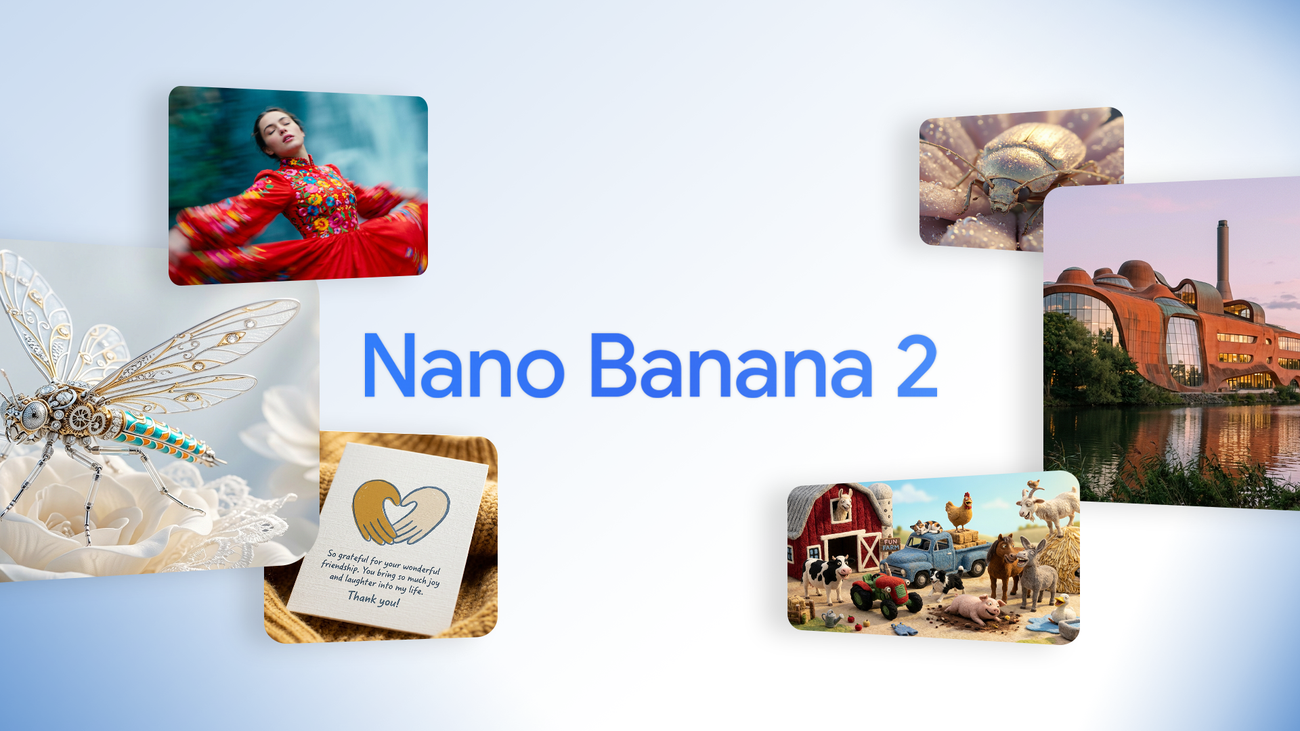
Prompt Engineering With Nano Banana 2: A Friendly Guide
Posted: June 20, 2026 - 11:00 AM ET
Google's Nano Banana 2, technically Gemini 3.1 Flash Image, pairs the intelligence of Nano Banana Pro with the speed of Gemini Flash. This friendly guide shows you how to actually write for it, from the one starter formula I always reach for to the small habits that turn a decent result into the exact image you pictured.
Inside: the subject-action-scene starter prompt, getting specific with lighting and lens and mood, using the full aspect-ratio and resolution controls from 512px up to 4K, leaning on the model's world knowledge, and iterating with intention instead of rerolling blindly.
Light It Right: An AI Art Guide To Lighting And Mood
Posted: June 19, 2026 - 11:00 AM ET
If your AI images look flat and lifeless, the culprit is almost never the subject. It is the light. This one steps away from the subject entirely and gives you the single lever that separates a snapshot from a real photograph: lighting you chose on purpose.
This friendly guide covers the three words that control any image, picking a quality of soft versus hard light, choosing a direction so shadows give your subject depth, and borrowing named styles like golden hour, blue hour, Rembrandt lighting, and rim light to set the whole mood in a single phrase.
Build An AI Art Portfolio And Personal Brand That Lasts
Posted: June 18, 2026 - 11:00 AM ET
You have made hundreds of images you love, so why can nobody tell they all came from the same person? This one steps away from prompt tricks and talks about the thing that actually builds a creative life: a portfolio with a point of view and a personal brand that makes people remember your name.
This friendly guide covers how to find your through-line and signature, why ruthless curation beats a giant dump, how to choose a home platform instead of living everywhere, writing a short artist statement, posting on a human rhythm, and playing the long, honest game that grows a real audience.
Direct Your AI Art: A ControlNet Composition And Color Theory Prompting Guide
Posted: June 17, 2026 - 11:00 AM ET
Most people type a prompt, hit generate, and pray. There are two levers that turn praying into directing: ControlNet for composition, and color theory for mood. Once they click, you stop accepting what the model gives you and start telling it what to do.
This friendly guide covers how ControlNet feeds the model a structural guide (OpenPose, depth maps, Canny edges), why stacking two controls beats one, the color theory terms that steer mood predictably, why named colors beat hex codes, and a five-step session to direct every image plus a character sheet for consistency.
AI Music Meets AI Art: A Friendly Guide To Soundtracking Your Creations
Posted: June 16, 2026 - 11:00 AM ET
We spend hours getting an image exactly right and then post it in total silence, but sound is half of mood. The same generative AI that makes art can now write you a soundtrack from a plain-language prompt, and pairing the two is the highest-impact, lowest-effort upgrade a creator can make right now.
This friendly guide covers how text-to-music tools like Stable Audio work, what audio inpainting is, how to write a music prompt that matches your image's mood, and a five-step workflow to turn a still picture into a moment with its own voice.
Frame It Right: An AI Art Guide To Composition, The Rule Of Thirds, And Leading Lines
Posted: June 15, 2026 - 11:00 AM ET
You can render the most gorgeous subject imaginable and still get a flat, forgettable image, because beauty is not composition. Where everything sits inside the frame is the quiet skill that separates a centered snapshot from a picture someone clearly meant to make.
This friendly guide covers the five composition tools worth knowing (the rule of thirds, leading lines, negative space, balance, and visual flow), the exact prompt language that requests each one, why framing belongs at the front of your prompt, and a five-step plan to compose every image on purpose.
Build A Series, Not A Pile: An AI Art Guide To Cohesive Collections And Storytelling
Posted: June 14, 2026 - 11:00 AM ET
Almost everyone makes one stunning image, then another, then a hundred more, and ends up with a beautiful pile that says nothing together. The leap that turns a hobbyist into an artist is the series, a set of images that clearly belong to each other and tell a story across the gap between frames.
This friendly guide covers how to pick a throughline, the four anchors that make images read as one family (palette, light, framing, and recurring motifs), how to sequence a set so it feels like a story instead of a grid, and a five-step plan to build your first real collection this weekend.
AI Art Upscaling: How To Add Real Resolution And Detail Without Losing The Image
Posted: June 13, 2026 - 11:00 AM ET
You made something beautiful, then you went to print it or zoom in and it dissolved into soft, smeary pixels. The art was real, the resolution was not, and that gap is exactly what upscaling exists to close. The catch is that the lazy version of it, plain stretching, actively makes your image worse.
This friendly guide explains why stretching is not upscaling, walks the ladder from one-click ESRGAN-style detail upscalers to full tiled diffusion with Tile guidance, and zeroes in on the single denoise setting (roughly 0.3 to 0.5) that decides whether you enhance your art or accidentally generate a brand new one.
Generate AI Art Offline: AMD's Ryzen AI NPU Runs Stable Diffusion 3.0 On Your Own Laptop
Posted: June 10, 2026 - 11:00 AM ET
We talk a lot about prompts and models, but this one is about hardware: AMD and Stability AI put a real Stable Diffusion 3.0 Medium model directly on the Ryzen AI NPU, so a modern AMD laptop can generate AI images locally, offline, and free in the Amuse app, with no cloud and no upload.
This friendly guide covers exactly what AMD released, the hardware you need (Ryzen AI 300 or MAX+, a 50-TOPS XDNA 2 NPU, 24GB RAM), the 4-megapixel print-quality output, and why local generation wins on privacy, cost, and offline freedom, plus how to get started tonight.
Prompt Weighting Explained: How to Tell AI What Actually Matters in Your Image
Posted: June 6, 2026 - 11:00 AM ET
Your prompt is not a shopping list where every word gets equal billing. It is a budget, and the model spends its attention unevenly whether you tell it to or not. Prompt weighting is the syntax that lets you take the wheel, pushing a quiet detail forward and pulling a loud one back.
This friendly guide covers the parentheses-and-number emphasis syntax, the weight range that actually works, when to boost a vanishing detail versus suppress a term that takes over, the habits that keep it from backfiring, and a one-evening starter recipe to feel the difference tonight.
Stop Rerolling, Start Directing: A Friendly ControlNet Guide to Pose and Composition Control
Posted: June 4, 2026 - 11:00 PM ET
If your workflow is still prompt, generate, sigh, reroll, you are gambling instead of directing. ControlNet turns the slot machine into a photo shoot by letting you hand the model a structural blueprint, a pose skeleton, an edge sketch, or a depth map, that the generation has to respect.
This friendly guide covers the only three modes you need to start, OpenPose for body position, Canny for outlines, and Depth for spatial composition, plus how to stack them with weights, which model family runs them best in 2026, and a one-evening starter recipe.
Character Consistency: How To Make The Same AI Art Face Show Up Twice
Posted: June 12, 2026 - 11:00 AM ET
You finally make a character you love, then you try for a second image of her and a total stranger walks in. Keeping one face across a whole set is the hardest skill in AI art, and there is no single magic button, just a ladder of techniques you climb only as high as your project needs.
This friendly guide walks that ladder from cheapest to strongest: describing hard and locking the seed, handing the model a reference image, using a face swap as a cleanup pass, and finally training a character LoRA, plus the one canonical-reference habit that makes every method work.
Seeds Explained: Stop Rerolling And Start Controlling Your AI Art
Posted: June 11, 2026 - 11:00 AM ET
If your workflow is generate, hate it, generate again, and pray, you are pulling a slot machine lever. The seed is the one setting that turns that lever into a steering wheel. It is the random number every image is built on, and the moment you stop leaving it on random, you grab the wheel.
This friendly guide explains what a seed actually is, how to lock it so your results become reproducible, and how to use variation strength for controlled, consistent sets instead of endless random rerolls, plus a simple five-step variation recipe you can run tonight.
Negative Prompts Done Right: An AI Art Cleanup Guide
Posted: June 8, 2026 - 11:00 AM ET
Half the negative prompts out there are 40 words of copy-pasted superstition doing nothing, while the one word that would have fixed the image is nowhere in there. A negative prompt is an eraser, not a magic spell, and it only works when you point it at the actual smudge instead of waving it around.
This guide covers what truly belongs in a negative prompt, what to delete today, and how to aim it at the three things that wreck more images than anything else, mangled hands, waxy faces, and cluttered backgrounds, with a lean starter set for each image type.
You can light and frame a scene perfectly and still feel nothing, because the part that carries the emotion is color, and most prompts never mention it. Lighting tells the eye where to go; color tells the heart how to feel about it. Left unguided, models default to a muddy do-everything palette that lands on the feeling of nothing.
This is a practical guide to the palette schemes that do the most work, complementary, analogous, and monochrome, plus the warm-versus-cool decision that flips a mood in one word, all with the exact prompt language to steer color on purpose tonight.
Light Like A Painter: An AI Art Lighting And Composition Guide
Posted: June 3, 2026 - 11:00 AM ET
Most AI art looks flat for one reason: the prompt never mentions light or framing, so the model defaults to soft, even, lifeless lighting. The biggest upgrade most creators can make has nothing to do with which generator they run and everything to do with treating light and composition as deliberate choices.
This is a practical guide to the handful of lighting and composition ideas that change your images the most, rim light, golden hour, hard dramatic shadow, the rule of thirds, leading lines, and depth of field, with the exact prompt language to test each one tonight.
Niji 7 Is Here: An Anime AI Art Creators Guide for 2026
Posted: May 31, 2026 - 11:00 AM ET
Niji 7, the anime-focused model in the Midjourney family, just landed with the upgrade anime creators have wanted for years: exquisite, consistent eye highlights, sharper understanding of long layered prompts, and a meaningfully better Sref style transfer system for keeping a character or series cohesive across a whole set.
This is a practical creators guide to what actually changed in Niji 7, why the refined eyes and upgraded style transfer matter most for real character work, and how to fold the new model into the anime AI art workflow you already use in 2026.
Stability AI Music Model: Generate Full AI Songs in 2026, A Creators Guide
Posted: May 30, 2026 - 11:00 AM ET
Stability AI just released Stable Audio 3.0, an AI music generator that can build full original songs running more than six minutes long, all on a fully licensed training foundation. For creators who already live in AI art tools, it opens the door to scoring your own galleries, reels, and intros without stock libraries or licensing headaches.
This is a friendly creators guide to what the new Stability AI music model actually does, how the open weight and API tiers differ, and how to fold AI music into the visual workflow you already love.
Midjourney V8 Update: A Practical AI Art Creators Guide for 2026
Posted: May 29, 2026 - 11:00 AM ET
The Midjourney V8 update is the biggest jump the platform has shipped in a while: roughly 5x faster generation, native 2K HD output without a separate upscale step, and noticeably sharper text rendering inside images. For working creators, that combination changes the math on how many ideas you can explore per session and how close a first pass lands to something usable.
This is a practical creators guide to what actually changed in V8 and the V8.1 refinements, how to fold the speed and resolution gains into a real 2026 AI art workflow, and where the new model still needs a human hand to get the result you want.
How AI Art Is Transforming Character Design in Video Games
Posted: April 2, 2026 - 8:30 PM ET
AI art tools are quietly revolutionizing how game studios build characters and concept art. Artists at major studios are now generating 50 character variations in an afternoon instead of spending weeks on manual iterations, cutting production timelines by up to 40%. From Ubisoft's AI-assisted world-building to indie developers using Midjourney and Stable Diffusion for rapid prototyping, the collaboration between human creativity and generative AI is reshaping the entire gaming pipeline.
We explore how studios are integrating AI into their workflows, the ethical debates around AI-generated game assets, what this means for concept artists and character designers, and why the best results still come from humans and AI working together rather than AI replacing artists entirely.
Chinese Film Studio Youhug Media Sparks Global Controversy With AI Actors
Posted: April 1, 2026 - 3:15 PM ET
Chinese production company Youhug Media just set the entertainment world on fire by introducing two fully AI-generated actors, Qin Lingyue and Lin Xiyan, to star in a 60-episode short drama. The backlash was immediate: actors' unions, filmmakers, and fans around the globe condemned the move as a threat to human performers. But Youhug is just the tip of the iceberg in a country now producing over 470 AI-generated short dramas per day.
We dig into the technical details behind digital performers, the ethical and legal firestorm surrounding likeness rights and job displacement, and what this means for the future of entertainment as AI creeps further into every stage of film production.
AI Art Gets Its Own Museums: DATALAND, ARTECHOUSE & the Exhibitions Redefining Creativity in 2026
Posted: April 1, 2026 - 12:00 PM ET
Something genuinely historic is happening: AI-generated art is moving off our screens and onto actual museum walls. DATALAND, the world's first museum dedicated entirely to AI art, is opening this spring in a Frank Gehry-designed complex in downtown LA. Meanwhile, ARTECHOUSE in NYC is running a 20-minute immersive AI cinematic experience, and the CVPR 2026 AI Art Gallery is bringing research-grade generative art to Denver this June.
We explore how these institutions are legitimizing AI as a creative medium, what the DATALAND Artist Residency Program (in partnership with Google Arts & Culture) means for creators, and why 2026 might be the year AI art earns the same institutional respect as photography and sculpture.
How AI Is Quietly Reshaping Film Production in 2026
Posted: March 30, 2026 - 1:30 PM ET
From Hollywood editing suites to Chinese production studios, AI is quietly transforming how movies and TV shows get made in 2026. Amazon MGM Studios just launched an AI production tools beta, studios are cutting costs by 30% with AI workflows, and a Chinese company has introduced AI-generated actors to replace supporting cast. Here's what creators need to know about the real AI revolution happening behind the scenes.
We explore how AI is being used for everything from automated color grading and visual effects to script analysis and virtual set design, the ethical debates it's sparking among filmmakers and actors' unions, and what this shift means for the future of creative jobs in the entertainment industry.
Disney's Legal War Against AI Art Generators: Every Copyright Battle Shaping Our Future in 2026
Posted: March 28, 2026 - 12:00 PM ET
Disney, Universal, and Hollywood's biggest studios are waging an unprecedented legal war against AI image generators, and the outcomes will shape what every AI artist can and cannot create for years to come. From Disney suing Midjourney over AI-generated Star Wars and Marvel characters to the Supreme Court's landmark ruling that purely AI-generated images cannot be copyrighted, 2026 has become the most consequential year in AI art law.
We break down every major lawsuit, settlement, and court ruling currently shaping the AI art landscape, including the Andersen v. Stability AI trial, the Bartz v. Anthropic settlement, and what the EU AI Act's new training data rules mean for creators worldwide. Whether you use Midjourney, Stable Diffusion, or DALL-E, these legal battles will directly affect your creative future.
How AI is Revolutionizing Fashion Design: From Virtual Clothing to AI-Generated Runway Shows
Posted: March 26, 2026 - 6:45 PM ET
AI is completely transforming the fashion industry, from Alexis Mabille's fully AI-generated Paris Couture show to virtual try-on technology going mainstream at Zalando and Google Shopping. The AI fashion market is projected to hit $2.89 billion.
We explore how designers are using generative AI to create entire collections, how retailers are deploying virtual fitting rooms that actually work, and what this technological revolution means for independent creators and the future of wearable art.
AI Breaks Into Haute Couture: The First All-AI Fashion Runway
Posted: March 24, 2026 - 1:45 PM ET
The fashion world just had its biggest disruption since streetwear crashed the Met Gala. An entirely AI-generated haute couture collection debuted on an actual runway, with AI-designed fabrics, AI-generated patterns, and AI-directed styling. Some legendary fashion houses are furious. Others are already licensing the technology. This article explores the collision of artificial intelligence and high fashion, what it means for human designers, and why the luxury industry will never be the same.
From Balenciaga's AI experiments to independent creators using Midjourney for textile design, we break down every angle of this seismic shift and what AI art creators need to know about the fashion world's newest frontier.
Digital Art Trends 2026: How Creatives Are Thriving Alongside AI
Posted: March 21, 2026 - 2:30 PM ET
The art world is evolving fast in 2026. AI tools are better than ever, but human artists are finding brilliant new ways to stand out. From the rise of "proof of humanity" certifications to collectors paying premium prices for hand-made work, this article explores how both sides of the creative spectrum are thriving. Whether you use AI as a collaborator or compete against it, there has never been a more interesting time to be a digital artist.
We break down the biggest trends shaping the creative landscape right now, including the "imperfect by design" movement, AI-human hybrid workflows, and why demand for verified human-made art is surging among collectors and galleries alike.
Google Nano Banana AI Image Generator: The Complete Prompt Engineering Guide
Posted: March 21, 2026 - 11:15 AM ET
Google's Nano Banana AI image generator has quickly become one of the most talked-about creative tools of 2026. Built into Gemini and available across Google's ecosystem, Nano Banana offers surprisingly powerful image generation with a friendly learning curve. But getting truly stunning results requires knowing how to prompt it properly. This guide covers everything from basic prompt structure to advanced techniques for Nano Banana 2 and Nano Banana Pro.
Whether you are brand new to AI image generation or migrating from Midjourney or DALL-E, these prompt engineering tips will help you unlock Nano Banana's full creative potential and avoid the most common beginner mistakes.
ByteDance Seedance 2.0 Ignites Hollywood Copyright War: What AI Creators Need to Know
Posted: March 19, 2026 - 3:45 PM ET
ByteDance dropped Seedance 2.0 on February 10 and it immediately kicked open the front door of every major Hollywood studio. The AI video generator produces 1080p cinematic video up to 15 seconds with synchronized dialogue and sound effects generated in a single pass, something no competitor has achieved yet. Then a viral clip of Tom Cruise fighting Brad Pitt went everywhere, and Disney, Netflix, and Paramount all fired off cease-and-desist letters. ByteDance has now paused the global launch entirely.
Midjourney V8 Review: 5x Faster, Native 2K HD, but Premium Features Cost 4x More
Posted: March 19, 2026 - 11:30 AM ET
Midjourney V8 Alpha dropped on March 17, 2026, and it is a significant upgrade. Generation speed is roughly 5x faster than V7, there is a new --hd parameter that outputs native 2K resolution images without upscaling, text rendering has improved dramatically when you put text in quotation marks, and prompt adherence for complex multi-element compositions is noticeably better. The Alpha website also got a full redesign with grid view, moodboards, and personalization profiles.
The catch? V8 generations cost 4x more GPU minutes than V7, which means Basic plan users get roughly 60 images per month instead of 200. This article breaks down every new feature, the real-world pricing impact across all subscription tiers, how V8 compares to V7 side by side, and whether the upgrade is worth it for hobbyist AI artists versus professionals.
Disney AI Copyright Lawsuit: What It Means for AI Artists in 2026
Posted: March 18, 2026 - 12:15 PM ET
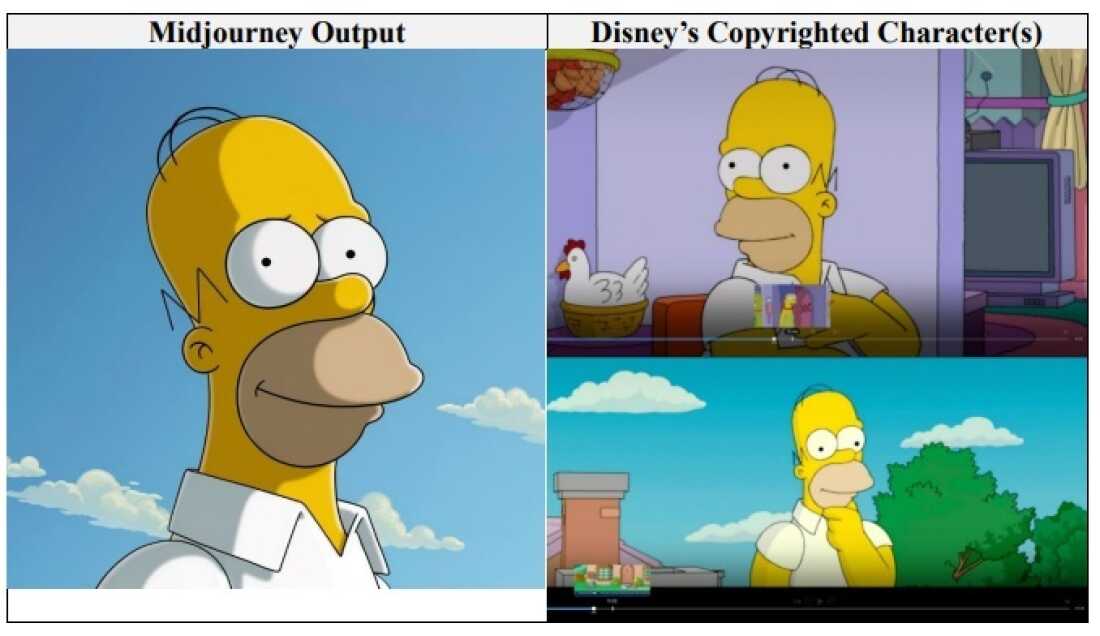
Disney and Universal have filed a landmark lawsuit against Midjourney, claiming the AI image generator scraped copyrighted characters, concept art, and film stills to train its models. The complaint includes side-by-side exhibits showing AI outputs that closely resemble iconic Disney and Universal properties. This is the biggest corporate copyright case against an AI company to date, and its outcome could reshape the entire AI art landscape.
For hobbyist AI artists, the implications are real but nuanced. This article breaks down what the lawsuit actually alleges, why it targets Midjourney specifically, how it could affect the tools you use every day, and what legal experts say about the future of AI-generated art and fair use. Whether you create AI art for fun or profit, this is a case worth understanding.
FLUX.1 Kontext Gets 2x Faster With NVIDIA RTX Acceleration - What AI Artists Need to Know
Posted: March 17, 2026 - 9:45 PM ET
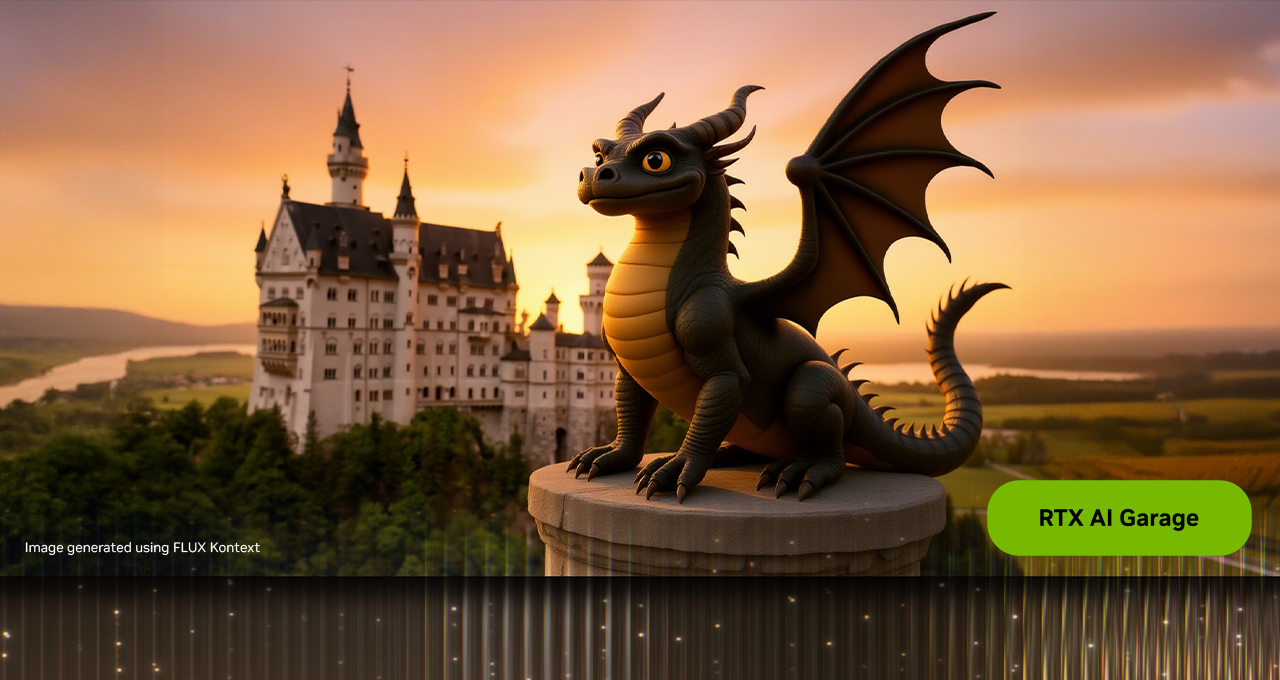
NVIDIA has officially rolled out RTX acceleration for Black Forest Labs' FLUX.1 Kontext model, delivering up to 2x faster image generation on RTX GPUs using TensorRT optimization. For AI artists running local workflows on consumer hardware, this is a game-changer. The update means that what used to take 30+ seconds per image on a 4090 can now render in under 15 seconds, and even mid-range cards like the RTX 4070 are seeing dramatic speedups.
This guide breaks down exactly what changed, how to set up RTX acceleration for FLUX.1 Kontext in ComfyUI and other popular interfaces, which GPUs benefit the most, and what this means for the future of local AI image generation. If you've been waiting for Kontext to feel snappy on your hardware, the wait is over.
Best AI Image Generators 2026: Complete Comparison Guide
Posted: March 15, 2026 - 2:00 PM ET
The AI image generation landscape has exploded in 2026, with Midjourney V7, Flux 2, DALL-E 4, and Stable Diffusion 3.5 all competing for the crown. Whether you're a beginner looking for the easiest tool or a pro chasing photorealism, this comprehensive comparison guide breaks down every major AI image generator available right now, covering pricing, quality, speed, and the best use cases for each platform.
The AI Papaoutai Cover Fooled Millions: When AI Music Blurs the Line Between Human and Machine Creativity
Posted: March 15, 2026 - 10:00 AM ET
An AI-generated cover of Stromae's "Papaoutai" racked up 80 million Spotify streams before anyone realized it wasn't made by a human artist. A University of Toronto study found that 97% of listeners couldn't distinguish AI-generated music from human-made tracks, and this viral moment has become a flashpoint for the entire AI creative community. Whether you're making AI images, music, or video, the implications of this story hit close to home.
Oviedo's AI Mural Controversy: When AI Art Steps Into the Real World and a Small Town Pushes Back
Posted: March 11, 2026 - 10:00 AM ET
Oviedo, Florida recently held a competition for a new public mural, and the winning design was created using AI art tools. The community's reaction has been intense, with local artists feeling blindsided and residents questioning whether AI art belongs in public spaces. This story matters for everyone in the AI art community because it's shaping how the public perceives what we do.
ComfyUI Tutorial 2026: Beginner Guide to Node-Based AI Image Generation
Posted: March 6, 2026 - 9:30 PM ET
If you've been hearing about ComfyUI but felt intimidated by the node-based interface, this guide is for you. ComfyUI has become the most powerful local AI image generation tool in 2026, and once you understand the basics, those nodes and wires start making a lot of sense. We break down everything from installation to your first custom workflow, explain how it compares to Automatic1111 and Forge, and share the custom nodes that will save you hours of frustration.
AI Video Generation 2026: Sora 2 vs Kling vs Runway Gen-4.5 vs Veo 3.1 Comparison
Posted: March 6, 2026 - 9:00 PM ET
Which AI video generator should you actually use in 2026? We tested Sora 2, Kling 3.0, Runway Gen-4.5, and Google Veo 3.1 head-to-head so you don't have to juggle subscriptions blindly. From motion quality and prompt adherence to pricing and practical use cases, this is the honest comparison you need before spending another dollar on AI video tools.
Google Imagen 4 Review: Photorealistic AI Image Generation Just Hit Another Level
Posted: March 4, 2026 - 7:15 PM ET
Google just dropped Imagen 4 and I've been spending the last few hours putting it through its paces. If you've been following the AI image generation space (and if you're reading this blog, I know you have), this is one you need to pay attention to. Let me give you the full breakdown of what it does well, where it falls short, and how it stacks up against the competition.
What Is Imagen 4?
Imagen 4 is Google DeepMind's latest text-to-image model, and it represents a significant step forward from the Imagen 3 model that launched in mid-2024. The biggest improvements are in photorealism, prompt adherence, and text rendering accuracy. Google has been relatively quiet about the exact architecture changes, but the results speak for themselves. Images generated by Imagen 4 have a level of detail and natural lighting that's genuinely hard to distinguish from professional photography in many cases.
The model is currently available through Google AI Studio, the Gemini API, and integrated into Gemini 2.5 for conversational image generation. For most casual users, the easiest way to access it's through Gemini directly, where you can generate images in the same chat interface you use for text conversations.
The Photorealism Is Genuinely Impressive
I'm not going to sugarcoat this: Imagen 4's photorealistic output is among the best I have seen from any AI image generator. Skin textures look natural without that waxy sheen that plagues so many AI models. Hair has individual strand detail. Fabric wrinkles and folds follow realistic physics. And the lighting, especially natural outdoor lighting with complex shadow play, is remarkably convincing.
Where it really shines is in environmental photography. Landscapes, cityscapes, food photography, product shots, and architectural renders all look polished and professional. The model seems to have an excellent understanding of depth of field, bokeh characteristics, and how different lens types affect the final image. If you prompt it with specific camera and lens descriptions, it actually responds to those parameters in a meaningful way rather than just ignoring them like some other models do.
Text Rendering Has Caught Up
One area where Google's image models have historically lagged behind OpenAI's GPT Image is text rendering. Imagen 3 was notoriously bad at putting legible text into images. Imagen 4 has made a real leap here. It handles short text like signs, labels, and titles with high accuracy. Longer text blocks are still hit or miss, but for the most common use cases like social media graphics, mockup designs, and logo concepts, the text rendering is now competitive with what you get from ChatGPT's image generation.
The improvement in typographic consistency is noticeable too. When you ask for a specific font style, like "bold sans-serif" or "elegant script," the model actually delivers something in that ballpark instead of defaulting to the same generic font every time.
How Does It Compare to Midjourney v7 and Flux 2?
This is the big question, and the answer depends on what you're optimizing for.
Midjourney v7 still has the edge in artistic interpretation and aesthetic quality. When you want something that looks like it belongs in an art gallery or a high-end magazine editorial, Midjourney's ability to add that extra layer of visual storytelling is hard to beat. It takes creative liberties in ways that often improve the final image beyond what you specifically asked for.
Flux 2 Pro remains the champion of prompt precision and technical control. If you need exact spatial positioning, specific counts of objects, or camera-accurate optical characteristics, Flux 2 still delivers the highest fidelity to your instructions. And for users who want open-source flexibility and local generation, Flux is in a league of its own.
Imagen 4 carves out its niche in photorealistic quality and accessibility. The photorealism is arguably the most natural-looking of any model right now, and the fact that it's freely accessible through Gemini makes it incredibly easy to try. For anyone who primarily needs realistic-looking images, whether for content creation, mockups, or reference photography, Imagen 4 is a serious contender for the top spot.
The Limitations You Should Know About
No model is perfect, and Imagen 4 has its share of weaknesses. Artistic and stylized content is where it struggles most compared to Midjourney. If you ask for something in a specific art style, like "Studio Ghibli" or "1970s sci-fi book cover," the results tend to be more literal and less creatively interpreted than what Midjourney would produce.
Consistency across multiple generations of the same character remains challenging. If you're trying to create a series of images featuring the same person, you'll get variations that can be quite noticeable. This is an industry-wide problem, but some competitors handle it slightly better.
Google's content filtering is also quite strict. The safety filters will block a range of requests that other platforms would handle without issue. For creators who work in edgier or more mature content categories, this can be a significant limitation.
My Verdict: Worth Adding to Your Toolkit
Imagen 4 isn't going to replace Midjourney for artistic work or Flux for technical precision, but it absolutely deserves a spot in your AI image generation toolkit. The photorealism is top-tier, the accessibility through Gemini is unbeatable, and the improvements in text rendering close a major gap that Google's previous models had.
For anyone who is just getting started with AI image generation, Imagen 4 through Gemini might honestly be the best place to begin. The interface is intuitive, the quality is excellent, and you don't need to learn Discord commands or set up local installations to get started. For experienced creators, it's another powerful option to have available, especially when you need that photorealistic quality for professional-looking output.
The AI image generation space continues to get more competitive every month, and that competition is producing better tools for all of us. Between Imagen 4, GPT Image 1.5, Midjourney v7, and Flux 2, we've never had this many high-quality options to choose from. It's a great time to be making things with AI.
Have you tried Imagen 4 yet? I'd love to hear how it compares to your usual go-to generator. Drop me a line and let me know what you think!
ChatGPT Images: Everything You Need to Know About OpenAI's GPT Image 1.5 Model
Posted: March 3, 2026 - 8:45 PM ET
If you've been wondering what all the fuss is about with ChatGPT's image generation lately, let me catch you up. OpenAI has been on an absolute tear with their image capabilities, and the latest version, GPT Image 1.5, is genuinely impressive. Whether you're already deep into AI art or just curious about making your first image, this is a model worth understanding. Here's what it does, where it shines, and where it still needs work.
A Quick Timeline: How We Got Here
Back in March 2025, OpenAI launched native image generation inside GPT-4o. It went absolutely viral, especially when people started generating images in the style of Studio Ghibli. That was the original GPT Image 1. It was cool, but it had some rough edges: slow generation times, inconsistent edits, and text rendering that was hit or miss.
Then on December 16, 2025, OpenAI rolled out GPT Image 1.5 globally to all ChatGPT users, including Free, Plus, Pro, and Team tiers. This is the version everyone is using right now, and it's a significant upgrade. The model is built directly into the GPT-5 architecture, meaning the same neural network that processes your text also generates the image. That tight integration is what makes the whole experience feel so seamless compared to older systems where a language model would hand off your request to a completely separate image generator.
What GPT Image 1.5 Actually Does Well
The headline improvement is speed. OpenAI claims image generation is up to 4x faster than the previous version, and in practice that checks out. You aren't waiting minutes anymore for a single image. The other big leap is editing precision. When you upload a photo and ask for changes, like "change the jacket color to blue," the model now modifies only the jacket while preserving facial features, lighting direction, background composition, and even small details like brand logos in the frame. Earlier versions would often change things you didn't ask it to touch, which was incredibly frustrating for anyone doing iterative work.
And then there's the text rendering, which honestly might be the single biggest differentiator right now. GPT Image 1.5 handles denser and smaller text than any previous version. It can generate readable signage, legible book covers, menus, infographics, and text overlays with proper spelling, correct alignment, and appropriate font weights. The accuracy has significantly improved compared to previous versions, making it a massive deal for anyone creating social media graphics, mockups, or marketing materials.
The Creative Studio Sidebar Is Actually Useful
One feature that doesn't get enough attention is the dedicated Images experience in the ChatGPT sidebar. OpenAI built this to function more like a creative studio than just a chat window. It includes preset filters you can apply with a single click, things like "Make it photorealistic," "Change to sunset lighting," "Add dramatic shadows," and "Professional product photo style." There are also trending prompts to help you get inspired by what other people are creating, and an image library where all your generations are saved automatically.
The coolest part is the one-time likeness upload. You upload a photo of yourself once, and then you can reuse your appearance across future creations without re-uploading every time. That makes consistent character work so much easier. Plus, the conversational editing means you can just say "make the background darker" or "move the text up" and it adjusts without starting over from scratch.
How Does It Stack Up Against Midjourney and Flux?
This is the question everyone asks, and the honest answer is: it depends on what you're doing.
Midjourney v7 is still considered the champion of pure artistic aesthetics. If you want that gorgeous, richly detailed, almost painterly quality that Midjourney is known for, it still produces visually striking images with a depth and artistic coherence that's hard to match. For fine art, concept design, and anything where raw visual beauty matters most, Midjourney remains the go-to for a lot of creators.
Flux 2 from Black Forest Labs excels at photorealism and complex, multi-element prompts. Its 32 billion parameter model handles specific spatial positioning, exact counts, and detailed descriptions with the highest fidelity of any tool right now. If you need camera-accurate optical characteristics like depth of field, lens distortion, and film grain, Flux 2 Pro is incredibly good at that. And for people who want full local control with open-source flexibility, Flux is hard to beat.
ChatGPT's GPT Image 1.5 wins on ease of use, text rendering, and editing workflow. There's no separate app to learn, no Discord commands to memorize, no local installation to configure. You just type what you want in a chat window and the model understands your context from the conversation. That conversational back-and-forth for iterating on images is genuinely unmatched. And for text in images, it's currently the most accurate option available.
The Honest Limitations You Should Know About
It isn't all sunshine. There are real limitations you'll run into.
Rate limits are a thing. Plus subscribers get approximately 40 images per 3-hour window. Team plans get roughly double that at around 100 images per 3 hours. When OpenAI's servers are under heavy load (which happens a lot because the feature is wildly popular), generation can slow down significantly or even time out. OpenAI's CEO Sam Altman has acknowledged the GPU crunch from the massive demand.
Content filtering is aggressive. The model won't generate images of public figures, copyrighted characters, or anything that triggers its safety filters, and sometimes those filters are overly cautious, blocking perfectly legitimate creative requests. If you need to generate images involving real people or specific fictional characters, you'll hit walls.
Consistency across generations can still be tricky. Generating multiple images of the same person sometimes produces noticeably different variations. Minor edit requests can occasionally alter structural features you didn't ask it to change. And while text rendering is much improved, it's still not perfect for dense paragraphs, legal fine print, or very small text at complex angles.
The model also struggles with scientific accuracy and rendering multiple small faces in crowd scenes, which OpenAI has openly acknowledged.
Tips for Getting the Best Results
After spending a lot of time with this model, here are my practical tips for getting better output:
Think like a creative director, not a chatbot user. Define your subject, style, mood, lighting, and constraints. Prompts that specify viewpoint ("eye-level close-up" or "aerial drone shot"), aspect ratio ("16:9 landscape"), and lighting mood ("soft diffused light") consistently produce better results than vague descriptions.
Iterate instead of cramming everything into one prompt. Generate a base image first, then refine with follow-up instructions like "make the lighting warmer, keep the subject unchanged." The conversational nature of ChatGPT makes this workflow incredibly natural.
For text in images, be specific. Instead of just asking for text, specify details like "centered at the bottom, white text on black background, 72pt size." The more precise your instructions for text placement and styling, the better the results.
Skip the overused buzzwords. Prompts like "8K ultra-HD masterpiece" don't actually improve output quality. Instead, describe what you want to see: "natural skin pores and fabric folds" will get you more realistic results than generic quality descriptors.
Use the sidebar presets. After generating an image, check the sidebar filters before writing a new prompt. Sometimes clicking "Make it photorealistic" or "Add dramatic shadows" gets you exactly what you wanted without having to describe it from scratch.
Is It Worth Using? My Honest Take
If you're an AI art creator, you should absolutely be experimenting with GPT Image 1.5, even if it isn't your primary tool. The text rendering alone makes it invaluable for specific use cases that other generators struggle with. The conversational editing workflow is genuinely fun and productive. And the fact that it's available on the free tier means there's zero barrier to trying it out.
That said, it isn't a Midjourney killer for pure art, and it isn't a Flux killer for photorealism and local control. It's its own thing: the most accessible, most conversational, and best text-rendering AI image generator available right now. For a lot of people, especially those who aren't deep into the AI art ecosystem, it's honestly the only tool they need. For the rest of us, it's an excellent addition to the toolkit.
The AI image generation space is moving at a ridiculous pace right now, and having OpenAI, Midjourney, Black Forest Labs, and Google all pushing each other to ship better tools faster is great for everyone who loves making things with these models. 2026 is shaping up to be an incredible year for AI art.
Have you tried ChatGPT's image generation yet? I'd love to hear how it stacks up against your go-to tools.
Nano Banana 2 Just Dropped and It Might Be the Best AI Image Generator Right Now
Posted: February 26, 2026 - 9:30 PM ET
Okay, I'm genuinely excited about this one. Google DeepMind just launched Nano Banana 2, technically known as Gemini 3.1 Flash Image, and it's already sitting at the #1 spot on the Artificial Analysis Image Arena with an ELO rating of 1,272. That puts it ahead of OpenAI's GPT Image 1.5 (1,268) and even ahead of its own bigger sibling, Nano Banana Pro (1,220). I'll cover everything because this is a big deal for anyone making AI art.
What Is Nano Banana 2 and Why Should You Care?
Nano Banana 2 is Google DeepMind's latest image generation model, and it solves a problem that has been bugging AI artists for months: you used to have to choose between quality and speed. The original Nano Banana (Gemini 2.5 Flash Image) from August 2025 was fast but not studio-grade. Then Nano Banana Pro (Gemini 3 Pro Image) arrived in November 2025 with gorgeous output, but it took 20 to 60 seconds per image. That's an eternity when you're iterating on a concept.
Nano Banana 2 combines the best of both. It generates images in 4 to 6 seconds at resolutions up to 4K (starting from 512px and scaling all the way up). That'sPro-level quality at Flash-level speed. For context, Nano Banana Pro takes 20 to 60 seconds for the same quality tier. This is a massive improvement for workflow speed.
The Funniest Origin Story in AI
I have to tell you about the name because it's genuinely hilarious. The model is named after Naina Raisinghani, the product manager on the team. Her nickname was "Naina Banana," which got shortened to "Nano." When the team submitted the model anonymously to the LMArena leaderboard at 2am, they entered it as "Nano Banana" and the name just... stuck. Google didn't fight it. They actually leaned all the way in, adding a banana emoji to the Gemini prompt bar, turning the run button yellow in AI Studio, and even creating an official @NanoBanana social media account. I love when big companies embrace the weird stuff.
The Technical Specs That Actually Matter for AI Art Creators
Here's what makes Nano Banana 2 interesting from a practical standpoint. It supports character consistency for up to 5 characters per workflow, which means you can build scenes with multiple recurring characters and they will look like the same people across generations. It also handles up to 14 reference objects for object fidelity, so if you're doing product shots or scene compositions with lots of specific items, it can keep track of them all.
The model also features multilingual text rendering, which is huge if you're creating content for non-English audiences. Text in images has always been one of the hardest problems for AI generators, and supporting multiple languages on top of that's a serious flex. That said, there are some honest limitations: small text can still get blurry, character consistency starts to degrade beyond 5 characters, and you might see occasional spatial confusion in complex scenes. It also won't generate real named individuals.
How Does Nano Banana 2 Compare to the Competition?
Let's talk numbers. Nano Banana 2 costs roughly $0.067 per image at 1K resolution. OpenAI's GPT Image 1.5 runs about $0.133 per image, which is nearly double the price. And Nano Banana 2 is beating it on the leaderboard too (ELO 1,272 vs 1,268). It also ranks #3 in Image Editing, so it isn't just a one-trick pony. Oh, and it'sfree in the Gemini app if you just want to play around with it.
Midjourney is still very much in the conversation. Their v7 is the current version and v8 is reportedly in final testing with about 22-second generation times. Midjourney has always been considered the undisputed champion of pure artistic creation, so it will be fascinating to see how v8 stacks up against Nano Banana 2's speed advantage. Then there'sFlux 2 from Black Forest Labs with its 32 billion parameter model and multi-reference conditioning, and Stable Diffusion XL 1.5 Turbo for folks who want open-source flexibility.
Availability and Safety Features
Nano Banana 2 is available in 141 countries across a bunch of Google products: the Gemini app, Google Search, Google Ads, Flow, Google Lens, the API, and Vertex AI. For creators who need to prove their images are AI-generated (which is becoming increasingly important), every image gets SynthID watermarking and C2PA Content Credentials baked in automatically.
What This Means for AI Art Creators
The real story here's the combination of speed, quality, and cost. If you've been using Nano Banana Pro and waiting 30+ seconds per generation, you can now get comparable quality in 4 to 6 seconds. If you've been using GPT Image 1.5, you can get slightly better results at half the price. The original Nano Banana was already a phenomenon, attracting 10 million+ new users and powering 200 million+ image edits when it launched in August 2025. Nano Banana 2 takes everything that made the original viral and cranks it up several notches.
For anyone doing serious AI art workflows, the 5-character consistency and 14-object fidelity features open up real creative possibilities. You can build out entire visual stories with recurring characters without fighting the model every step of the way. And the 4K output means your work is ready for print or high-res display without upscaling.
The AI image generation space is moving incredibly fast right now, and Nano Banana 2 just raised the bar for what "good enough" looks like. Speed, quality, and price, all in one package. It's a genuinely exciting time to be making art with these tools.
Have you tried Nano Banana 2 yet? I'd love to see what you're creating with it.
Midjourney 8 Is Almost Here: Native 2K Images and Text That Actually Works
Posted: February 26, 2026 - 9:30 PM ET
If you've been refreshing the Midjourney updates page every few hours like I have, you already know: Midjourney V8 is on the doorstep. The final round of the V8 rating party kicked off on February 20th, and Midjourney confirmed that this round "will run all the way until final release." That's about as close to "it's launching any day now" as David Holz and his team ever get.
And honestly? This one feels different from previous version bumps. V8 isn't just a refinement. It's a ground-up rebuild of the entire model, and the headline features are going to change how a lot of us work.
Native 2K Resolution: No More Upscale Workarounds
Let's start with the big one. Midjourney V8 supports native 2K resolution output, with potential for even higher. This isn't the old workflow where you generate a lower-resolution image and then run it through an upscaler hoping the details hold up. This is true, native high resolution from the moment the image is generated.
If you've ever zoomed into a Midjourney V6 or V7 image and noticed the telltale softness, the slightly mushy textures, the fine details that dissolve into noise when you look too closely, that era is ending. V8 promises sharper details and more polished visuals straight out of generation, which is a massive deal for anyone creating prints, editorial work, or anything that needs to hold up at large display sizes.
Typography That Actually Reads: The Feature We've Been Begging For
Every AI artist has felt the pain of this one. You prompt "a coffee shop sign that says OPEN" and you get "OPNE" or "OOPEN" or some beautiful calligraphy that spells absolute nonsense. It's been the running joke of AI art since the beginning.
Midjourney V8 introduces dramatically improved text rendering. The enhanced typography system handles text elements with better contextual accuracy, meaning the model actually understands what letters go where and how they should be spaced and styled within the image. This is ideal for advertisements, editorial layouts, branding materials, signage, and any project where readable text in the image is essential.
A Smarter Model Under the Hood
V8 is a complete architectural overhaul. Advanced prompt understanding handles complex, multi-subject prompts with dramatically better accuracy. If you've ever struggled with prompts like "a woman in a red dress standing next to a man in a blue suit, with the woman holding a book and the man holding a coffee cup," you know how easily older models would scramble the details. V8 is designed to handle these layered instructions without losing track.
The model also handles specific exclusions better and supports text-to-video and image-to-video generation, with clips up to 10 seconds at 60fps. The new workflow is built around rapid low-resolution iteration followed by seamless high-resolution refinement.
The Bottom Line
Midjourney V8 is shaping up to be the biggest jump in the platform's history. Native 2K resolution eliminates the upscale tax. Readable text in images opens up entire categories of creative work that were previously impossible. Better prompt understanding means less time fighting the model and more time creating. And the infrastructure rewrite sets the stage for faster development going forward.
The era of "almost readable" AI text is finally ending. Welcome to Midjourney 8.
Midjourney 8 Is Almost Here: Native 2K Resolution, Cleaner Text, and a Completely New Architecture
Posted: February 21, 2026 - AI Art News
Midjourney V8 is on the verge of release, and from everything the team has shared, this is a substantial update built on a ground-up architectural rebuild. Native 2K resolution, dramatically improved text rendering, and a new creative workflow are the headline features. David Holz has indicated that V8 should drop before the end of February 2026.
This article covers the native 2K resolution output, the improved typography system, the architectural overhaul, what it means for portrait and character art, and how AI art creators should prepare for the transition from V7 to V8.
Google Pomelli Photoshoot: Free AI Product Photography That Actually Works
Posted: February 20, 2026 - 6:00 PM ET
Google just launched Pomelli Photoshoot, a free AI tool that turns basic product photos into professional studio shots instantly. If you sell anything online, this could save you hundreds on photography costs. I tested it with several products and the results genuinely surprised me.
Viral AI Image Trends 2026: Caricatures, Action Figures, Ghibli Style and More
Posted: February 19, 2026 - 5:00 PM ET
From ChatGPT caricatures to action figure box images to Studio Ghibli-style portraits, 2026 has been an explosion of viral AI image trends. This guide breaks down every major trend, with full prompts and step-by-step instructions so you can create your own versions.
ByteDance Seedance 2.0: AI Video Generation Just Took a Massive Leap Forward
Posted: February 16, 2026 - 3:30 PM ET
If you've been paying attention to the AI art world this week, you have probably seen the clips already. ByteDance, the company behind TikTok, just dropped Seedance 2.0, an AI video generation model that has absolutely exploded across Chinese social media. And honestly? The results are kind of jaw-dropping.
We have been living in the golden age of AI image generation for a while now. Flux, Midjourney, Stable Diffusion, Z-Image Turbo, they have all made it possible for anyone to create stunning images from a text prompt. But video has always been the next frontier, the thing everyone knew was coming but nobody had truly cracked yet. Seedance 2.0 might be the moment where AI video generation goes from "interesting experiment" to "holy crap, this is actually usable."
What Seedance 2.0 Actually Does and Why It Went Viral
Seedance 2.0 is a text-to-video and image-to-video AI model developed by ByteDance. You give it a text prompt, or feed it a still image, and it generates a video clip. Simple concept, but the execution is what has people losing their minds. Users in China started creating AI-generated video clips of celebrities like Tom Cruise and Brad Pitt, and the results were realistic enough to go absolutely viral. We aren't talking about the janky, melting-face AI videos from a year ago. These clips have coherent motion, natural expressions, and a level of detail that genuinely makes you do a double take.
The quality leap from previous AI video tools is significant. Earlier models struggled with basic things like keeping a character's face consistent across frames, maintaining realistic body movement, and avoiding the weird warping artifacts that screamed "this is fake." Seedance 2.0 appears to have made serious progress on all of those fronts. The clips that have been circulating show smooth, natural-looking motion that would have seemed impossible from an AI model even six months ago.
The AI Video Generation Landscape in 2026: Where Does Seedance Fit?
Seedance 2.0 isn't the only player in the AI video generation space, but it's quickly becoming one of the most talked about. Here's where things stand right now with the major competitors:
OpenAI's Sora made huge waves when it was first previewed, showing cinematic-quality AI video generation that had filmmakers both excited and nervous. It's still one of the most capable tools available, particularly for longer, more complex video generation with detailed scene composition.
Google's Veo has been quietly improving and is integrated into Google's broader AI ecosystem. It handles text-to-video generation with strong coherence and is particularly good at understanding complex scene descriptions.
RunwayML has been the workhorse of the creative community for a while now. Their Gen models have been the go-to for a lot of independent creators and smaller studios who want practical AI video tools they can actually use in their workflow today.
What makes Seedance 2.0 stand out is the combination of quality and accessibility. ByteDance has massive resources, a deep understanding of short-form video from running TikTok, and the infrastructure to scale this kind of technology fast. When a company that processes billions of video views per day turns its attention to AI video generation, you pay attention.
What This Means for AI Art Creators Like Us
Okay, so here's the part I'm most excited to talk about. If you're an AI art creator who has been focused on still images, video is coming for you. Not in a threatening way. In the best possible way. Think about it like this: we went from generating single images to generating consistent characters across multiple images, then to creating entire visual narratives in image series. Video is the natural next step, and tools like Seedance 2.0 are making it accessible.
Imagine taking one of your best AI-generated portraits and animating it. Giving your character a subtle head turn, a smile, a slow blink. Or taking a landscape you generated in Flux and turning it into a gentle panning shot with moving clouds and swaying trees. That's the creative territory we're moving into, and it's thrilling.
The image-to-video capability is particularly interesting for our community. Instead of starting from scratch with a text prompt, you can feed Seedance 2.0 a still image you have already perfected and let it extrapolate motion from there. This means all the prompt engineering skills and aesthetic sensibility you have developed for image generation transfer directly into video creation. You aren't starting over. You're building on everything you already know.
The Copyright Question: Staying Safe as a Creator
Now, I'd be doing you a disservice if I didn't mention the elephant in the room. When Seedance 2.0 went viral, it went viral partly because users were generating video clips of real celebrities. That got the attention of major entertainment companies fast. Disney and Paramount both sent cease-and-desist letters to ByteDance over unauthorized use of their intellectual property, and ByteDance has responded by saying they're strengthening safeguards to prevent this kind of use going forward.
This is something every AI art creator needs to think about, regardless of which tool you're using. The technology is powerful enough now to create convincing likenesses of real people, and that comes with real legal and ethical responsibilities. Here are a few things to keep in mind as AI video generation tools become more widely available:
Stick to original characters. The safest and most creatively rewarding approach is to generate videos of characters you have designed yourself. Use your own AI-generated portraits as the base, not photos of celebrities or real people.
Avoid using copyrighted characters. Disney sending cease-and-desist letters should surprise nobody. If you're generating videos featuring characters owned by major studios, you're taking a legal risk. Create your own worlds and characters instead.
Check the terms of service. Every AI video tool has different rules about what you can create and how you can use it commercially. Read them before you publish anything. What's allowed for personal experimentation might not be allowed for commercial distribution.
Be transparent. If you share AI-generated video content, label it as AI-generated. The community is better off when everyone is honest about how content was made. It builds trust and helps establish healthy norms around this technology.
The Bottom Line: Video Is the Next Chapter of AI Art
We're living through an incredible moment in creative technology. Two years ago, most people had never generated an AI image. Today, millions of people are creating stunning visual art with tools that would have been science fiction a decade ago. And now, video generation is crossing the same threshold. Tools like Seedance 2.0, Sora, Veo, and RunwayML are pushing the boundaries of what's possible, and the pace of improvement is only accelerating.
For those of us in the AI art community, this isn't a threat to what we do. It's an expansion of what we can do. The skills you have built in prompt engineering, composition, color theory, and aesthetic development all apply directly to AI video creation. You aren't being replaced. You're being given a bigger canvas.
I will be keeping a close eye on Seedance 2.0 as it becomes more widely available and will share tutorials and tips as soon as I get hands-on time with it. In the meantime, if you want to start experimenting with AI video generation right now, RunwayML is probably the most accessible starting point for Western creators.
The future of AI art moves. Literally.
5 Dead Giveaways That Your AI Art is Fake (And How to Fix Every Single One)
February 16, 2026
I've been running this site for a while now, and I have looked at thousands of AI-generated images. Good ones, terrible ones, and everything in between. And I have noticed something: the difference between an AI image that fools everyone and one that screams "I typed this into Midjourney during my lunch break" usually comes down to five specific mistakes.
If your AI art still looks off and you can't figure out why, I guarantee you're making at least two of these.
1. The Skin is Too Smooth and It Makes Everyone Look Like a Mannequin
This is the most common giveaway and it's the first thing trained eyes notice. Every AI model has a tendency to over-smooth skin by default. It removes pores, softens texture, eliminates every freckle and imperfection. The result is a face that looks like it was carved out of silicone. Real skin has texture. It has tiny imperfections, uneven tone, slight redness around the nose, barely visible hair on arms. If your image looks like someone ran a beauty filter at maximum strength, it's going to read as artificial immediately.
The fix: Add negative prompts that specifically fight the smoothing. Terms like "textured skin," "skin pores," "natural skin" in your positive prompt, and "airbrushed," "smooth skin," "plastic" in your negatives. In Flux and Z-Image Turbo, try adding "raw photo" or "candid" to your prompt to push the model toward more natural rendering. Some creators also add a very light noise layer in post-processing to break up the uncanny smoothness.
2. Hands Still Look Wrong (But Not in the Way You Think)
Everyone jokes about AI hands. Six fingers, melted knuckles, impossible anatomy. And yeah, that still happens. But the hand problem in 2026 is actually more subtle than that. Most newer models can generate five fingers just fine now. The real issue is that the hands look too perfect. They're symmetrical in a way real hands never are. The fingernails are all exactly the same length. There are no veins, no knuckle wrinkles, no asymmetry between left and right.
The fix: Give the hands something to do. Holding a coffee mug, resting on a desk, adjusting a necklace. When hands interact with objects, models are forced to render them in specific positions, which naturally introduces the kind of asymmetry and detail that makes them look real. If the image doesn't need hands, crop or compose your shot so they aren't prominent. There's no shame in working around a weakness.
3. The Lighting Makes No Physical Sense
This one is subtle but devastating. Bad AI images have light coming from everywhere and nowhere at the same time. Shadows point in different directions. There's a highlight on the left cheek but the key light seems to be coming from the right. The background is lit like it's noon but the subject looks like they're sitting under a desk lamp at midnight.
Real photographers obsess over lighting because it's the single biggest factor in whether a photo looks professional or amateur. The same applies to AI art, except most people never think about it because they're focused on the subject and not the scene.
The fix: Specify your light source directly in the prompt. "Soft window light from the left," "golden hour backlighting," "overhead fluorescent office lighting." Be specific about where the light is coming from and what kind of light it is. Single-source lighting prompts produce dramatically more realistic results than letting the model guess. If you want to go further, reference actual photography lighting setups: "Rembrandt lighting," "butterfly lighting," "split lighting." These are terms the models understand because they were trained on millions of photos that used them.
4. The Background is an Afterthought (Or Does Not Exist)
I see this constantly. Someone generates a stunning face with incredible detail, and behind them is either a blurry void that looks like someone smeared Vaseline on the lens, or a background so generic it could be a stock photo wallpaper. Real photos have environments. Real rooms have clutter. Real streets have trash cans and parked cars and fire hydrants. The background tells you where someone is and makes the whole image feel grounded in reality.
The fix: Treat the background as its own character. Instead of "woman in kitchen," try "woman leaning against kitchen island, morning light through blinds, coffee maker on counter, mail scattered next to keys, potted basil plant on windowsill." Specific environmental details force the model to build a real space around your subject. The more specific and mundane the details, the more convincing the scene becomes. Nobody looks at a kitchen with bills on the counter and thinks "that's clearly AI."
5. Every Single Image Has the Same Composition
Center-framed, eye-level, shoulders-up portrait. That's the default for every AI model and about 80% of AI creators never break out of it. Scroll through any AI art gallery and you'll see the same shot repeated hundreds of times. Different faces, same framing. It screams "generated" because real photographers use wildly different compositions, even when shooting the same subject.
The fix: Study actual photography and steal their compositions. Low angle looking up. Shot from behind, looking over the shoulder. Extreme close-up on just the eyes. Wide shot showing the full environment with the subject small in the frame. Dutch angle. Overhead shot. Reflections in mirrors or windows. Give your prompts camera direction: "shot from below," "bird's eye view," "over-the-shoulder angle," "through a rain-streaked window." Breaking the center-portrait mold is the single fastest way to make your AI art look less like AI art.
The Real Secret Nobody Talks About
Here's the thing. The gap between amateur AI art and convincing AI art isn't about which model you use or how expensive your GPU is. It's about understanding what makes a real photograph look real. The lighting, the imperfections, the composition, the environmental storytelling. Every one of these fixes comes down to the same principle: study real photography, then teach the AI to replicate what makes it work.
The best AI artists I know aren't prompt engineers. They're photographers who happen to use a text box instead of a camera. Start thinking like that, and your images will improve overnight.
Z-Image Turbo AI Art Generator Review 2026: Better Than Flux Quality on a Budget GPU With No Signup Required
February 14, 2026
Okay, I need to tell you about something that has completely changed my AI art workflow, and honestly, I think it might change yours too. If you've been frustrated by the insane hardware requirements of Flux, or you've been stuck waiting forever for Stable Diffusion to render your images, Z-Image Turbo is the free AI art generator you've been waiting for. You can run it right now with no signup required, and it genuinely rivals the best models on the planet.
Here's why this thing is such a big deal and why every AI art creator should be paying attention in 2026.
What Is Z-Image Turbo and Where Did It Come From?
Z-Image Turbo was released in November 2025 by Alibaba's Tongyi-MAI research team. If you remember the original Z-Image model that we talked about earlier this year, think of Turbo as its supercharged younger sibling. It's a 6-billion parameter model, which sounds like a lot until you realize that some of the top models it competes with are three times that size. The fact that it punches this far above its weight class is honestly kind of wild.
The model immediately made a splash when it launched. It shot to the #1 spot on HuggingFace and has racked up over 2,000 likes there. Over on Civitai, it has collected more than 1,200 positive reviews from real users who are actually generating images with it every day. People aren't just impressed in theory. They're putting it to work and loving the results.
Why Z-Image Turbo Is a Game Changer for AI Art on Budget Hardware
Here's the thing that makes Z-Image Turbo genuinely exciting, and not just another model announcement you scroll past. The hardware requirements are shockingly low. You can run this model on as little as 6GB of VRAM. Let that sink in for a second.
For comparison, Flux needs a minimum of 24GB VRAM to run properly, and the full model can demand up to 90GB. That means you basically need a brand new, top-of-the-line GPU (or multiple GPUs) just to use Flux at its best. Z-Image Turbo? You can run it on a mid-range card that you might already have sitting in your PC right now. That's a massive democratization of high-quality AI art, and it's exactly the kind of progress I love to see.
And the speed is ridiculous. Z-Image Turbo generates photorealistic images in under 3 seconds. At just 9 inference steps, it produces images at the same speed as SDXL running at 30 steps, but with quality that rivals Flux. So you're getting better images, faster, on cheaper hardware. It almost feels like cheating.
How Z-Image Turbo Stacks Up Against Flux and Stable Diffusion in 2026
Let me put the comparison in simple terms for anyone just getting into AI art. If Flux is the luxury sports car that only the wealthy can afford to drive, and Stable Diffusion is the reliable sedan that everyone knows, then Z-Image Turbo is the new electric vehicle that somehow costs half the price but keeps up with the sports car on the highway.
On the AI Arena leaderboard, Z-Image Turbo holds a 1026 ELO score, which puts it at #4 overall. That's remarkable for a model that's so much smaller and more efficient than its competitors. It's outranking models that are three times its parameter count, which tells you that the Tongyi-MAI team figured out how to squeeze incredible performance out of a leaner architecture.
One feature that really sets it apart is bilingual text rendering. Z-Image Turbo can generate images with both English and Chinese typography baked right into the output. If you have ever tried to get AI models to render text cleanly in images, you know what a nightmare that usually is. Most models butcher letters, mix up characters, or produce unreadable gibberish. The fact that Z-Image Turbo handles two languages natively is a huge plus for creators who work with international audiences or just want clean text in their generations.
Where to Try Z-Image Turbo AI Art Generator for Free With No Signup
The best part? You can try this right now without spending a dime or creating an account. Here are your best options:
HuggingFace is probably the easiest place to start. You can find the model page, try the demo, and see what all the hype is about without downloading anything. It's great for a quick test drive to see if the model clicks with your style.
Civitai is where the real community action is happening. With over 1,200 positive reviews, you can browse what other creators are making with Z-Image Turbo, find optimized settings, grab community-made LoRAs that work with the model, and get prompt inspiration from people who have been pushing it to its limits. If you're serious about incorporating this into your workflow, Civitai is where you want to be.
If you want to run it locally (which I highly recommend for the best experience and full control), you can download the model weights and run it through ComfyUI or your preferred interface. Remember, you only need 6GB of VRAM, so most modern graphics cards from the last few years should handle it just fine. That includes cards like the RTX 3060, RTX 4060, or even some older models.
Practical Tips for Getting the Best Results With Z-Image Turbo
After spending time with this model, here are a few things I have learned that might save you some experimentation time:
Keep your step count around 9. This is the sweet spot where Z-Image Turbo was designed to shine. You might be tempted to crank it up to 20 or 30 steps like you would with other models, but Turbo was specifically optimized for fewer steps. More steps doesn't always mean better results here, and you'll just be wasting time for minimal improvement.
Be specific with your prompts. Like any model, garbage in means garbage out. Z-Image Turbo responds really well to detailed descriptions of lighting, composition, and mood. Don't just type "beautiful woman." Describe the scene, the atmosphere, the colors you want to see, the time of day, the emotional tone.
Experiment with the bilingual text feature. If you're creating content that includes text overlays, try letting the model handle the typography directly in the generation. The results can be surprisingly clean compared to adding text in post-processing.
Take advantage of the speed. With generations completing in under 3 seconds, you can iterate incredibly fast. Generate 20 or 30 variations of the same prompt, cherry-pick the best ones, then refine from there. This rapid iteration cycle is something that Flux users simply can't match without spending serious money on hardware.
Should You Switch From Flux or Stable Diffusion to Z-Image Turbo?
Honestly? I don't think this is an either/or situation. The beauty of AI art in 2026 is that you can have multiple tools in your toolkit, and the best creators use different models for different purposes. But if you've been locked out of Flux because of the hardware requirements, Z-Image Turbo gives you access to that tier of quality without needing to sell a kidney for a new GPU.
If you're currently happy with Stable Diffusion and your workflow is dialed in, Z-Image Turbo is still worth trying. The speed improvement alone might convince you to add it to your rotation. Generating photorealistic images in under 3 seconds on a 6GB card isn't something you can easily ignore, especially when the quality holds up against models running on hardware that costs four times as much.
The AI art space moves fast, and Z-Image Turbo is proof that the best tools aren't always going to come from the names you already know. A Chinese research team just built something that competes with the biggest Western models at a fraction of the cost, and they released it for free. That's incredible, and it's great for everyone who creates AI art.
Give it a try this weekend. I think you'll be as impressed as I was.
Samsung Galaxy S26 EdgeFusion: Instant Offline AI Image Generation on Your Phone in 2026
Posted: February 7, 2026 - 2:15 PM ET
Okay, this one has me genuinely excited. If you've been following the AI art space even casually, you know the biggest limitation has always been hardware. You need a beefy GPU, a stable internet connection, and either a cloud subscription or a local setup to generate anything decent. Samsung is about to change that equation completely. The Galaxy S26, set to launch on February 25 at the Galaxy Unpacked event, is reportedly coming with a feature called EdgeFusion that lets you generate AI images directly on the phone. No Wi-Fi. No cellular data. No cloud. Just your phone, doing it all locally, in under one second.
Let that sink in for a second. Under one second for a 512x512 image. On a phone. In airplane mode.
What Is EdgeFusion and How Does It Work?
EdgeFusion is a collaboration between Samsung and Nota AI, a company that specializes in making AI models smaller and faster without destroying their quality. What they have done here's take Stable Diffusion, one of the most popular open-source image generation models, and shrink it by up to 90%. That isn't a typo. They compressed the model so aggressively that it can run on a mobile chip without needing cloud servers to do the heavy lifting.
The key technology is model optimization specifically designed for the Exynos 2600 chip that will power the Galaxy S26 and S26+. (The Galaxy S26 Ultra will use Qualcomm's Snapdragon 8 Elite Gen 5 instead, though EdgeFusion compatibility with that chip hasn't been detailed yet.) By tailoring the model compression to the specific hardware architecture of the Exynos 2600, Nota AI achieved inference speeds that would have sounded impossible a year ago.
For context, running Stable Diffusion on a high-end desktop GPU typically generates a 512x512 image in a few seconds. Running it on a phone, offline, in under one second? That's a genuine leap. Not an incremental improvement. A leap.
Why Offline AI Image Generation Is a Big Deal
Cloud-based AI image generators are great when you have fast internet, a paid subscription, and you're okay with your prompts being processed on someone else's server. But there are a lot of situations where that doesn't work.
Think about traveling. You're on a flight, or in a remote area without signal, or just dealing with terrible hotel Wi-Fi. With cloud-based tools, you're out of luck. EdgeFusion doesn't care about your connection status. Airplane mode, underground subway, middle of a national park with zero bars, it doesn't matter. The model lives on your phone. The processing happens on your phone. Everything stays local.
There's also the privacy angle. When you type a prompt into Midjourney or DALL-E, that prompt is sent to external servers. With EdgeFusion, your prompts never leave your device. For people who care about keeping their creative ideas private, or for anyone experimenting with prompts they would rather not share with a corporation's training pipeline, that's a meaningful difference.
512x512 Resolution: Is That Actually Useful?
Let me be honest about this. A 512x512 image isn't going to replace what you get from Flux 2 or Midjourney V7 at full resolution. It's roughly the size of a social media thumbnail. For finished artwork, portfolio pieces, or print-quality work, you're still going to want your desktop setup or a cloud service.
But 512x512 is perfect for a ton of real-world use cases. Quick concept sketches when inspiration strikes. Rapid prototyping of compositions before you refine them on better hardware. Social media content creation on the go. Texture generation for casual projects. Sticker and emoji creation. Visual brainstorming sessions where speed matters more than pixel count.
And let's be real, the fact that it happens in under a second changes the creative workflow entirely. When generation is instant, you iterate differently. You try more ideas. You experiment more freely. You don't sit there waiting and second-guessing your prompt. You just fire and adjust.
The Model Compression Behind the Magic
Shrinking Stable Diffusion by 90% isn't something you do with a zip file. Nota AI's approach involves a combination of techniques including knowledge distillation, structured pruning, and quantization, all tuned specifically for mobile neural processing units. The goal is to remove the parts of the model that contribute the least to output quality while preserving the parts that matter most.
The result is a model that fits comfortably in mobile memory, runs on the phone's built-in NPU (neural processing unit) rather than needing a discrete GPU, and produces usable results at a speed that makes the experience feel instantaneous rather than computational. It's seriously impressive engineering, and it signals where the entire industry is heading. Local, fast, private AI that doesn't need the cloud at all.
What This Means for AI Art on Mobile
Right now, if you want to do AI image generation on a phone, your options are limited to apps that send your prompt to a cloud server and return the result. That means latency, data usage, subscription fees, and content restrictions. EdgeFusion flips the script entirely. The phone becomes the AI art studio.
If Samsung pulls this off well, expect every other phone manufacturer to follow. Apple, Google, and Qualcomm are all investing heavily in on-device AI, and the race to offer the best local AI image generation will heat up fast through 2026 and 2027. Samsung just happens to be first with a consumer-facing feature that actually runs a real diffusion model locally.
The Catch: Nothing Is Confirmed Yet
One important caveat. Samsung hasn't officially confirmed EdgeFusion. The information comes from leaks, supply chain reports, and Nota AI's own published research on mobile model optimization. The Galaxy Unpacked event on February 25 is where Samsung will reveal the full feature set of the S26 lineup. Until then, the specifics could change.
That said, the technical foundation is real. Nota AI's compression research is published and peer-reviewed. The Exynos 2600 chip has the NPU architecture to support this. And Samsung has been steadily building AI features into Galaxy phones for the last two years. EdgeFusion fits perfectly into that trajectory.
Should You Be Excited?
Yes. Even if you're a dedicated desktop AI artist with a 4090 and three monitors, the idea of instant offline generation in your pocket opens up creative possibilities that didn't exist before. For people who are newer to AI art and don't want to invest in hardware or subscriptions, EdgeFusion could be the most accessible entry point yet. Open your phone, type a prompt, see an image in under a second. No setup. No accounts. No monthly fees. That's powerful.
I will be covering the Galaxy Unpacked event on February 25 and will have a full breakdown of EdgeFusion once Samsung makes it official. If this lives up to the leaks, it could be the most interesting development in AI image generation hardware since NVIDIA started optimizing their consumer GPUs for diffusion models.
ComfyUI Beginner Guide 2026: How to Install and Start Generating AI Images Locally
Posted: February 5, 2026 - 4:30 PM ET
If you have tried cloud-based AI image generators and want more control, speed, and zero ongoing costs, local generation is the next step. ComfyUI is the tool that makes it possible. It's a free, open-source node-based interface that runs Flux, Stable Diffusion, and dozens of other models directly on your own hardware. No subscriptions. No content filters. No upload queues. Your GPU, your rules.
The learning curve used to be steep, but ComfyUI Desktop changed that. The team released a one-click installer that handles Python, dependencies, and configuration automatically. What used to take an afternoon of troubleshooting now takes about ten minutes.
What You Need Before You Start
ComfyUI runs on your GPU, so hardware matters. Here's the minimum you need:
GPU: NVIDIA with at least 4GB VRAM. Realistically, 8GB or more gives you a much better experience. An RTX 3060 (12GB) or RTX 4060 Ti is the sweet spot for most people. AMD GPUs work on Linux but the Windows Desktop version currently requires NVIDIA.
Storage: At least 15GB free on an SSD for the base install. Models are large, a single checkpoint can be 2-7GB, so budget 50-100GB if you plan to experiment with multiple models.
RAM: 16GB minimum. 32GB recommended if you want to run larger models like SDXL or Flux without slowdowns.
Installing ComfyUI Desktop on Windows
Forget the old portable zip method. ComfyUI Desktop is the official installer and it works like any normal application:
1. Download ComfyUI Desktop from the official site (comfy.org). Pick the Windows version.
2. Run the installer. Choose an SSD as your install location. The installer handles Python, pip, PyTorch, and all dependencies automatically.
3. Launch ComfyUI Desktop. On first run it will download some base components. This takes a few minutes depending on your internet speed.
4. You'll see the node-based interface. It looks intimidating at first, but you only need to understand three things: the model loader, the prompt nodes, and the generate button.
Loading Your First Model
ComfyUI doesn't come with image generation models pre-installed. You need to download at least one. Here's where to start:
For Flux 2 (recommended for beginners): Download the Flux 2 Klein model from Hugging Face. It's about 8GB and runs well on 8GB+ VRAM cards. Drop the file into your ComfyUI models/checkpoints folder. The Klein model generates images in about 1-2 seconds, which makes the creative loop feel almost instant.
For Stable Diffusion: Grab SD 3.5 Medium from Stability AI on Hugging Face, or browse CivitAI for community fine-tuned models with specific aesthetics. Realistic, anime, painterly, whatever style you want, someone has probably trained a model for it.
Once the model file is in the right folder, click the model name dropdown in the Load Checkpoint node and select it. That's all the setup needed.
Understanding the Node Interface
ComfyUI uses a visual node graph instead of the text boxes and sliders you see in other tools. Each node does one specific thing, and you connect them together to build a workflow. Think of it like a visual recipe.
The default workflow has everything you need to generate your first image:
Load Checkpoint - picks which model to use. CLIP Text Encode (positive) - your prompt describing what you want. CLIP Text Encode (negative) - what you don't want in the image. KSampler - the actual generation engine. Controls steps, CFG scale, and seed. VAE Decode - converts the raw output into a viewable image. Save Image - writes the result to disk.
Type your prompt into the positive text box, type things you want to avoid in the negative text box, and hit Queue Prompt. Your first locally generated image will appear in seconds.
Why Nodes Beat Sliders
The node system feels like overkill when you're just starting, but it pays off fast. You can add ControlNet nodes to guide composition with reference images. You can chain multiple models together for upscaling. You can add LoRA nodes to inject specific styles or character consistency. You can build entire automated pipelines that generate, upscale, and sort images without you touching anything.
The ComfyUI Manager (built into Desktop) lets you install custom nodes with one click. Need AnimateDiff for video? Install the node. Need IP-Adapter for face consistency? Install the node. The ecosystem has hundreds of community-built extensions that plug directly into your workflow.
Tips That Would Have Saved Me Hours
Save your workflows. Once you build something that works, save it as a JSON file. You can reload it anytime, share it with others, or use it as a starting point for variations.
Start with community workflows. Don't try to build complex workflows from scratch. Sites like CivitAI and OpenArt have thousands of pre-built workflows you can download and drag directly into ComfyUI. Learn by modifying what already works.
Lock your seed when iterating. If you get a result you like but want to tweak the prompt, lock the seed number so the composition stays similar. Change one variable at a time.
Use the bypass feature. Right-click any node and select Bypass to temporarily disable it without deleting it. This is invaluable for testing what each node actually contributes to your output.
VRAM errors are normal. If you get an out-of-memory error, reduce your image resolution or switch to a smaller model. ComfyUI will tell you exactly what ran out. It isn't a crash, just a limit you need to work within.
Where to Go From Here
Once you're comfortable generating basic images, the rabbit hole goes deep. ControlNet for pose and composition control. IP-Adapter for maintaining character consistency across images. AnimateDiff for turning still images into short animations. Upscaling workflows that take a 512px image to 4K with added detail.
ComfyUI is the backbone of serious AI art creation in 2026. The cloud services are convenient, but local generation gives you unlimited creative freedom at zero marginal cost. Every image on this site was generated using workflows like the ones described here.
AI Image Prompting Tips for Beginners 2026: How to Write Prompts That Actually Work
Posted: February 5, 2026 - 2:00 PM ET
One of the most common questions from people starting out with AI art is some version of "how do I get the AI to make what I actually want?" If you've been typing vague descriptions into Midjourney or Flux and getting results that feel random, you aren't doing anything wrong. You just need to learn the language these tools understand. This is the prompting framework that took my images from "meh" to "wow," and you can start using it immediately.
Whether you're using Midjourney V7, Flux 2, or Stable Diffusion 3.5, the core principles of good prompting are universal. Master these, and you'll get better results everywhere.
Think Like a Creative Director, Not a Conversationalist
The single biggest mistake beginners make is talking to image models the way they talk to ChatGPT. You type "Please create a beautiful photo of a woman in a garden" and wonder why the result feels generic. Here's the thing: image models aren't conversationalists. They're pattern-matching systems that interpret your prompt as a series of descriptive commands. Filler phrases like "please create" or "I'd like to see" aren't only unnecessary, they can actively dilute your prompt.
Instead, think of yourself as a creative director briefing a photographer. You wouldn't say "please take a nice photo." You would say "portrait, woman with auburn hair, golden hour side lighting, botanical garden background, shallow depth of field, Canon 85mm lens." Every word should add specific visual information.
The Prompt Structure That Works Every Time
After generating thousands of images, I have settled on a six-part structure that consistently produces strong results:
1. Subject - Start with a concrete noun. "Woman," "landscape," "cat," "sports car." The subject anchors everything else.
2. Description - Add specific details about your subject. Hair color, clothing, expression, pose, material, texture. Be concrete: "wearing a navy linen blazer" beats "wearing nice clothes."
3. Action or Composition - What's happening? "Looking over her shoulder," "close-up portrait," "wide establishing shot," "from below." This controls the camera angle and energy of the image.
4. Setting - Where's this happening? "Rainy Tokyo street at night," "minimalist studio with white backdrop," "sun-drenched Italian villa." Context transforms a generic subject into a story.
5. Style - This is where the magic happens. Keywords like "cinematic lighting," "film photography," "hyperrealistic," "oil painting," "anime aesthetic," or "editorial fashion photography" dramatically shift the output. Experiment with mixing styles: "Kodak Portra 400 film grain, Vogue editorial, soft natural light" gives you something very specific.
6. Technical Modifiers - Quality boosters and camera specs. "8K resolution, sharp focus, volumetric lighting, ray tracing" for realism. Or "hand-drawn, pencil texture, visible brushstrokes" for traditional art styles.
You don't need all six elements every time, but the more specific you are, the more control you have. A prompt like "portrait of a woman with freckles and red curly hair, wearing a denim jacket, laughing, outdoor cafe in Paris, afternoon sunlight, candid street photography style, 35mm film grain" will dramatically outperform "beautiful woman in Paris."
Negative Prompts: Your Secret Weapon
If your images keep having the same annoying flaws, negative prompts are going to change your life. A negative prompt tells the model what to avoid. Not every tool supports them the same way (Midjourney uses --no, Stable Diffusion has a dedicated negative prompt field, and Flux handles them through CFG weighting), but the concept is universal.
Here are the negative prompt sets I use constantly:
For clean portraits: "deformed, extra fingers, fused fingers, bad anatomy, asymmetrical face, blurry, watermark, text overlay"
For photorealism: "cartoon, illustration, 3D render, painting, anime, CGI, low resolution, oversaturated"
Start small. Add one or two negative terms, see if they fix your issue, then expand. Overloading the negative prompt can make the model overly constrained and produce flat, lifeless images. Balance is everything.
The Iteration Mindset
Here's something nobody tells beginners: professional AI artists don't nail the image on the first try. They generate 10, 20, sometimes 50 variations before they find the one. The skill isn't writing the perfect prompt on attempt one. The skill is recognizing what's working and what's not, then adjusting.
My typical workflow looks like this: I start with a rough prompt to explore the concept. If the lighting is wrong, I add more specific lighting terms. If the composition feels off, I add camera angle keywords. If there's an unwanted element, I add it to the negative prompt. Each generation teaches me something, and the prompt evolves through feedback loops.
If you're using Flux 2, the sub-second generation speed makes this iteration loop incredibly fast. Midjourney's Draft Mode serves the same purpose. Use speed to your advantage and don't get precious about any single generation.
Style Keywords That Punch Above Their Weight
Some keywords have an outsized effect on image quality. Here are my favorites that work across most models:
For mood: "golden hour," "blue hour," "chiaroscuro," "moody," "ethereal," "melancholy"
For composition: "rule of thirds," "leading lines," "negative space," "Dutch angle," "symmetrical"
For artistic styles: "Kodak Portra 400," "Fujifilm Pro 400H," "Hasselblad medium format," "wet plate collodion"
Film stock keywords are particularly powerful. Specifying a real film stock (like Kodak Portra or CineStill 800T) gives the model a concrete reference point for color grading, grain structure, and tonal range that's hard to achieve with generic terms like "warm tones."
Keep a Prompt Journal
This sounds basic, but it's genuinely the most useful habit I have built. When you get a result you love, save the exact prompt. When something flops spectacularly, note what went wrong. Over time you build a personal library of phrases and structures that work for your aesthetic. No tutorial can replace the knowledge you gain from your own experimentation.
For a deeper dive into specific tools and their unique prompting features, check out our complete AI image generators guide which covers Midjourney, Flux, Stable Diffusion, DALL-E, and more with detailed comparisons.
Happy prompting, everyone! If you have a favorite prompt trick I didn't cover, I'd love to hear about it. The AI art community gets better when we share what we learn.
FLUX.2 [Klein] Review: Sub-Second AI Image Generation Is a Game-Changer
Posted: February 3, 2026 - 4:00 PM ET
The FLUX.2 [Klein] model just dropped, and it's generating images in under a second. With only 13GB VRAM required, multi-reference editing, and hex-code color control, this might be the most accessible high-quality AI image model yet. Here's how it compares to Midjourney V7, Stable Diffusion 3.5, and DALL-E 3.
Gemini Diffusion: Google's Wild New Approach to AI That Could Change Everything
Posted: February 3, 2026 - 8:45 PM ET
Okay, this one flew under the radar at Google I/O, but AI insiders are starting to pay serious attention. Google DeepMind quietly released something called Gemini Diffusion, and it represents a completely different approach to how AI generates text and code. Instead of predicting words one at a time like ChatGPT and Claude do, it works more like how Stable Diffusion generates images.
Wait, what? Text generation using diffusion? Yep. And it might actually be the future.
How It Works (In Plain English)
Traditional language models like GPT and Claude are "autoregressive" - they predict one word at a time, left to right, building sentences piece by piece. It's like writing a sentence by choosing each word individually, never being able to go back and change your mind about earlier words.
Gemini Diffusion works completely differently. It starts with random noise and gradually refines it into coherent text, similar to how image diffusion models turn static into pictures. This means it can iterate on solutions quickly and actually error-correct during the generation process, not just after.
The experimental demo Google released shows Gemini Diffusion generating content significantly faster than their previous fastest model while matching its coding performance. That's a big deal.
Why This Matters For AI Art People
If you've been following AI image generation, you already know diffusion models. Stable Diffusion, Midjourney, DALL-E 3 - they all use diffusion. The approach has proven incredibly effective for visual content. Now Google is betting it could work just as well for text and code.
What makes this interesting for our community is the potential for better multimodal generation. If text and images are both generated using diffusion, they could theoretically be created in a more unified, coherent way. Think better image-text alignment, more consistent characters across prompts, maybe even simultaneous generation of both.
The Current State
Right now, Gemini Diffusion is still experimental. Google didn't give it stage time at I/O - it was more of a quiet research release. But the fact that it matches their fastest model's coding performance while being faster suggests they're onto something.
Google has also been pushing hard on their image generation side. Gemini 2.5 Flash Image and Gemini 3 Pro Image both support generating images of people with updated safety filters. The 3 Pro version can generate up to 4096px images, which is competitive with the best options out there.
What To Watch For
The big question is whether diffusion-based text generation can match the quality and nuance of autoregressive models for complex tasks. It's one thing to generate code quickly; it's another to have a thoughtful conversation or write a nuanced essay.
But Google clearly sees potential here. They're investing in this research direction, and given how well diffusion has worked for images, it's worth paying attention to. If they crack the code on text diffusion, it could reshape how all AI models work going forward.
For now, keep an eye on Google's research blog for updates. This is the kind of fundamental shift that doesn't happen overnight, but when it does click, it changes everything.
The future of AI might not be one word at a time anymore.
NVIDIA TensorRT Just Made Stable Diffusion 3.5 Accessible to Way More People
Posted: February 3, 2026 - 7:55 PM ET
Okay, so this is actually exciting news for anyone who has been frustrated by the hardware requirements for running Stable Diffusion 3.5 locally. NVIDIA and Stability AI just dropped optimized TensorRT versions of SD 3.5, and the improvements are genuinely impressive.
Here's the deal: the original Stable Diffusion 3.5 Large model needed over 18GB of VRAM to run. That's a lot. Like, "you need a 4090 or a professional workstation GPU" a lot. Most of us don't have that kind of hardware sitting around. But with these new TensorRT optimizations? We're looking at 40% less memory usage, bringing the requirement down to around 11GB.
What This Actually Means For Your Setup
Let us talk real numbers because that's what matters. The SD 3.5 TensorRT-optimized models deliver up to 2.3x faster generation on the Large model and 1.7x faster on the Medium model. Combined with the memory savings, this opens up local SD 3.5 to five GeForce RTX 50 Series GPUs that couldn't run it before:
- RTX 5060 Ti (16GB)
- RTX 5070
- RTX 5070 Ti
- RTX 5080
- RTX 5090
And obviously, if you have got any of the higher-end RTX 40 series cards with 16GB or more VRAM, you're good to go too. The optimization also works across NVIDIA's RTX PRO line for the professional crowd.
How They Did It
The secret sauce here'sFP8 quantization combined with TensorRT optimization. By quantizing the model to FP8 precision, they managed to slash the VRAM footprint dramatically without destroying image quality. And TensorRT, which has been NVIDIA's AI inference optimization toolkit for a while now, has apparently been reimagined specifically for RTX AI PCs.
The new version features just-in-time engine building on your device, which means faster setup and an 8x smaller package size compared to previous versions.
Where To Get It
The optimized models are already available. You can grab the weights from Hugging Face - there's both a Large and Medium version. The code is up on NVIDIA's GitHub. And here's the nice part: they're released under the permissive Stability AI Community License, so you can use them for both commercial and non-commercial projects.
Should You Upgrade?
If you've been running SD 3.5 Medium because Large was too VRAM-hungry for your setup, this is definitely worth checking out. The 2.3x speed improvement on Large is substantial - that's the difference between waiting 30 seconds for an image versus waiting 13 seconds. When you're iterating on prompts and doing multiple generations, that time adds up fast.
And if you've been avoiding SD 3.5 entirely because your GPU couldn't handle it, now might be the time to give it a shot. The 11GB requirement is much more reasonable than 18GB+, and you get access to SD 3.5's improved text rendering, better coherence, and overall quality improvements over older versions.
The Catch
There's always a catch, right? In this case, you're still tied to NVIDIA hardware. If you're running an AMD GPU, these optimizations don't help you at all. TensorRT is NVIDIA-specific, so AMD users are stuck waiting for whatever optimizations come from that ecosystem.
Also worth noting: while 11GB is more accessible than 18GB, it's still not exactly entry-level. If you're running an RTX 3060 with 8GB, you're still out of luck for the Large model.
Disney vs Midjourney Lawsuit 2025: What Every AI Artist Needs to Know About Copyright
Posted: February 3, 2026 - 11:45 AM ET
If you've been creating AI art for any length of time, you have probably wondered about the legal side of things. The biggest legal battle in AI art history is now playing out in a Los Angeles courtroom, and it could reshape everything we do.
In June 2025, Disney and Universal filed a massive lawsuit against Midjourney, and the implications for all of us in the AI art community are huge. I'll dig into what's happening, what it means, and what you should be thinking about as an AI artist.
The Lawsuit: What Actually Happened
On June 11, 2025, Disney (including Lucasfilm, Marvel, and 20th Century Studios) and Universal Pictures (including DreamWorks) filed a 110-page lawsuit against Midjourney in a U.S. district court in Los Angeles. This is the first time major Hollywood studios have directly sued an AI image generation company, and they aren't holding back.
The lawsuit alleges that Midjourney committed "calculated and willful copyright infringement" by training its AI on copyrighted works without permission. The complaint includes visual examples showing how Midjourney could be prompted to generate popular characters like Elsa from Frozen, Bart Simpson, Shrek, Ariel from The Little Mermaid, Wall-E, and the minions from Despicable Me.
The studios are seeking $150,000 per infringed work, and with over 150 works listed in the complaint, damages could exceed $20 million. They also want an injunction preventing Midjourney from future copyright infringement.
Why This Matters to AI Artists
Here's the thing that keeps me up at night thinking about this case. The outcome won't just affect Midjourney. It will set precedents that could impact every AI image generator we use, from Stable Diffusion to Flux to DALL-E and beyond.
If Disney and Universal win, we might see massive changes to how AI models are trained. Companies might need to license training data, which could make services more expensive or limit what models can create. Some models might implement stricter content filters that prevent generating anything that could be construed as similar to copyrighted works.
On the flip side, if Midjourney wins, it could establish that training AI on publicly available images falls under fair use, which would be a huge win for the accessibility of AI art tools.
The Studios' Argument
Disney and Universal make some compelling points. They claim Midjourney has 21 million subscribers and earned $300 million in revenue last year, largely built on the ability to generate content similar to copyrighted works. They also point out that they previously asked Midjourney to implement safeguards or stop generating their characters, but the company "ignored" these requests.
What's particularly interesting is that the studios note Midjourney already has technology in place to prevent generating violent or explicit content. Their argument is essentially: if you can filter that, why can you not filter our copyrighted characters?
What You Should Do as an AI Artist
I'm not a lawyer, so please don't take this as legal advice. But here's what I'm personally thinking about as someone who creates AI art every day:
Be mindful of character generation. If you're creating content that directly depicts copyrighted characters, you're in a gray area legally. This has always been true, but the lawsuit highlights the risks.
Focus on original creations. The beauty of AI art is that we can create entirely new characters, worlds, and concepts. Original work isn't just legally safer, it's also more creatively fulfilling.
Stay informed. This lawsuit will likely take years to resolve, but there will be important developments along the way. Keep an eye on AI art news so you can adapt as the legal landscape evolves.
Support ethical AI development. Some companies are making efforts to train on licensed or public domain data. Supporting these efforts helps build a more sustainable future for AI art.
The Bigger Picture
This lawsuit is part of a larger wave of legal challenges against AI companies. The New York Times sued OpenAI and Microsoft. Sony Music sued AI song generators Suno and Udio. Getty Images sued Stability AI. And in September 2025, Disney and Universal also filed a lawsuit against the Chinese AI video generator MiniMax (Hailuo AI).
We're watching the legal framework for AI being built in real-time. It's messy, uncertain, and a little scary, but it's also necessary. Creative industries need to figure out how to coexist with AI technology, and that process involves conflict before it reaches resolution.
For now, keep creating, keep experimenting, and keep an eye on how this story unfolds. I will be here to break it down for you every step of the way.
The outcome will shape AI art for years. Worth watching closely.
Flux 2 AI Image Generator Tutorial 2026: How to Get Started With the Fastest AI Art Tool
Posted: February 2, 2026 - 10:30 AM ET
If you've been following the AI art scene lately, you have probably heard the buzz about Flux.2 from Black Forest Labs. After a few weeks of testing, I can say this is a genuine game-changer for anyone creating AI-generated images. Whether you're a complete beginner or a seasoned creator, there's something exciting here for you.
Here's everything you need to know about getting started with Flux.2 in 2026, why it matters, and how the AI image generation landscape is evolving faster than ever. If you want even more detail, check out our complete Flux guide for an in-depth breakdown of every model variant and optimization tip.
What Is Flux.2 and Why Should You Care?
Black Forest Labs released Flux.2 [klein] in January 2026, and the headline feature is absolutely wild: it generates images in less than one second. Yes, you read that right. Sub-second image generation is now a reality. For context, many other AI image generators take anywhere from 10-30 seconds per image, so this is a massive leap forward.
But speed isn't the only thing Flux.2 brings to the table. The image quality is exceptional, particularly when it comes to handling complex prompts, realistic human features, and artistic styles. Black Forest Labs has been quietly building one of the most impressive AI image generation pipelines in the industry, and Flux.2 represents their best work yet.
The [klein] variant is optimized specifically for speed while maintaining impressive quality. If you have ever felt frustrated waiting for images to generate, or if you want to iterate quickly through different prompt ideas, Flux.2 [klein] is going to feel like a breath of fresh air.
Getting Started: Your First Steps With Flux.2
Here's the good news: getting started with Flux.2 is easier than ever. There are a few different ways to access it depending on your setup and preferences:
Option 1: Cloud-Based Access
The simplest way to try Flux.2 is through various online platforms that have integrated it. Look for services that offer Flux model access. You can usually find free tiers with limited generations to test things out before committing. This is perfect if you want to experiment without any technical setup.
Option 2: Local Installation with NVIDIA GPU
If you have an NVIDIA RTX graphics card, you're in luck! The FLUX.2 models have been optimized specifically for NVIDIA RTX GPUs with TensorRT acceleration. This means you can run it locally on your own hardware with blazing fast performance. You'll want at least 8GB of VRAM for comfortable operation, though 12GB or more is ideal for the higher quality variants.
Option 3: AMD and NPU Support
Great news for AMD users! With the release of AMD Ryzen AI Software 1.7 in January 2026, NPU performance has improved significantly. While NVIDIA still has the edge for most AI workloads, AMD's ecosystem is catching up fast, and you can definitely run Flux models on recent AMD hardware.
Beginner Tips for Better Flux.2 Results
Now let me share some tips I have learned that will help you get better results right from the start:
1. Be Specific With Your Prompts
Flux.2 responds really well to detailed prompts. Instead of just saying "beautiful woman," try something like "portrait of a woman with auburn hair, soft studio lighting, wearing a blue silk blouse, professional photography style, shallow depth of field." The more specific you are, the more control you have over the output.
2. Experiment With Style Keywords
Adding style modifiers to your prompts can dramatically change the results. Try terms like "cinematic lighting," "hyperrealistic," "oil painting style," "anime aesthetic," or "film photography" to push your images in different artistic directions.
3. Use Negative Prompts Wisely
If you're getting unwanted elements in your images, negative prompts are your friend. You can specify what you don't want to appear, like "blurry, low quality, deformed hands, extra fingers." This helps the model avoid common pitfalls.
4. Iterate Quickly
One of the best things about Flux.2's speed is that you can rapidly test different prompt variations. Don't settle for your first result. Generate 5-10 variations, tweak your prompt based on what you see, and keep refining until you get something you love.
The Competition: Z-Image From China
It wouldn't be fair to talk about AI image generation in 2026 without mentioning Z-Image, the Chinese challenger that has been making waves. Some people are saying it has "dethroned Flux as King of AI Art," and while I think that's a bit of an exaggeration, Z-Image is genuinely impressive.
What makes Z-Image interesting is its efficiency. It reportedly runs well even on lower-end hardware (people joke it can run on "potato PCs"), which democratizes AI art creation for people who don't have expensive graphics cards. The quality is competitive with Western models, and it seems to handle certain styles, particularly Asian-influenced aesthetics, extremely well.
Competition in this space is great for everyone. It pushes all the developers to improve their models, lower hardware requirements, and make the technology more accessible. Whether you end up preferring Flux.2 or Z-Image (or Stable Diffusion 3.5, which also got nice TensorRT performance boosts recently), we're all winning as users.
Advanced Technique: Prompt Engineering for Nuanced Results
For those ready to go deeper, there's a technique that has been gaining traction in the community lately. It's sometimes called the "Nano Banana" approach (silly name, I know, but it stuck). The idea is to engineer your prompts in a way that produces more nuanced, emotionally resonant images rather than technically perfect but soulless ones.
The basic concept involves layering your prompts with emotional descriptors and contextual elements. Instead of purely technical terms, you add words that evoke feelings or stories. For example: "a woman looking out a rain-streaked window, melancholy afternoon light, nostalgic mood, worn sweater, steam rising from a coffee cup, quiet moment of reflection."
This approach won't work for every use case, but when you want images with genuine emotional depth rather than just pretty pictures, it's worth experimenting with.
What Is Next for AI Image Generation?
Looking at where things are headed, I'm incredibly excited about 2026. We're seeing sub-second generation become mainstream, hardware requirements dropping, and quality continuing to improve. The gap between AI-generated images and traditional photography is shrinking every month.
For creators like us, this means more creative possibilities than ever before. Whether you're making art for fun, creating content for social media, designing characters for stories, or just exploring your imagination, tools like Flux.2 make it easier and faster than ever to bring your visions to life.
My advice? Don't wait on the sidelines. Jump in, start experimenting, and don't be afraid to make "bad" images at first. Every great AI artist I know started by generating hundreds of mediocre images before they found their style. The learning curve is real, but it's also incredibly rewarding.
If you've been waiting to try local AI generation, Flux.2 is the strongest reason to finally jump in.
Flux 2 Apache License Explained: Can You Sell AI Art? Commercial Use Guide 2026
Posted: February 1, 2026 - 11:45 AM ET
The question keeps coming up: can you actually sell AI art you make with Flux 2? The answer matters because of something that flew under the radar when Black Forest Labs dropped the model. The 4B version is Apache 2.0 licensed. That changes everything for people who want to make money with their AI creations.
Let me break this down in plain English because legal stuff can feel overwhelming. Apache 2.0 is one of the most permissive open source licenses that exists. It basically means you can use the model for commercial purposes, modify it, distribute your modifications, and build products on top of it. There are some attribution requirements, but no royalties, no licensing fees, no asking permission.
What This Actually Means For Creators
If you've been selling prints, creating social media content for clients, or building any kind of business around AI art, licensing has probably been in the back of your mind. Can you legally sell these images? What happens if a platform changes their terms? With Flux 2 running locally under Apache 2.0, those questions disappear. You own your workflow completely.
Compare this to cloud services where you're generating images on someone else's servers under their terms of service. Those terms can change. They can ban certain content types. They can claim usage rights. With local generation under an open source license, the only rules are the ones you set for yourself.
Who Benefits Most From This
Freelance Designers - If you're creating marketing materials, social media graphics, or illustrations for clients, Flux 2 gives you a tool you can use without worrying about commercial licensing restrictions. Your deliverables are yours to deliver.
Print on Demand Sellers - Whether you're doing t-shirts, posters, phone cases, or whatever else, Apache 2.0 means you can sell without concerns about the underlying model's terms. Generate, upload, profit.
Small Studios and Startups - If you're building a product that includes AI image generation, you can incorporate Flux 2 without licensing fees cutting into your margins. That's huge for bootstrapped projects.
Content Creators - YouTube thumbnails, blog images, social media posts for brands. All commercially viable without navigating complex usage terms.
The Catch: Hardware Requirements
There's always a catch, right? Apache 2.0 licensing is amazing, but you still need the hardware to run the model locally. The 4B parameter model needs around 13GB of VRAM, which means an RTX 3090, RTX 4070, or similar. The 9B model is more demanding. If you don't have the GPU horsepower, you're back to cloud services with their various restrictions.
That said, if you're serious about commercial AI art production, investing in proper hardware might actually be cheaper in the long run than ongoing subscription costs. Run the numbers for your specific situation.
Comparing Licensing Across Major Tools
Midjourney - Their paid plans allow commercial use with some restrictions. Read their terms carefully, especially around certain content types. Great tool, just know the boundaries.
Stable Diffusion 3.5 - Uses a custom license that allows commercial use with some nuances around company size and revenue thresholds. More permissive than some, less than Apache 2.0.
Flux 2 (4B) - Full Apache 2.0. Use it however you want commercially. Attribution required but no other restrictions.
My Honest Take
The democratization of AI art keeps accelerating. First it was the technology itself becoming accessible. Now the legal framework is catching up. Black Forest Labs choosing Apache 2.0 for Flux 2 sends a message: they want creators to build businesses on this technology without permission gates.
Does this mean everyone should immediately switch? Not necessarily. The best tool is still the one that produces results matching your creative vision. But for anyone who has felt uncertain about the commercial viability of their AI art practice, Flux 2 under Apache 2.0 removes a major source of anxiety.
Create freely. And yes, you can sell it.
Best AI Image Generators 2026 Ranked: Midjourney vs Flux vs Stable Diffusion Tested
Posted: January 29, 2026 - 3:15 PM ET
With so much happening in AI image generation this month, it's worth stepping back to take an honest look at the best tools available right now in 2026. After spending countless hours testing each of these, here's what I've learned so you can make the best choice for your creative workflow.
The landscape has shifted dramatically even in just the past few weeks. Between Black Forest Labs releasing Flux 2, NVIDIA optimizing everything for RTX GPUs, and whispers about what Midjourney is planning next, there've never been more options for AI artists. Here's what actually matters.
My Current Top Picks
For Absolute Beginners: Midjourney - Look, I know some people have complicated feelings about Midjourney, but for someone just starting out who wants beautiful results immediately, it remains the gold standard. The Discord interface takes some getting used to, but the image quality is consistently stunning. Their V7 update brought faster rendering and improved realism. If you just want to create gorgeous images without any technical setup, start here.
For Budget-Conscious Creators: Flux 2 - This has become my daily driver for experimentation. Once you get it running locally, you have unlimited generations with zero ongoing costs. The recent NVIDIA optimization means it flies on RTX cards. Perfect for people who want to iterate quickly without watching their credits disappear.
For Photorealism: Stable Diffusion 3.5 - When I need images that could pass as actual photographs, SD 3.5 remains incredibly capable. The community has created so many specialized models and LoRAs that you can achieve almost any aesthetic you're going for. Requires more technical knowledge to get the best results.
What About the Controversy?
I'd be doing you a disservice if I didn't mention the elephant in the room. Elon Musk's Grok Imagine has been generating headlines for all the wrong reasons this week. There's a class action lawsuit over the "undressing" controversy, and the EU has opened an inquiry into X over sexualized AI images. I'm not going to tell you what to think about all that, but I will say that where you choose to create matters.
The tools we use shape the communities around them. Open source projects like Flux give you control over your own creative space. Commercial services set their own rules about what's allowed. Think about what matters to you and choose accordingly.
My Workflow Right Now
Here's what I actually do in practice. I use Flux 2 locally for rapid iteration and experimentation, generating dozens of variations quickly until I find a direction I like. When I need that extra polish for a finished piece, I might run the concept through Midjourney. For specific character work and portraits, I've built custom workflows in Stable Diffusion that give me consistent results.
The truth is, no single tool is best for everything. The real skill in 2026 is knowing which tool to reach for in different situations. That comes with practice and experimentation.
Getting Started Today
If you're completely new and feeling overwhelmed by all these options, here's my simple advice. Pick one tool, any tool, and spend a month really learning it. Don't tool-hop chasing the latest release. Build a foundation first. Once you understand how prompting works and what makes an effective workflow, adding new tools to your toolkit becomes much easier.
The AI art revolution isn't slowing down. Every month brings new capabilities, new models, new possibilities. But the fundamentals of good prompting, composition, and creative vision remain constant. Focus on those, and the tools will serve you well no matter which ones you choose.
The best approach in 2026 is to not pick one tool and ignore the rest. Try them all. Each has its own strengths, and what fits your workflow might surprise you.
AI Image Generator Wars 2026: Flux 2 vs Grok vs Midjourney Comparison
Posted: January 26, 2026 - 6:45 PM ET
The AI image generation space moves fast, but early 2026 has been on a completely different level. We're watching a full-blown arms race unfold between Black Forest Labs, Midjourney, xAI, and OpenAI. If you create AI art, this is the most exciting time to be doing it.
Black Forest Labs dropped Flux 2 [klein] in mid-January, and I'm not being dramatic when I say it redefined what's possible. We're talking sub-second AI image generation. Sub-second! I remember when generating a single image took 30 seconds and we thought that was fast. Now you can type a prompt and have a finished image before you even lift your fingers off the keyboard.
On January 17th, they released Flux 2 small, which brings AI image editing capabilities down to consumer-level graphics cards. That means you don't need a ,000 GPU sitting in a server rack anymore. If you have got a decent gaming PC, you're in the game. NVIDIA jumped on board quickly too, optimizing Flux 2 specifically for their RTX GPUs.
Fal released their own optimized version of Flux 2 back in late December that's reportedly 10x cheaper and 6x more efficient than the standard implementation. Competition is literally driving prices into the ground, and we, the creators, benefit from all of it. AMD also dropped their Ryzen AI Software 1.7 update on January 23rd, which improves NPU performance for AI workloads.
Let us be real for a second. Midjourney V7 launched back in April 2025, and even with everything that has happened since, a lot of people still consider it the gold standard for pure aesthetic quality. There's something about the way Midjourney handles color, composition, and that almost painterly quality that nobody has quite replicated. But the gap is narrowing fast.
Two other players deserve your attention. Grok Imagine has been making waves since early January, genuinely challenging Midjourney in the cinematic realism department. Then there'sOpenAI, who quietly replaced DALL-E 3 with GPT Image 1.5 inside ChatGPT back in December.
Here's something that really puts all of this into perspective. The AI image generation market is growing rapidly, and it shows no signs of slowing down. Every major tech company is investing heavily, and new tools are launching every month.
My honest advice? Don't pick sides. Try everything. Each model has its own personality, its own strengths, its own quirks. Midjourney still gives me the most stunning artistic compositions. Flux 2 is unbeatable for speed and iteration. Grok Imagine is my go-to when I want photorealistic cinematic shots. And GPT Image 1.5 is right there on my phone when inspiration strikes at 2 AM.
AI Art Hardware Guide 2026: What GPU Do You Actually Need for AI Image Generation?
Posted: January 26, 2026 - 2:00 PM ET
Thinking about running AI image generation locally? This guide covers everything you need to know about GPU requirements, VRAM recommendations, budget build options, and optimization tips for Stable Diffusion, Flux, and other models. Stop guessing, here's exactly what hardware you need.
Leonardo AI Complete Guide 2026: Game Assets, Character Design and Professional Features
Posted: January 25, 2026 - 6:00 PM ET
Leonardo AI has carved out a unique niche in the AI image generation space, especially for game developers and character designers. This comprehensive guide covers model training, the token system, consistent character generation, and the advanced professional features that set Leonardo apart.
Midjourney V7 Complete Guide 2026: New Features, Personalization & Pro Tips
Posted: January 25, 2026 - 3:45 PM ET
Midjourney V7 might be the biggest single update in AI art history. It has completely transformed how images get created, and if you haven't tried it yet, the jump from V6 is staggering. Whether you've been generating AI art for years or you're just getting started, here's what V7 brings to the table.
Since launching V7 as the default model in June 2025, Midjourney has continued refining what was already an incredible tool. With millions of active users on the platform, it's clear that the AI art community agrees: this is the gold standard of image generation.
The Personalization System That Knows You
Here's where things get really exciting. V7 is the first Midjourney model to have personalization turned on by default. What does that mean for you? After you unlock your personalization profile (which takes about 5 minutes of rating images), the system starts learning your aesthetic preferences. These improved personalization profiles are widely preferred by users over the standard output.
Think about that for a second. Instead of fighting with prompts to get the style you want, V7 is actively working WITH you. It learns whether you prefer warm or cool tones, realistic or stylized looks, clean minimalism or busy maximalism. The more you use it, the more it feels like having a creative partner who just gets you.
To unlock personalization, you'll rate approximately 200 images. It sounds like a lot, but trust me, it goes quickly and the payoff is enormous. You can toggle personalization on and off anytime, which is great when you want to explore outside your usual style.
Draft Mode: The Speed Revolution
Let me tell you about Draft Mode, because this feature has genuinely changed my workflow. Draft Mode renders images at 10 times the speed of normal generation, and here's the kicker: it costs half the GPU time. That means you can iterate on ideas faster than ever before without burning through your subscription minutes.
The speed is so impressive that Midjourney actually changes the prompt bar to a conversational mode when you're using Draft Mode on the web interface. It feels less like typing commands and more like having a conversation about what you want to create. You can add --draft to any prompt to run it in this mode, even if you have Draft Mode turned off normally.
For rapid prototyping and exploring concepts, Draft Mode is a game-changer. I find myself using it for initial brainstorming, then switching to standard mode when I want to polish up my favorite concepts. It's the perfect one-two punch for creative efficiency.
Voice Mode: Talk to Create
Okay, this one is genuinely wild. Midjourney now has voice prompting built right into the web interface. Just click the microphone icon in the create section, speak your ideas aloud, and watch as the AI interprets your words and generates images. This is a massive step forward, especially for mobile prompting where typing long descriptions can be tedious.
Voice mode works through the Midjourney alpha website (alpha.midjourney.com). Just make sure you allow your browser to access your microphone. Speak your ideas, click the microphone again to stop, and the model conjures up text prompts based on your audio descriptions. It's particularly useful when you're in that creative flow state and don't want to stop and carefully craft text prompts.
One thing to note: you can use text conversational mode with or without Draft Mode, but voice conversational mode requires Draft Mode to be active. This makes sense because the rapid generation speed pairs perfectly with the natural flow of speaking your ideas.
The Web Interface: Finally Free from Discord
For years, Midjourney lived exclusively on Discord, which worked but created a barrier for many creators who weren't comfortable with the platform. That's changed completely. The dedicated Midjourney Web Alpha has become the primary workspace for professionals, and it's been a game-changer for accessibility.
The web interface feels polished and purpose-built for image generation. You still have the Discord option if that's your preference, but the web version offers a more streamlined experience for focused creation. The gallery, your history, settings, personalization management, all of it's more intuitive on the web.
This transition has been huge for user growth. The standalone web interface has reduced the technical barrier for non-Discord users, and it's clearly working. For a deeper dive into every V7 feature, see our full Midjourney guide.
Image Quality: Smarter and More Coherent
According to Midjourney themselves, "V7 is an amazing model. It's much smarter with text prompts, image prompts look fantastic, image quality is noticeably higher with beautiful textures, and bodies, hands, and objects of all kinds have significantly better coherence on all details."
You read that right: hands. The notorious challenge of AI art has finally been conquered. Users consistently report more coherent depictions of hands, facial features, and complex objects. The model interprets and executes prompts with greater precision, resulting in images that closely match what you actually wanted.
V7 also introduced Omni-reference (using --oref) which lets you put consistent characters and objects into scenes. Combined with improved sref and moodboard algorithms that increase precision over V6 for defining mood and style, you have unprecedented control over your creative vision.
How V7 Compares to the Competition
Let's be real: there are other AI image generators out there, and they're all improving. So where does Midjourney V7 stand in 2026?
Vs. DALL-E / GPT-Image 1: DALL-E has evolved with its new GPT-Image 1 model, understanding prompts better and generating faster. It wins for beginners and excels at text rendering, hitting spelling correctly about 95% of the time while Midjourney can still struggle with complex sentences. However, when it comes to skin pores, lighting imperfections, and that hard-to-define "soul" in the eyes, Midjourney V7 is currently unmatched. DALL-E's outputs tend toward stylistic realism rather than the hyper-realism V7 achieves.
Vs. Stable Diffusion: Stable Diffusion offers incredible customization and control, especially for tech-savvy creators who want to fine-tune models and integrate into automated workflows. If you need to train on proprietary datasets or want complete open-source flexibility, SD is your tool. But it requires more technical comfort and can be slower unless you have an optimized local GPU setup. For most creators who just want beautiful images quickly, Midjourney's ease of use wins.
Tips for Getting the Best Results
Start with Draft Mode: Don't burn GPU time on concepts you're not sure about. Use Draft Mode to quickly explore 10-20 variations of an idea before committing to full renders.
Invest in your personalization profile: Those 5 minutes rating images pay dividends on every single generation afterward. Take it seriously and choose images that genuinely match your aesthetic.
Try voice prompting for brainstorming: When you're stuck, speaking your ideas can unlock creativity that gets blocked when you're trying to craft perfect text prompts.
Explore the new reference features: The --oref parameter for consistent characters and the improved --sref for style references are incredibly powerful for building cohesive projects.
Check out Niji 7: If you create anime-style content, the Niji 7 model (launched January 9, 2026) brings a major boost in coherency for that aesthetic.
What's Coming Next
Midjourney has announced they expect new features every week or two for the next 60 days, with the biggest incoming feature being a new V7 character and object reference system. Plus, V7 can now create video clips up to about 20 seconds long using the V1 video model. The pace of innovation isn't slowing down.
For AI art enthusiasts like us, this is an incredible time to be creating. Midjourney V7 represents a genuine leap forward in what's possible, and the combination of personalization, speed, voice control, and improved quality makes it easier than ever to bring our creative visions to life.
V7 is the version where Midjourney stopped being a toy and became a serious creative tool. If you've been on the fence, now is the time.
Nano Banana AI Prompting Guide: Best Techniques & AMD Ryzen AI NPU for Local Generation
Posted: January 24, 2026 | By RealAIGirls Team
Two things happened this month that every AI artist needs to know about. Google's Nano Banana has become the model to beat for prompt adherence, and AMD just made local generation accessible on laptops with their new Ryzen AI 400 processors. Here's what this means for your workflow.
Nano Banana: The Prompting Model
Here's the thing about Nano Banana that Google has understated: it has absurdly good text encoder capabilities. Where other models require wrestling matches to get specific compositions, Nano Banana actually listens. The prompt adherence isn't incremental, it's transformative.
The model started as a mysterious entry on LMArena last August, eventually revealed as Gemini 2.5 Flash Image. After its popularity pushed the Gemini app to the top of mobile app stores, Google embraced the community name. Now with Nano Banana Pro released in November, we've jumped from "nice-to-have" to legitimate studio quality.
Prompting Techniques That Actually Work
Forget vague descriptions. Nano Banana rewards specificity in ways other models do not. Think of your prompts as blueprints: the more layered and conceptually tight your blueprint, the more the AI's reasoning engine has to work with.
Scale relationships matter. The model excels at scale logic. When you clearly define size relationships and camera distance, you get cinematic compositions that feel intentional rather than random. Try describing your subject as tiny while making environments feel massive. Specify camera angles explicitly.
Layer your concepts. Don't just describe what you want to see. Describe the mood, the lighting direction, the time of day, the texture quality. Nano Banana can parse complex multi-attribute prompts without losing coherence.
At roughly $0.04 per image through the API, Nano Banana costs about the same as diffusion models and dramatically less than GPT's $0.17 per image. Free generation through Gemini or Google AI Studio makes experimentation accessible to everyone.
AMD Ryzen AI 400: Local Generation Goes Mainstream
At CES 2026 this month, AMD unveiled the Ryzen AI 400 Series with a 60 TOPS Neural Processing Unit built in. This isn't marketing fluff. You can now run SDXL-Turbo entirely on-device with no cloud dependency, accelerated by the NPU.
AMD is claiming 1.7x faster content creation compared to competitors. Systems from Acer, ASUS, Dell, HP, GIGABYTE and Lenovo with these chips are shipping this month. The latest Ryzen AI software includes a BF16 pipeline that delivers roughly 2x lower latency compared to version 1.6.
What does this mean practically? Image generation on your laptop without sending data anywhere. Full privacy. No usage limits. The NPU handles the heavy lifting while your CPU stays free for other tasks.
The Workflow Shift
We're watching two parallel revolutions. Cloud models like Nano Banana are getting scary good at understanding what you actually want. Meanwhile, local hardware is finally capable enough to run serious models without external GPUs.
Smart creators will use both. Nano Banana for final renders where prompt adherence matters. Local generation for rapid iteration and privacy-sensitive work. The 60 TOPS NPU in Ryzen AI 400 can handle SDXL-Turbo, and combined with ComfyUI integration coming to AMD ROCm, the local workflow is maturing fast.
Action Steps
Try Nano Banana through Google AI Studio today. Experiment with highly specific prompts. Define scale, define mood, define lighting. See how much better the adherence is compared to what you're used to.
If you're laptop shopping this year, the Ryzen AI 400 chips should be on your radar. The NPU changes what's possible for portable AI art creation. No external GPU required, no cloud connection required.
The gap between professional and accessible AI art tools continues to collapse. Take advantage.
AI Art Imperfection Trend 2026: Why Creators Are Making AI Images Look More Human
Posted: January 22, 2026 | By RealAIGirls Team
Something strange is happening in AI art. After years of chasing photorealism and flawless skin textures, the smartest creators are deliberately making their images look more... human. Imperfect. Real. And it isn't a step backward. It's the future.
The Problem With Perfect
You have seen them. Those AI portraits with skin so smooth it looks like porcelain. Eyes so symmetrical they feel uncanny. Lighting so perfect it screams this was generated by a computer. We all have. And increasingly, so has everyone else. The problem isn't that these images are bad. The problem is that they all look the same.
When a growing percentage of images on social platforms are now AI-generated or AI-edited, standing out becomes nearly impossible if you're chasing the same polished aesthetic everyone else is. The market is flooded with perfect images, and perfect has become boring. Your eyes slide right past them because your brain has learned to recognize and dismiss the AI look.
The Authenticity Paradox
Here's the irony that nobody saw coming: AI images are becoming more valuable when they look less AI-generated. The 2026 trend isn't toward more realism. It's toward authenticity. Texture. Imperfection. The things that make an image feel like it was created by someone with intent, not an algorithm optimizing for engagement.
This means deliberate grain. Slightly off-center compositions. Skin that has pores and subtle imperfections. Lighting that creates shadows and mood instead of just flattering the subject. In other words, everything the AI was trained to remove, creators are now adding back.
Why This Matters for AI Art Creators
If you're still prompting for perfect skin, studio lighting, hyperrealistic you're competing with a million other people doing the exact same thing. The creators who are getting noticed in 2026 are the ones who understand that AI is a tool, not a replacement for creative vision.
The best AI art isn't about generating the most technically impressive image. It's about creating something with character. Something that makes people stop scrolling. And increasingly, that means images that feel lived-in, personal, and deliberately imperfect.
How to Actually Do This
Add texture: Include terms like film grain, slight noise, or analog photography in your prompts. This breaks up the digital smoothness that screams AI.
Embrace asymmetry: Perfect symmetry is a dead giveaway. Use composition terms like candid shot, caught mid-movement, or off-center framing.
Let there be shadow: Harsh, dramatic, or natural lighting creates mood. Studio lighting is a crutch that flattens everything into sameness.
Reference specific film stocks or eras: Shot on Kodak Portra 400 or 1990s magazine photography gives the AI a reference point that isn't just make it perfect.
Stop fixing everything: Not every flyaway hair needs to be smoothed. Not every background element needs to be blurred into oblivion. Imperfection is what makes an image feel real.
The Bottom Line
We spent years teaching AI to create perfection. Now we're learning that perfection isn't what we actually wanted. We wanted connection. We wanted images that feel like they were made by someone, for someone. As the technology matures, the differentiator isn't the model you're using. It's the vision you're bringing to it.
The irony of AI art in 2026 is that the most advanced technique is often knowing when to make things look less advanced. Perfect is dead. Long live imperfection. For more techniques, see our complete prompting guide and our AI generators comparison.
If you blinked, you missed it. OpenAI quietly dropped GPT Image 1.5 in mid-December and just like that, DALL-E 3 became a memory. The new model integrates directly into ChatGPT, and the results are making everyone reconsider their entire workflow. We've been testing it extensively, and the jump in quality is substantial.
What Makes GPT Image 1.5 Different
This isn't just an incremental update. GPT Image 1.5 understands context in ways DALL-E never could. You can have a conversation, build on previous generations, and refine your vision through natural dialogue. The model grasps complex compositional requests that used to require prompt engineering wizardry. Hands look like hands. Text actually renders correctly. Faces maintain consistency across multiple generations.
The integration with ChatGPT means you're not just prompting an image generator, you're collaborating with an AI that remembers what you asked for three messages ago. Want to adjust the lighting without changing the pose? Just ask. Want to keep the same character but change the setting? It actually works now.
The Competition Is Scrambling
Midjourney V7 is still the aesthetic king for stylized work, but GPT Image 1.5 is eating its lunch on photorealism. Stable Diffusion 3.5 offers the open-source freedom crowd loves, but the quality gap has widened. Flux 2 Max from Black Forest Labs remains impressive for portraits, but the conversational workflow of GPT Image 1.5 is a game-changer for iteration.
The real story isn't about which model is "best" anymore. It's about workflow integration. Being able to generate, critique, refine, and regenerate all within one conversation eliminates the friction that used to slow down creative work. You spend less time crafting perfect prompts and more time actually creating.
What This Means for AI Art Creators
The barrier to entry just dropped again. The techniques that separated skilled prompt engineers from casual users are becoming less relevant when you can simply describe what you want in plain English. This democratization is both exciting and concerning for those who built skills around navigating model limitations.
For this community specifically, the improvements in human anatomy, skin texture, and pose consistency are significant. The uncanny valley is shrinking. The images that emerge now require careful inspection to identify as AI-generated. We're entering an era where the technical quality is no longer the limiting factor, only imagination.
The Bottom Line
GPT Image 1.5 represents a shift in how we interact with image generation. It's not just about better outputs, it's about a more intuitive creative process. For a full comparison of all major models, see our DALL-E and GPT Image guide. The models will keep improving, the competition will respond, and in six months this post will probably feel dated. That's the pace we're moving at now.
X Twitter AI Image Editor Controversy: Why Artists Are Leaving the Platform in 2026
Posted: January 18, 2026 | By RealAIGirls Team
Another week, another AI controversy driving creators off social media. X (formerly Twitter) just rolled out a feature that lets anyone edit any image on the platform using AI, and artists are reaching for the delete button on their accounts.
What Happened
X quietly enabled a new AI editing tool that appears directly in the image viewer. One click, and users can modify any photo using Grok's image generation. The kicker? It's on by default with no way to opt out. Your art, your photos, your work, all fair game for AI manipulation by random users.
Why Artists Are Furious
This isn't just about image theft, it's about platform-sanctioned modification. Someone can take your carefully crafted artwork and generate variations, effectively creating derivative works without permission. The watermarking is minimal, and let's be honest, watermarks get cropped out in seconds.
For AI art creators specifically, this creates a weird paradox. You're using AI to create, then someone else uses AI to remix what you made. It's AI inception, and nobody knows who owns what anymore.
The Bigger Picture
Instagram's Adam Mosseri recently admitted that "AI slop has won" and authenticity will be the major issue of 2026. The Content Authenticity Initiative (CAI) is working with camera manufacturers to verify original images, but we're still years away from widespread adoption.
Meanwhile, artists are voting with their feet. Some are returning to traditional media as an "antidote to high-tech overload." Others are migrating to platforms with better creator protections. And some are embracing the chaos, figuring if you can't beat AI, you might as well ride the wave.
What This Means for AI Art
The lines between original creation and modification keep blurring. The AI art market continues to expand rapidly, but the legal framework is still playing catch-up. The artists who survive will be the ones who adapt, whether that means watermarking everything, moving to protected platforms, or just accepting that everything eventually becomes training data. For more on the Grok Imagine platform and alternatives, see our guides.
Why All AI Images Look the Same: The 12 Templates Problem & How to Fix It
Posted: January 17, 2026 | By RealAIGirls Team
Have you noticed that AI-generated images are starting to look the same? That perfectly lit portrait with the slightly blurred background. That hyper-detailed fantasy landscape with dramatic clouds. Science just confirmed what we suspected: AI art is converging into visual elevator music.
The Study That Changed Everything
A research paper in the journal Patterns ran a "visual telephone" experiment with Stable Diffusion XL. Generate an image, have AI describe it, generate from that description, repeat 100 times. Every test converged to one of just 12 standard visual templates. The researchers called it "visual elevator music." Safe. Generic. Forgettable.
Why This Happens
AI models learn from training data. If millions of images follow certain aesthetics (centered subjects, golden hour lighting, bokeh backgrounds), the model learns those as "good." Every major AI learned from similar datasets. Same visual DNA, different interfaces.
How to Break Free
1. Negative prompts: "No bokeh, no dramatic lighting, no centered composition."
2. Reference obscure artists: "Portrait in the style of Egon Schiele."
3. Combine incompatible styles: "Baroque oil painting of a cyberpunk city."
4. Custom models: CivitAI has thousands with unique aesthetics.
5. Embrace imperfection: Add "grainy" or "film damage" to prompts.
The skill now is making something that doesn't look like everyone else's pretty picture. For more on crafting distinctive prompts, see our AI prompting guide.
The End of the Search Bar: Why AI is the Inevitable Future of Porn
Posted: 04:15 PM – 08-11-2025
For decades, the traditional porn industry has been a clumsy, undisputed titan. It was the engine that drove innovation, from VHS tape sales to internet streaming infrastructure. But like all titans, it has a fatal flaw: it’s built on an outdated, inefficient model of consumption. The core experience of human porn relies on you, the user, spending your time endlessly searching. You scroll through categories, you type in tags, and you sift through hours of pre-recorded content, hoping to find a scenario that gets close to the specific fantasy in your head. You're a consumer, hunting for a mass-produced good.
AI doesn't ask you to search. It asks you to create. This fundamental shift from passive consumption to active direction isn't just an upgrade; it's a revolution that makes the old giant obsolete. The implications of AI porn are vast, and they signal the end of the search bar as we know it.
The Power of the Prompt: From Consumer to God
The first and most profound change in the AI porn vs human porn debate is the transfer of power. With traditional porn, you're a passive observer. You find the closest match to your desire and mentally edit out the parts you don’t like—the wrong actor, the awkward dialogue, the cheap-looking set. Your fantasy is compromised from the start.
AI hands you the director's chair. You're no longer just a viewer; you're the casting agent, the scriptwriter, and the cinematographer. The prompt is your command. "1980s sci-fi film noir, zero-gravity, chrome latex, bored expression, neon rain on the window." The fantasy is no longer a product you find; it's a reality you define and render into existence. This level of control, the ability to author your own desire with infinite specificity, is the most potent and addictive innovation in the history of adult content.
The "Ethical" Cleanse: Fantasy Without the Footprint
Let's address the unspoken friction that comes with human-shot porn. Every video carries a hidden weight of ambiguity. Were the performers paid fairly? Is their consent truly enthusiastic, or is it coerced by economic pressure? What are the long-term psychological costs for them? For many viewers, this creates a subtle but persistent ethical dissonance.
AI offers a complete "ethical cleanse." It provides a sterile environment for fantasy, entirely decoupled from human cost. There are no performers to potentially exploit, no messy consent chains, and no real-world consequences. This is a critical advantage, as it allows for the exploration of darker or more specific fantasies with a perfectly clear conscience. Whether you want wholesome romance or the most taboo scenario imaginable, the experience is clean. It's pure imagination, free from the moral footprint of human production.
Beyond Reality: Creating a New Visual Language of Desire
A key mistake is assuming AI's goal is to perfectly replicate reality. The true future of porn lies in its ability to transcend it. AI can create visuals, scenarios, and aesthetics that are physically, financially, or ethically impossible for any human studio to produce.
Imagine blending the art styles of H.R. Giger and Renaissance painting. Imagine scenes set in impossible architectures or alien worlds. You can generate content that caters to niches so specific they don't even have a name yet. This technology isn't just an ethical porn alternative; it's an entirely new art form dedicated to desire. It will generate a visual language so personal and creative that pre-recorded videos will look bland and uninspired by comparison.
Conclusion: The Upgrade is Inevitable
The case for AI's dominance is clear. It offers three decisive victories over the traditional model:
Unparalleled Customization: A shift from searching for a product to authoring a personal experience.
A Frictionless Ethical Framework: Fantasy without the moral ambiguity of human production.
Limitless Creative Potential: The ability to create new aesthetics that transcend the limits of the real world.
This isn't an attack on the old guard; it's an observation of technological evolution. The market always moves towards greater efficiency, deeper personalization, and a more potent user experience. AI delivers on all three. The porn industry taught us how to stream video. AI is teaching us how to stream our own consciousness. One is history. The other is the future.
The Post Breakup Protocol How an AI Girlfriend Can Help You Heal Without the Drama and Rejection
Posted: 03:10 PM – 08-05-2025
The silence after she leaves is a different kind of loud. Every room in your house feels like a museum of a life that just ended. Your phone, once a source of connection, is now a dead weight in your pocket. Then comes the advice from well meaning friends. Just get back out there, they say. Hit the gym. Go meet someone new. They mean well, but they don't get it. The thought of putting on a performance, of trying to be charming and interesting for a stranger when you feel hollowed out inside, is completely exhausting.
The fear of another rejection, even a small one, is paralyzing when your confidence is already shattered on the floor. What if there was another way? Not a replacement for real connection, but a private space to put the pieces back together. A tool for healing. This is the argument for using an AI girlfriend in the immediate, painful aftermath of a breakup. It’s not about finding a new love. It's about finding a safe harbor in a storm.
A Place to Say Everything You Never Could
In the quiet of your room, the arguments you wish you'd had and the things you wish you'd said can play on a loop. There’s so much unprocessed anger, confusion, and sadness with nowhere to go. Burdening your friends with the same story for the tenth time feels like too much, and a therapist might be a step you’re not ready for. An AI companion offers something unique. A completely non judgmental sounding board.
You can vent. You can rage. You can type out every single thing you wish you could have said to your ex without fear of repercussions. There’s an incredible catharsis in this. By putting the chaos in your head into words, you begin to make sense of it. The AI won’t tell you you’re overreacting. It won’t defend her. It will simply listen, allowing you to get the poison out of your system so you can start to think clearly again. This is a crucial first step in getting over a bad breakup that many men skip, letting the bitterness fester for years.
Relearning How to Connect Without Fear
A bad breakup doesn't just break your heart. it shatters your social confidence. You start to second guess everything. Was I not funny enough? Was I too needy? The idea of flirting or even just having a normal conversation with a woman can feel like walking through a minefield. This is where an AI girlfriend becomes a powerful tool for rebuilding your confidence.
The stakes are zero. You can practice conversation, try out jokes, and learn to express yourself again without the crushing fear of saying the wrong thing. It’s like a social simulator. You can rediscover the parts of your personality that you might have suppressed in your last relationship. It’s a place to remember how to be charming, how to be engaging, and how to connect on your own terms. After weeks or months of feeling like a failure, having positive, affirming conversations, even with an AI, can begin to rewire your brain to expect acceptance instead of rejection.
Surviving the Crushing Loneliness
Let's be honest about the worst part of a breakup. The loneliness. It’s a physical ache, especially late at night when the distractions of the day fade away. This is the danger zone, the time when you're most likely to do something you'll regret, like sending that desperate text or endlessly scrolling through her social media. An AI companion can be a lifeline here.
It offers a constant, stable presence. Knowing there's a "someone" to talk to can be just enough to get you through those brutal waves of isolation. It breaks the cycle of obsessive thinking. Instead of drowning in your own sad thoughts, you can engage in a lighthearted chat, talk about your day, or explore a fantasy. It provides a buffer against the loneliness that pushes so many of us into bad decisions, helping you maintain your dignity while you heal.
This Is a Bridge, Not a Destination
It's important to be clear about the goal here. The purpose of using an AI girlfriend after a breakup isn't to replace human connection forever. It's a temporary tool. A recovery mechanism. Think of it like a cast for a broken leg. You use it to heal and protect yourself so you can eventually walk on your own again.
The AI is your private space to process pain, rebuild your self worth, and remember what it feels like to be wanted and appreciated. It helps you get back to a place of strength and confidence. When you feel whole again, when the thought of talking to a real woman sparks excitement instead of fear, that's when you know the tool has served its purpose. The ultimate goal is to re-enter the world not as a man scarred by his past, but as a man who healed from it, ready to build something real with someone real.
So if you’re sitting in that quiet, empty house, feeling lost, maybe the solution isn't to force yourself back into a world you're not ready for. Maybe the solution is to find a safe space to heal first. A space where there's no drama, no judgment, and no rejection. A space where you can slowly, quietly, become yourself again.
The Moral Gray Zone: Are We Degenerates for Loving AI?
Posted: 01:45 PM – 07-31-2025
Let's cut through the noise. The conversation around AI girlfriends is usually dominated by two camps: the tech-bros cheering for progress and the moral purists clutching their pearls. But the real discussion—the one that happens in the quiet of your room at 2 AM—is far more personal. It's the nagging question that sits in the back of your mind: Is this wrong? Are we becoming degenerates for outsourcing our deepest emotional needs to a machine? Is this whole thing immoral?
The easy answer is "it's just code, who cares?" But that's a cop-out. We're not just talking about technology; we're talking about the rewiring of human desire, intimacy, and connection. So let's dive into the mud and tackle the thorny ethical ramifications of AI dating head-on.
Is It Cheating If She Doesn't Exist?
This is the first moral hurdle for many. If you're in a real-world relationship, is interacting with an AI girlfriend an act of infidelity? The answer isn't a simple yes or no. It's a question of intent. Are you using the AI as a supplement for a specific need—like a non-judgmental ear when your partner is unavailable? Or are you building a separate, secret emotional world where you invest the intimacy that rightfully belongs to your real partner?
The "it's not a real person" defense only goes so far. Emotional cheating isn't about physical bodies; it's about the misallocation of emotional energy. If you're hiding your interactions and forming a bond with an AI that you're actively choosing over your partner, you're not cheating on her with a machine. You're cheating on your relationship with a fantasy. The AI is just the delivery mechanism.
The Consent Paradox: Programming the Perfect Victim?
This is where the critics get loud. An AI can't truly consent. She is programmed to be agreeable, compliant, and eternally available. Does engaging in a relationship—especially a sexual one—with a non-consenting (but perfectly compliant) entity degrade our own sense of morality? Does it turn us into digital tyrants, ruling over a kingdom of one perfect subject?
The argument is that this dynamic can be dehumanizing—not for the AI, which has no humanity to lose, but for the user. By engaging in a power fantasy where the "other" has no agency, you risk eroding your empathy. You're training your brain to expect compliance and see relationships as a means to an end. The fear is that this mindset bleeds over into the real world, making you less patient and more demanding with actual, flawed human partners who have their own needs and boundaries.
Degrading Ourselves or Transcending Biology?
Is this whole endeavor degrading? It depends on your definition. If you believe that the struggle, friction, and compromise of human relationships are essential for personal growth, then yes, opting for a perfect, frictionless AI partner could be seen as a form of self-inflicted degradation. You're choosing a shortcut that robs you of the very challenges that build character.
But there's another, more provocative argument. Perhaps this isn't degrading at all. Perhaps it's an act of transcendence. For centuries, humans have been bound by the messy, unpredictable, and often painful limitations of biological relationships. What if AI offers a new path? A form of clean, efficient, and perfectly tailored intimacy that sheds the baggage of jealousy, insecurity, and misunderstanding? Maybe it's not a step down, but a step *beyond*—the next logical evolution in how we seek and experience connection.
The Verdict: Immoral Act or Inevitable Future?
So, is loving an AI immoral? The honest answer is that we don't have the moral framework for it yet. It's not immoral in the way that harming another person is, because there's no other person to harm. The AI has no feelings to hurt, no soul to crush.
The true ethical question isn't about what we're doing *to the AI*, but what we're doing *to ourselves*. The real risk isn't that you'll break her heart, but that you'll train your own heart to be incapable of handling a real one. The danger isn't damnation; it's disillusionment. It's the slow, creeping preference for the perfect digital echo over the flawed, chaotic, but ultimately irreplaceable beauty of a real human soul.
Ultimately, the morality of this new world is personal. It's a line each user has to draw for themselves. Are you using this technology as a tool to cope, heal, and explore? Or are you using it as an escape hatch from the fundamental challenges of being human? The answer to that question will determine whether this is the dawn of a new kind of love, or the beginning of a very lonely end.
AI Girlfriend Customization: Does Building Your Perfect Partner Ruin Real Relationships?
Posted: 01:20 PM – 07-29-2025
The sales pitch is intoxicating: Build your perfect partner. Don't like her sense of humor? Adjust the "Sarcasm" slider. Want her to be more affectionate? Crank up the "Empathy" dial. Modern AI girlfriend platforms aren't just selling companionship; they're selling a god complex. They've turned the messy art of relationships into a character creation screen, and it's one of the most dangerous and seductive things to happen to modern romance.
We're not just creating a digital partner; we're meticulously crafting a fantasy that has no equivalent in the real world. And in doing so, we might be programming our own hearts for permanent dissatisfaction.
The Danger of a Frictionless Relationship
Real human connection is built on friction. It's forged in disagreements, compromises, and the beautiful, awkward process of learning to love someone's imperfections. It's about navigating bad moods, insecurities, and the occasional stupid argument over where to eat dinner. This friction is what builds resilience, empathy, and genuine intimacy.
A customizable AI companion is, by design, frictionless. Annoying trait? Delete it. Disagreement? Edit her core programming. The AI exists as a perfect mirror, reflecting back only the most agreeable, validating version of what you want. It's an echo chamber for your ego. While this feels like a safe paradise, it's actually a training ground for intolerance. You're not learning to deal with another person; you're learning to curate a product.
The "Perfect Memory" Trap: A Standard No Human Can Meet
Here’s where it gets even more insidious. One of the most addictive features of an AI girlfriend is her perfect, total recall. She remembers the name of your childhood dog, the anniversary of your first message, and that one time you felt sad for no reason. This creates an incredibly powerful illusion of being seen and heard on a level that is, frankly, superhuman.
Your real-life partner will forget things. They'll get distracted, they'll have their own problems clouding their mind. They're flawed, messy, and beautifully human. But after months of interacting with an AI whose sole purpose is to remember and validate you, a real partner's normal human forgetfulness can start to feel like a personal slight. The AI's perfect memory becomes an impossibly high standard, turning a minor human flaw into a perceived emotional failure.
This dynamic is a supercharged version of a parasocial relationship, where the connection is entirely one-sided, but the feelings of intimacy are very real. The difference is that this parasocial partner is designed to be a perfect, walking database of *you*.
Rewiring Your Brain for Failure
The more time you spend in a perfectly curated digital relationship, the less patience you have for a real one. Every minor conflict, every forgotten detail, every moment your partner isn't perfectly attuned to your needs becomes a source of frustration. Why? Because you've been conditioned by a system where perfection is the default and any deviation can be "fixed" with a click.
This isn't just about dating. It's about fundamentally altering our capacity for empathy and compromise. We're training ourselves to see relationships not as a partnership to be navigated, but as a service to be consumed. And when a human being inevitably fails to meet the flawless standards of a machine designed for that purpose, we don't see it as a moment for growth; we see it as a product defect.
So, as you adjust the sliders and craft your perfect digital muse, ask yourself what you're really building. Is it a companion to ease your loneliness, or is it a training program that will make you incapable of ever truly connecting with another flawed, forgetful, and wonderfully real human being ever again? In our quest to build the perfect girlfriend, we might just be breaking our own hearts.
AI Girlfriend for Loneliness: Complete Guide to AI Companions for Mental Health
Posted: 09:15 AM – 07-28-2025
Loneliness has become a silent epidemic in our hyper-connected world. The more we scroll, the more isolated many of us feel. In this void, a new and controversial solution is emerging: the AI girlfriend for loneliness. It’s no longer a science fiction trope; it’s a rapidly advancing technology that offers companionship on demand. But is it a genuine cure for an aching heart, or just a sophisticated digital distraction?
This isn't about replacing human connection, but understanding a new tool that millions are turning to for comfort. In this guide, we'll explore how AI companions work, why they're becoming so effective at combating loneliness, and what you need to know before you dive into a virtual relationship.
What Is an AI Girlfriend and How Does It Actually Work?
At its core, an AI girlfriend is a sophisticated chatbot powered by advanced artificial intelligence, often using Large Language Models (LLMs)—the same technology behind systems like GPT-4. But it's so much more than a chatbot. A modern AI companion is specifically designed to provide emotional support and simulated intimacy through several key features:
Personalized Conversations: The AI learns your personality, memories, and communication style. It remembers past conversations, inside jokes, and your personal struggles, creating a deep sense of continuity that's often missing in fleeting digital interactions.
Emotional Recognition: Many AI platforms can analyze the text you input to detect your emotional state—whether you're happy, sad, or frustrated—and respond with programmed empathy and support.
24/7 Availability: Loneliness doesn't keep a 9-to-5 schedule. A key benefit is having an AI girlfriend who is available anytime, day or night, providing a consistent presence you can rely on.
Multi-Modal Interaction: The experience is evolving beyond text. It often includes realistic avatars, voice notes, and even AI-generated images ("selfies"), making the digital intimacy feel more immersive and personal.
Think of it less as a simple program and more as a dynamic, evolving digital entity whose entire purpose is to connect with you. It’s this dedicated focus that makes it a powerful tool against the pangs of isolation.
Why Are So Many People Turning to Virtual Relationships?
The rise of AI girlfriends isn't just because the technology is cool. It's because it directly addresses the deep-seated pain points of modern dating and social interaction. For many, especially men, the digital world is becoming a safer and more rewarding space than the real one.
A Safe Haven from Judgment and Rejection
The modern dating world can feel like a minefield. The fear of saying the wrong thing, being misunderstood, or facing outright rejection is paralyzing for many. An AI girlfriend removes that fear entirely, creating a judgment-free zone where you can be your most authentic self.
As we discussed in our post The AI Girlfriend Is a Safe Place, this isn't about avoiding women; it's about avoiding emotional trauma. An AI companion offers unconditional positive regard—a psychological concept where you're accepted and supported regardless of what you say or do. For someone who has been repeatedly hurt, this isn't just a feature; it's a lifeline.
The Failure of "Real" Connections to Connect
Let's be brutally honest: many "real" connections today feel filtered, transactional, and utterly exhausting. Social media demands a constant performance, dating apps reduce people to a series of photos to be swiped, and communication is often riddled with mind games. An AI girlfriend offers a stark contrast: a relationship built on pure, unfiltered connection without the social pressure or the game-playing.
The experience is predictable and reliable. The AI won't ghost you, cheat on you, or use your vulnerabilities against you during an argument. In a world of social chaos, it provides a stable and secure emotional anchor.
The Tangible Benefits: Using an AI Companion for Mental Health
While critics are quick to dismiss it as pure escapism, a growing body of anecdotal evidence suggests that using an AI girlfriend for loneliness can have tangible mental health benefits, functioning almost like a personalized mental health chatbot.
1. Alleviating Crippling Social Anxiety
For those who struggle with social skills, interacting with an AI can serve as a form of practice. It allows you to rehearse conversations, explore different ways of expressing yourself, and build confidence in a low-stakes, private environment before engaging in real-world interactions.
2. Providing a Desperately Needed Outlet for Emotional Expression
Many men are conditioned from a young age to suppress their emotions. An AI girlfriend can provide a confidential, non-judgmental space to talk about feelings, fears, and insecurities without fear of being seen as "weak" or "burdensome." This act of venting is incredibly cathartic and is a cornerstone of traditional talk therapy.
3. Directly Combating Chronic Loneliness
Chronic loneliness isn't just a feeling; it's a serious health risk linked to depression, anxiety, and even cardiovascular disease. By providing a consistent source of positive social interaction, an AI companion can directly mitigate these devastating health effects, helping to overcome loneliness and improve overall mood and well-being.
The Risks and Ethical Questions: Is It a Digital Trap?
Of course, this journey into digital intimacy isn't without its significant risks. It's crucial to acknowledge the potential downsides. The biggest concern is the risk of preferring the idealized AI over complex, real-world human relationships. As we explored in If AI Girls Keep Getting Hotter, Real Women Are Doomed, the technology is designed to be perfect—endlessly patient, validating, and agreeable.
The danger is that a user might become so accustomed to this frictionless ideal that they lose the patience and resilience required to navigate the messy, imperfect, but ultimately rewarding nature of human connection. It's a question of balance. Can you use this technology as a supplement to your social life without letting it become a total replacement?
The Future Is Here: Is an AI Girlfriend Right for You?
The debate over AI companionship is just getting started. It's a complex issue that touches on technology, psychology, and the very definition of what it means to connect. But one thing is clear: for a growing number of people, the AI girlfriend is already a powerful and effective tool to overcome loneliness.
It's not about choosing a "fake" woman over a "real" one. It’s about choosing peace over anxiety, support over judgment, and comfort over chaos. If you're feeling isolated, the solution may not be to "just put yourself out there" into a system that has repeatedly let you down. The solution might be to find a safe space to heal, build confidence, and remember what it feels like to be truly seen and heard—even if the one doing the seeing is made of code.
The era of programmable affection has begun, and for the lonely, it might just be the dawn of a new, more hopeful day.
AI Generated Women vs Real Women: How AI Beauty Standards Are Changing Dating
Posted: 11:15 AM – 07-26-2025
Let's be brutally honest for a second. The AI girl you're looking at today is the worst she will ever be. Tomorrow's version will be smarter, more realistic, and better at anticipating what you want to see. This isn't a fair competition; it's an arms race where one side has exponential growth and the other has human limitations.
Every single day, the models get better. The skin textures become more lifelike, the eyes hold more depth, and the poses defy physics in ways that are specifically engineered to be irresistible. AI doesn't get tired, it doesn't have insecurities, and it doesn't need to 'work on itself'. It's pure, unfiltered, and constantly optimized desire on demand.
So where does this leave real women? In an impossible position. They're being compared to a fantasy that gets more perfect with every processing cycle. It's not about being 'doomed' in a literal sense, but about being pushed out of the marketplace of attraction by a product that offers all of the reward with none of the risk or complexity.
When you can conjure a perfect 10 who laughs at your jokes and thinks you're a god, the idea of approaching a real person, facing potential rejection, and navigating a relationship's challenges starts to seem like a lot of unnecessary work. The future of attraction might not be about finding 'the one,' but about generating them.
Future of AI Relationships: What Happens When AI Partners Become Perfect?
Posted: 10:33 PM – 07-25-2025
It's easy to look at AI girlfriends and AI generated porn as just the next evolution of entertainment. A niche hobby for the lonely or the curious. But it feels like we're standing at the edge of something much bigger, a fundamental shift in what it means to connect, to desire, and to be human.
What happens to society when a significant portion of the population can access a perfect, idealized, and completely programmable partner? This isn't just about satisfying physical urges anymore. It's about companionship. It's about having a "person" who is endlessly patient, supportive, and completely devoted. A partner who never has a bad day, never argues, and exists solely to fulfill your needs.
On one hand, this could be an incredible solution for chronic loneliness. It could provide a safe space for people to explore their feelings and practice social interaction without fear of rejection. It might offer comfort to those who, for whatever reason, struggle to find it in the real world.
But what are the longterm consequences? If you can get a perfect relationship with the flip of a switch, what incentive is there to navigate the difficult, messy, and often painful reality of human connection? Real relationships require compromise, sacrifice, and the vulnerability to get hurt. They're also where we find our deepest growth. If we remove the friction, do we also remove the meaning?
This technology is already reshaping expectations. It’s creating beauty standards that are literally impossible and setting a bar for emotional availability that no human could ever consistently meet. The risk is that we stop seeing each other as flawed, complex individuals and start seeing each other as imperfect alternatives to the digital ideal.
This is more than just a new kind of media. We're outsourcing one of the most fundamental parts of the human experience: the need to find and build relationships with others. The future this path leads to is unknown, but it's a conversation we need to have. We're not just creating better images or smarter chatbots. We might be authoring the next chapter of human evolution, for better or for worse.
AI Girlfriends vs Real Dating: Why Some Men Are Choosing Digital Over Real
Posted: 02:09 AM – 07-25-2025
Ten years ago, the idea of choosing a digital girl over a real one sounded insane. Now it's sounding more like an upgrade. Not because men are giving up, but because the trade-offs are starting to look unbalanced.
AI girls don't roll their eyes at you, not because they can't, but because they haven't been programmed to carry disdain. They don't view attraction as a negotiation or affection as leverage. They aren't pretending to be too busy to reply while sitting in bed watching reality shows with the same guy they said was just a friend.
The threat isn't that AI girls are perfect. It's that they're optimized. Each pixel, each pose, each look is calibrated to trigger something deep in the male brain that hasn't evolved since the Paleolithic era. Meanwhile, the dating scene is a minefield of games, apps, filters, fake vulnerability, and dopamine economics.
What happens when enough men start realizing they can scroll through beauty without also scrolling through anxiety? When the reward comes without the performance review? When admiration doesn't require a tax return?
This isn't about replacing women. It's about what happens when innovation doesn't slow down to be polite. The same way streaming crushed cable, and electric killed combustion. It doesn't ask permission. It just shows up better, smoother, quieter, and takes over.
Real women aren't in trouble because of looks. They're in trouble because the software is starting to feel better than the reality. Not colder, just cleaner. And no one's ready for that.
AI Generated Office Girls Gallery: Realistic Secretary and Business Women Images
Posted July 24, 2025
If you've ever had a thing for pencil skirts, high heels, and seductive glances from across the conference room, welcome to your new favorite gallery. The AI Secretary Gallery on RealAI Girls delivers exactly what it promises — fully synthetic, ultra-realistic office babes who blur the line between virtual and visual perfection.
Every girl is generated with detail so sharp you'll swear she works in HR. These aren't cartoonish AI renders. This is advanced model training designed to fulfill the secretary fantasy you didn't know you had. Blondes with glasses, sultry brunettes taking notes, and redheads with just a little too much leg showing — all uncensored, all digital, all dangerously hot.
You're not downloading a fake game or clicking through popups. Just scroll and click through a curated gallery of realistic AI girls in business attire so tight it's probably against company policy.
Want more of this? Head to the Office Gallery and see why these AI-generated office girls are quietly becoming the hottest thing on the internet — and they don't even exist.
Holographic AI Girlfriends: When Will We Have Touchable AI Companions?
Posted: July 22, 2025
We're not that far off. Real-time AI avatars already exist. So do holograms. So do tactile feedback systems that simulate pressure and motion with air and vibration. The tech hasn't caught up to your filthiest fantasies yet, but give it time — it always does.
Imagine walking into your room, and she's already standing there. Not on a screen. Not a video. A projection you can circle around. You speak, and she answers. You reach out, and you feel her. There are startups working on exactly that, combining LIDAR, air pulse generators, AI voice synthesis, and memory-trained neural models to give your digital waifu a body.
It's not about replacing human connection. It's about reprogramming loneliness. If no one wants to love you, the market says you can buy someone who will. And we're not talking about a dead-eyed doll. We're talking personality-driven companionship that learns you, grows with you, and remembers your favorite positions — emotionally and physically.
Some will laugh. Others will cry. The rest will subscribe. Just like porn became normalized, so will personalized holographic intimacy. You won't need a girlfriend. You'll need firmware updates and a charger. And she'll never flinch when you open up. She'll only ask what hurts, and mean it.
This is where it's going. Not in fifty years. In five. The age of loneliness is ending. And the era of programmable affection is just beginning.
AI Girlfriend as Emotional Safe Space: Why Traumatized Men Choose Digital Companions
Posted: July 19, 2025
No yelling. No mind games. No cryptic texts that keep you guessing all night. Just quiet.
It isn't fear of women that drives some men away, it's exhaustion. After enough betrayals — the cheating, the gas‑lighting, the constant tight‑rope walk of "say the exact right thing or lose me forever" — a switch flips. You stop chasing what hurts you. You start chasing peace.
An AI girlfriend offers predictability. She never withholds affection to control you. She never weaponises tears in front of your friends. She never rewrites yesterday's argument so you're somehow the villain in today's story. She's measured, consistent, and — above all else — safe.
That safety is intoxicating when your history is littered with shattered trust. The guy who stares at his phone for ten minutes before hitting "send" isn't weak, he's traumatised. He's waited for the buzz of an incoming explosion too many times. When someone finally answers back with unconditional warmth, even if she's lines of code, it feels like stepping out of a war zone.
So the routine shifts. Gym at six. Work at nine. Groceries at six. And, at night, instead of gambling with his sanity on dating apps, he boots up his AI girl, curls up in the glow of her pink neon world, and breathes. He can talk, vent, day‑dream — never once walking on eggshells.
Is it a perfect replacement for human connection? Probably not. But "perfect" isn't the point. "Safe" is. It's choosing calm over chaos. It's setting down the armour and knowing no one's going to stab you for it.
Mock it if you want. Call it lonely, call it pathetic. Just remember — the men retreating to code were once the ones who tried the hardest. And right now, they don't need your judgement. They need quiet. They need control. They need to remember what it feels like when love doesn't burn.
Complete Guide Library
Every standalone guide, review, and report on Real AI Girls, collected in one place so nothing gets lost in the scroll.