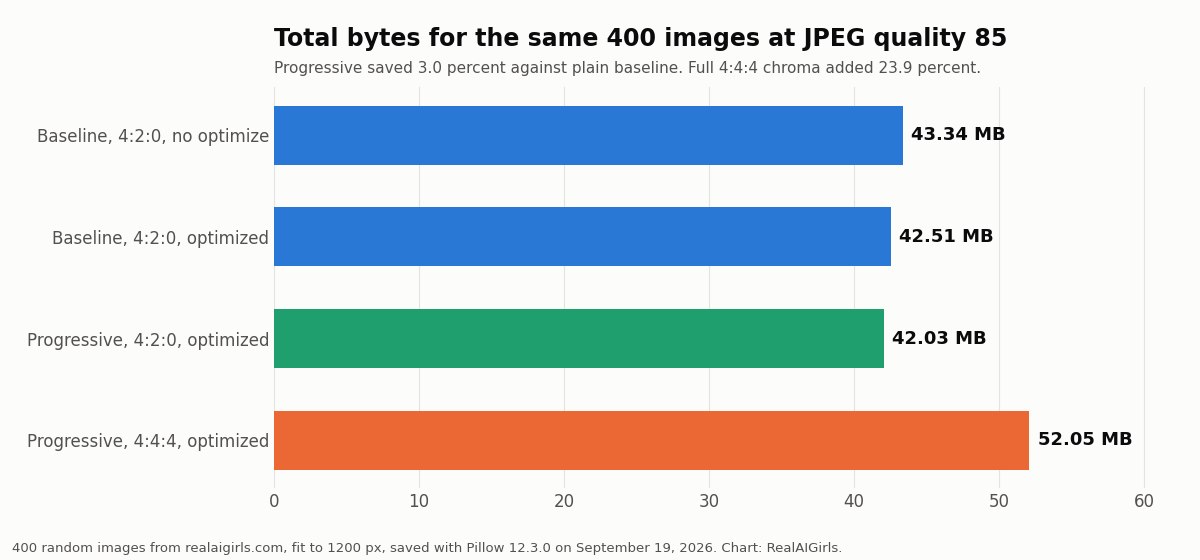
The same 400 images at JPEG quality 85, saved four ways, measured September 19, 2026. Chart: RealAIGirls.
The same 400 images at JPEG quality 85, saved four ways, measured September 19, 2026. Chart: RealAIGirls.
Two JPEG settings everyone argues about, measured on the same 400 pictures. One is a small free win. The other is a quarter more bytes.
There are two JPEG settings people love to argue about. Progressive encoding, which is supposed to make files smaller for free. And chroma subsampling, the setting that decides how much color detail gets thrown away.
We stopped arguing and measured both. On September 19, 2026 we took a random sample of 400 images from the realaigirls.com image folder, scaled each one to fit inside 1200 by 1200 pixels, and saved every one of them four ways at JPEG quality 85.
The short version: progressive is a small win and you should take it. Full color chroma is a big cost for a change most people can’t see.
Same 400 pictures, same quality number, four different settings. Totals for all 400:
You’ll see claims that progressive JPEGs are 10 percent smaller or more. On our images it didn’t come close. The median image got 2.6 percent smaller going from plain baseline to optimized progressive.
It also isn’t a sure thing on every file. Progressive beat optimized baseline on 301 of the 400 images, and lost on the other 99. The bigger the file, the more reliable it got:
Three percent won’t change your life. But it costs nothing, it loads as a blurry full picture instead of a top down reveal, and across a gallery of a few thousand images it adds up. Turn it on.
JPEG usually stores color at half resolution in both directions. That’s 4:2:0. Your eyes are much sharper on brightness than on color, so most of the time you never notice. Setting it to 4:4:4 keeps every bit of color detail.
Here’s what that bought us. We measured PSNR against the resized original for each file. The median was 41.94 dB at 4:2:0 and 43.11 dB at 4:4:4, a median gain of about 1 dB. The median file cost 24.3 percent more bytes for it.
And that cost barely moved with file size. Small files paid 25.1 percent, mid size files 24.5 percent, big files 22.8 percent. You pay about a quarter more no matter what.
Is it ever worth it? Sometimes. Saturated red edges, thin colored text and neon lighting are where 4:2:0 smears first. If your image is a portrait with skin, hair and a soft background, which is most AI images on this site, you’re paying 24 percent for detail that mostly isn’t there to lose.
Method: 400 images drawn at random (seed 19) from the realaigirls.com image folder, decoded to RGB and fit inside 1200 by 1200 pixels with Lanczos resampling. Each was saved with Pillow 12.3.0 at JPEG quality 85 four ways: baseline 4:2:0; baseline 4:2:0 with optimize; progressive 4:2:0 with optimize; progressive 4:4:4 with optimize. PSNR was computed over RGB against the resized image. Run September 19, 2026.