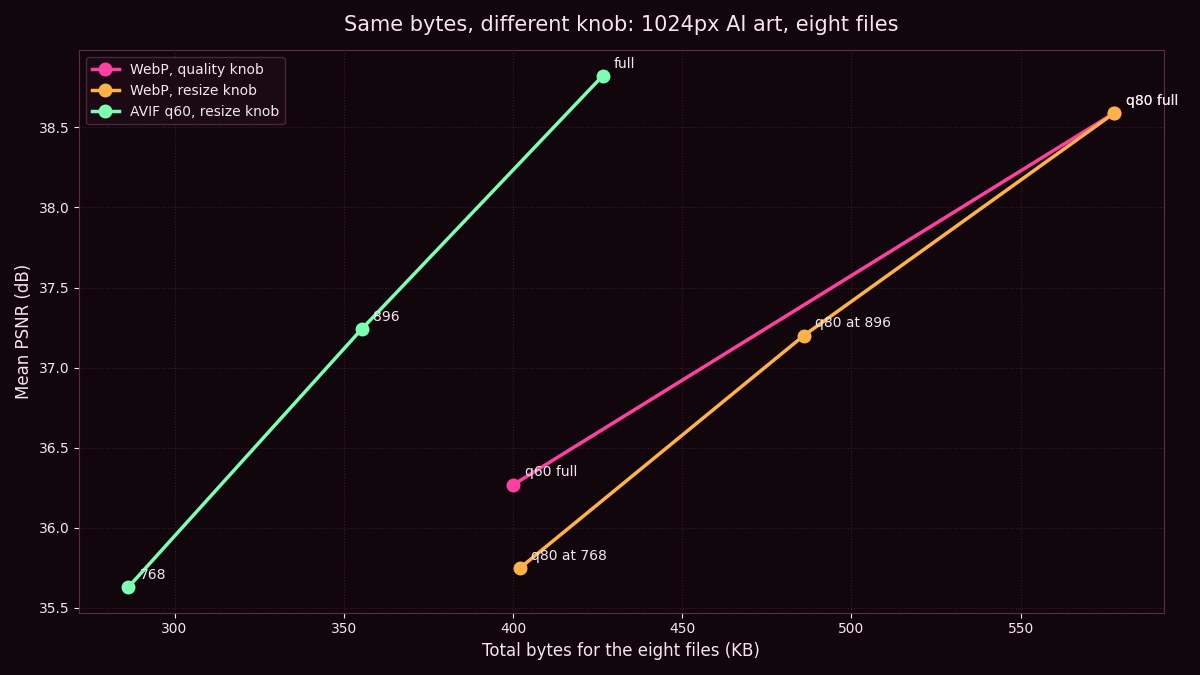
Total encoded bytes on the horizontal axis against mean PSNR on the vertical. Chart generated from the measurement run described below.
Total encoded bytes on the horizontal axis against mean PSNR on the vertical. Chart generated from the measurement run described below.
Every gallery guide says the same two things: serve WebP, and resize before you upload. The first one is measured and true. The second one is the thing everybody does without measuring, so this is the measurement.
There are two ways to make an image file smaller. You can keep every pixel and let the encoder throw away detail, which is the quality slider. Or you can throw away pixels before the encoder ever sees them, which is resizing. Most people who run a gallery do both, and almost nobody checks which one is doing the work.
So this is the fourth measurement in this series, same eight files, same discipline. Two knobs, turned separately, scored the same way.
Eight 1024 by 1024 PNG files from this gallery, the same eight used in the WebP, chroma and AVIF guides. Each was encoded seven ways. Three of those turn the quality knob or change format at full size. Four of them hold the encoder still and shrink the picture first, with Lanczos resampling, to 896 and to 768 pixels on the long side.
Scoring is the awkward part and it is worth being honest about. A 768 pixel file cannot be compared to a 1024 pixel original directly. So every decoded result was resized back up to 1024 with the same Lanczos filter and scored against the original there, with PSNR, in decibels, averaged across the eight files. That is a fair test of what a viewer actually sees on a screen that is going to display the image at full size anyway, which is most screens. It is unfair to the resize knob only if your viewers really do look at the image at 768.
| Setting | Pixels on the long side | Total bytes, eight files | Mean PSNR |
|---|---|---|---|
| WebP quality 80 | 1024 | 578 KB | 38.59 dB |
| WebP quality 80 | 896 | 486 KB | 37.20 dB |
| WebP quality 80 | 768 | 402 KB | 35.75 dB |
| WebP quality 60 | 1024 | 400 KB | 36.27 dB |
| AVIF quality 60 | 1024 | 426 KB | 38.82 dB |
| AVIF quality 60 | 896 | 355 KB | 37.24 dB |
| AVIF quality 60 | 768 | 286 KB | 35.63 dB |
Read the two bold rows against the row above them. Shrinking to 768 pixels at WebP 80 produces 402 KB at 35.75 dB. Leaving every pixel in place and dropping the quality to 60 produces 400 KB at 36.27 dB. Same bytes to within half a percent. The quality knob wins by 0.52 dB, and it wins while keeping a quarter more pixels on the page.
Bytes across, quality up. The pink line is the quality knob at full size. The orange line is the resize knob at WebP 80. For the same bytes the pink line sits higher, and it does it with more pixels.
An encoder is a very good judge of which detail in a picture nobody will miss. It spends its byte budget on edges and gradients and starves flat regions, which on AI art means it protects hair, eyes and fabric texture and lets the soft background go. Lowering the quality slider tells it to do more of that, and it keeps making sensible choices as the budget shrinks.
Resizing has no judgement at all. It removes exactly one pixel in four everywhere, from the eyes and from the empty backdrop alike, before the encoder gets to choose. Then it spends full quality 80 bytes preserving the blurred result faithfully. You pay to encode detail that the resize already destroyed.
The 896 row is the interesting one. WebP 80 at 896 pixels scores 37.20 dB for 486 KB. Nothing at full size gets to 486 KB with WebP at all, so if your target is between 400 and 578 KB with WebP, a modest resize is a legitimate way to land there. The loss from 1024 to 896 is 1.39 dB for 16 percent fewer bytes, which is a much better trade than the next step, 896 to 768, which costs 1.45 dB for 17 percent fewer bytes on top of a picture that is already softer.
And then AVIF makes the whole argument moot. AVIF at quality 60 and 896 pixels is 355 KB at 37.24 dB. That is fewer bytes than WebP 60 at full size and a full decibel better. If you have already switched to AVIF, which the last guide argued you should, a small resize is a free win. If you are still on WebP, the quality slider is the knob to reach for and the resize is the one to leave alone.
Three rules that fall straight out of the table.
Never resize below 896 for a gallery that displays at 1024. The 768 step costs more quality than any quality setting that hits the same bytes.
If you are on WebP and need to cut bytes, cut quality first. Quality 60 at full size is the cheapest 400 KB in this table that is not AVIF.
If you are on AVIF, resize to 896 and stop. 355 KB, 37.24 dB, and the difference from full size is invisible on anything but a side by side.
Eight files, seven encodes each, 56 files scored. Pillow 10 with libwebp method 6 and pillow-avif at the default speed. PSNR computed on RGB after the decoded image was resampled back to 1024 by 1024 with Lanczos. Every original is a PNG, so there is no prior lossy pass to muddy the reference. The files are the ones in this gallery, which means the result describes AI art with the usual soft backgrounds and sharp faces, and might not hold for photographs of gravel.