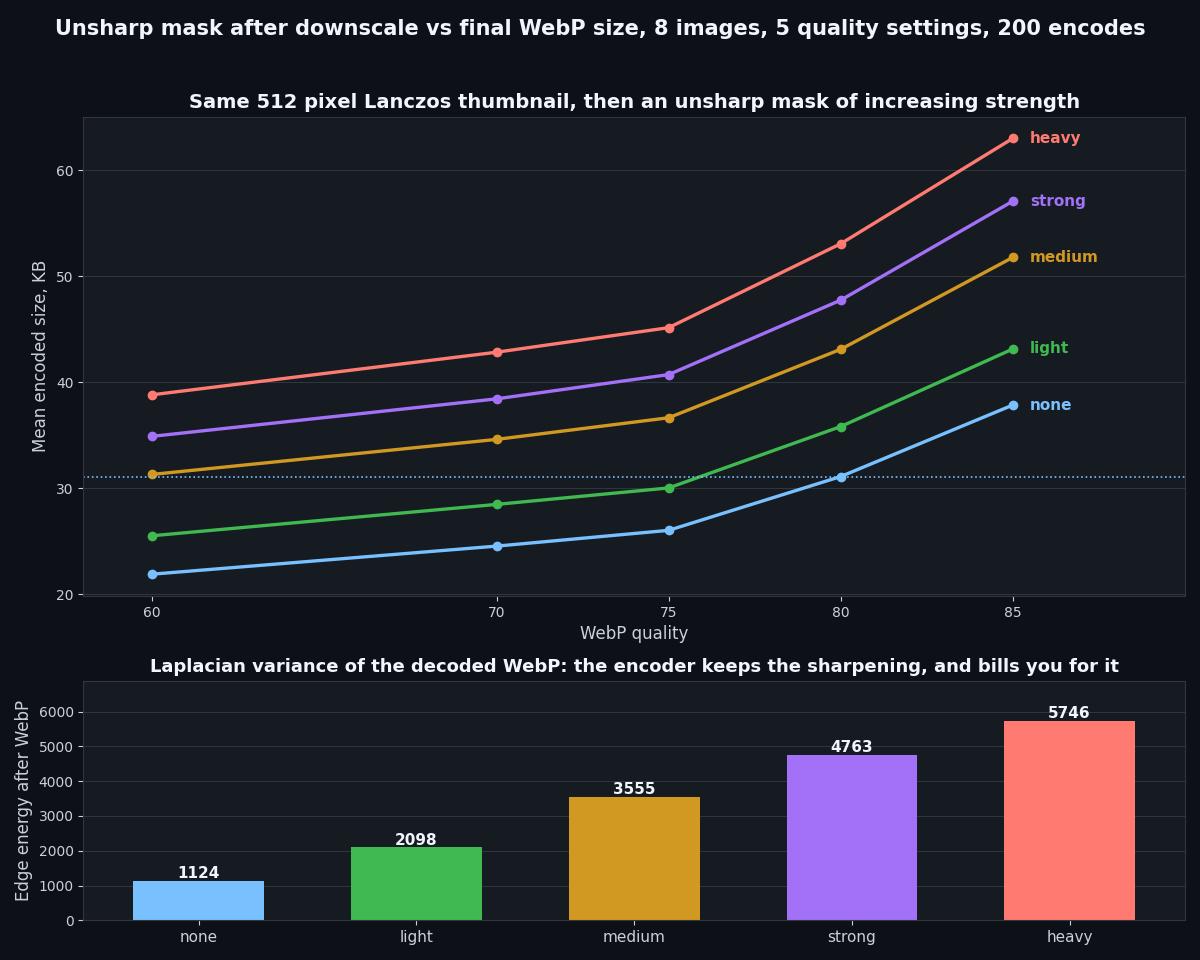
A Light Sharpen After Downscaling Adds 15 Percent To Every WebP, And Medium Adds 40
Almost every thumbnail script ends with a quick sharpen, because a downscaled image looks soft and a little unsharp mask makes it pop. The encoder does not throw that sharpening away. It keeps nearly all of it, and it charges you for every edge.
Published September 13, 2026 · RealAIGirls · About a 7 minute read
Here is how nearly every thumbnail script I have ever read ends. Resize the image down, notice it looks a bit soft, run an unsharp mask over it, save. It is one line of code and it makes the gallery look crisper, so nobody questions it.
Yesterday's piece on this site found that Lanczos, the sharpest resize filter, ships the biggest WebP, because sharp detail is exactly what a lossy encoder has to spend bytes on. The obvious next question is what happens when you add even more sharpness on purpose, after the resize. So I measured that too.
The Measurement
The same eight gallery images used in every measurement piece here. Each one downscaled to a 512 pixel box with Lanczos, then given one of five treatments: no sharpening, or Pillow's UnsharpMask at four strengths from light to heavy. Every result was encoded as WebP at quality 60, 70, 75, 80 and 85 with method 4. That is 200 encodes.
To check whether the sharpening survives compression or just gets smoothed away by the encoder, I also measured edge energy, the variance of a Laplacian filter over the luma channel, once on the sharpened image and once on the decoded WebP. Bigger numbers mean more hard edges.
The Result
A light sharpen made the average file 15.25 percent bigger. Medium made it 39.62 percent bigger. Heavy, 71.75 percent. The bytes climb in step with the edge energy, and the edge energy does not go anywhere when the file is compressed. The light pass keeps 97.6 percent of its edges through WebP, and even the heavy pass keeps 96.2 percent. The encoder is faithfully preserving the thing you added, which is precisely why it costs so much.
It Holds At Every Quality
No crossover anywhere. The penalty shrinks a little as quality rises, because a high quality setting is already spending bytes on fine detail, but even at quality 85 a light sharpen still costs 13.97 percent. Across the eight individual images the light pass at quality 75 landed between +13.3 and +16.8 percent, so this is not one busy picture dragging the average.
The Number That Changed My Mind
Look at two cells in that table. Medium sharpening at quality 60 averages 32,067 bytes. No sharpening at quality 80 averages 31,862. Those are the same file size, 0.64 percent apart.
So when a pipeline runs a medium unsharp mask and then turns quality down to keep files small, it is making a trade it probably never meant to make. It spends the entire budget of quality 80 on artificial edge contrast, then pays for it with quality 60 compression artifacts everywhere else in the picture. The same bytes could have bought a clean, unsharpened image at quality 80.
The light pass is gentler about it. Light at quality 75 comes in at 30,758 bytes, still a little under plain quality 80. If you genuinely like the crisper look, that is the pairing that pays for itself.
What It Costs To Run
The filter itself is cheap. On a 512 pixel image the unsharp mask took between about 11 and 23 milliseconds, best of three runs, with the light pass at 11.33. Run time is not the reason to skip it. The reason is that the cost does not land on your server once, it lands on every visitor who loads the gallery, every time.
What I Changed
No sharpening on gallery thumbnails. At a 512 pixel box on AI art that is already clean, I cannot see the medium pass as an improvement at normal viewing distance, and it was 40 percent of the transfer.
If a set really needs crispness, light only, and drop quality one step. Radius 1, percent 50 at quality 75 looks sharper than plain quality 80 and still comes in smaller.
Strong and heavy nowhere. A 55 to 72 percent size penalty for halos around every edge is not a trade I can defend.
If you swapped Lanczos for bilinear after yesterday's piece, do not undo the saving with a sharpen. A light unsharp mask adds back more bytes than bilinear took off.
What The Edge Energy Column Is And Is Not
Laplacian variance measures how much hard edge contrast is in an image. It is a fair way to prove the sharpening survived compression, and it is not a quality score. A heavy unsharp mask scores five times higher than no sharpening and looks worse, with bright halos on every outline. So read that column as how much edge you are paying the encoder to keep, not as how good the picture looks.
Method
Pillow 12.3, Image.resize to a 512 pixel long edge with LANCZOS, then ImageFilter.UnsharpMask with the radius, percent and threshold listed in the first table, then save to WebP with method=4 at each quality. Sizes are exact byte counts of the encoded buffer. Filter time is the best of three runs timed with perf_counter and covers the unsharp mask alone. Edge energy is the variance of a four neighbour Laplacian over the luma channel, excluding the one pixel border. The unsharpened baseline reproduces yesterday's Lanczos figures exactly, 26,662 bytes at quality 75 and 31,862 at quality 80, so the two runs are directly comparable.